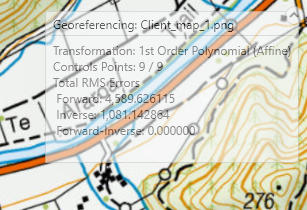
I often georeference annotated topographic maps clients have sent me to topographic maps in our system. Regrettably, this makes the georeferencing information ArcGIS Pro (e.g. 3.5.2) helpfully provides very hard to read because the information is in a semi-transparent box which only becomes opaque if I mouse over it.
I may be mistaken, but I could not find any options to make the box opaque or move it to e.g. over a blank area of my Contents pane. I ended up turning my basemap off so I could see the results - which of course was unhelpful when I wanted to visually gauge the alignment of the newly georeferenced image.
Please can you offer options of e.g.:
- Right clicking on this box and having an option to make it opaque with black not grey text, or
- Configuring a setting under Options to always show this box opaquely, or
- Being able to move the box to elsewhere on my screen, or
- Making it into a pane so I can show it where my ArcCatalog, Geoprocessing or Elements pane would normally be?
I am open to feedback if there are tricks with Pro I haven't found yet.
Thank you very much for your consideration.
