During recent use of the Analyze Parcels by Least Squares Adjustment geoprocessing tool, we encountered a critical issue caused by the absence of a selection. Currently, the parcel fabric displays only a small warning icon indicating that nothing is selected. This is more of an issue for us as we have 1.8 millions parcels so not having a selection will try to process all parcels. This subtle indicator is easy to overlook, and if unnoticed, the tool proceeds to process 1.8 million features. In our current environment, this results in an immediate service lock-up and crash due to excessive memory consumption. The service will sometimes restart automatically sometimes it requires human intervention.
In more modern versions of ArcGIS Enterprise, the process eventually times out—typically after about an hour and then crashes the service, but still leads to failure.
Proposed Improvement:
Introduce a clear, prominent pop-up warning when tool is activated:
- No features are selected, or
- More than 100,000 features are selected.
This safeguard would prevent runaway processes that can cause complete service restarts. Given the severity of the impact, a more visible alert is warranted rather than relying on a small, easily missed icon.
I have attached an example of what the warning looks like below as an example:
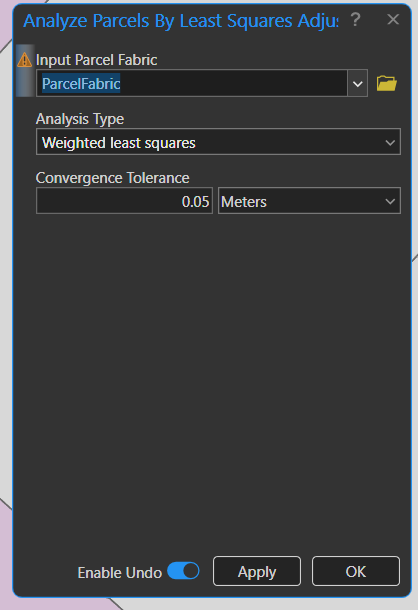
That will crash the while service!
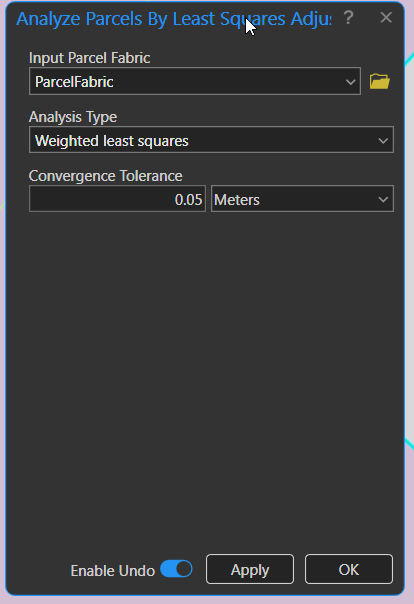
This one will not neither option actually shows you if you have anything selected. That is to subtle for the level of impact.


