Select to view content in your preferred language

Symbolising a feature service by subtype name

432
1
Jump to solution
02-19-2026 06:01 PM
Labels (2)
Michele_Hosking
Regular Contributor

Hi there, I have a feature service which is being published to enterprise portal (not AGOL) from an enterprise geodatabase. The feature class has a subtype defined. I am trying to use the subtype name to create a category to symbolise by in my feature service. I actually want to concatenate this with the value in another field to do this.

Annoyingly I can't just symbolise by the two fields directly as you can't symbolise by two text fields in portal. It has to be a text field and a numerical field and anyway I want to check another fields as well so...

Anyway I have it working in Pro - please forgive my arcade - there is probably a better way to do it but after a lot of faffing this seems to work:

var code = SubtypeCode($feature);
var name = SubtypeName($feature);
var subtypeList = [0,1,2,3];
var planStatus = $feature.PlanStatus;
var activityStatus = $feature.Status;
var activityStatusList = ["Actual", "Planned", "Existing"];

if (planStatus == "Cancelled") {
  return "Cancelled";} 
else {
  if (Includes(activityStatusList, activityStatus)) {
    if (Includes(subtypeList, code)) {
      return Concatenate([name, " - ", activityStatus]);}
    else {
      return "No activity type";}}
  else {
    return "No activity status";}
  }

These are the symbol categories I get in ArcPro using the above:
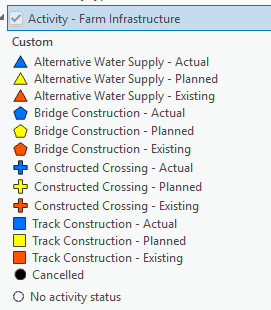
Michele_Hosking_0-1771550990065.png

However, if I put this in as an expression under styles in the visualization tab for my feature service in portal I don't get any categories - only No activity type and Cancelled show up:
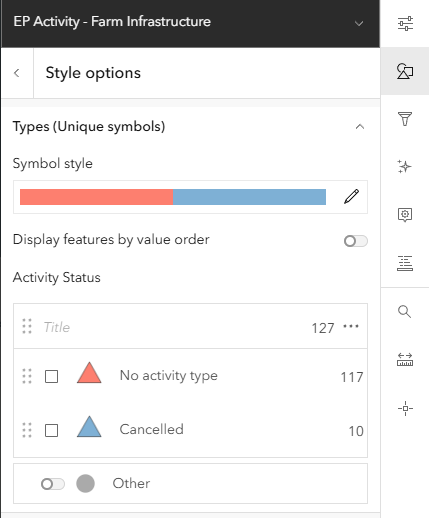
Michele_Hosking_1-1771551063060.png

I messed around and tried a few things and then manually added in all the possible categories into styles and I swear they all coloured up but when I refreshed the page they all disappeared and everything was just lumped into the Other category. Now I can't replicate that - nothing I do works. They are all just either Cancelled, No activity type or Other.

I tested the code in the popup. I made an attribute expression using the same code above and added that new attribute to my popup and this works fine.
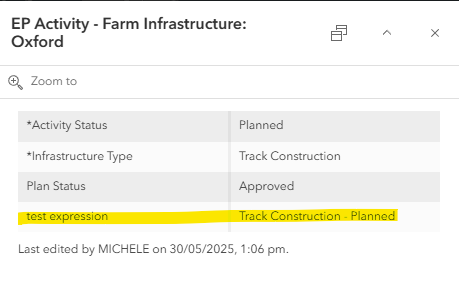
Michele_Hosking_2-1771552761056.png

It feels to me as if portal is not recognising the subtype but only in styles. Is this a limitation, a bug, a 'feature' or am I doing something wrong?

Any help would be appreciated.


0 Kudos
1 Solution

Accepted Solutions
Michele_Hosking
Regular Contributor

Ok - it seems that we have to hard-code the subtypes into the arcade to make it work. Interestingly, you can use the console to get it to give you the subtype dictionary but it doesn't work unless hard-coded in the actual style. I think this is a bug.... Thanks Dean, our inhouse arcade guru! 😊

var planStatus = Upper(Trim($feature.PlanStatus));
var activityStatus = Upper(Trim($feature.Status));
var activityStatusList = ["ACTUAL", "PLANNED", "EXISTING"];
var code = Text($feature.InfrastructureType);

var subtypeNames = Dictionary(
  "0", "Alternative Water Supply",
  "1", "Bridge Construction",
  "2", "Constructed Crossing",
  "3", "Track Construction"
);

var name = subtypeNames[code];
var legendName = "";

if (planStatus == "CANCELLED") {
  legendName = "Cancelled";
} else if (!IsEmpty(name) && Includes(activityStatusList, activityStatus)) {
  legendName = Concatenate(name, " - ", Proper(Lower(activityStatus)));
} else {
  legendName = "No activity type or status";
}

return legendName;

To get the dictionary:

var subtypeInfo = Subtypes($feature);
var subtypes = subtypeInfo.subtypes;
var result = "var subtypeNames = Dictionary(\n";
for (var i = 0; i < Count(subtypes); i++) {
  var comma = IIF(i < Count(subtypes) - 1, ",", "");
  result = Concatenate(result, '  "', Text(subtypes[i].code), '", "', subtypes[i].name, '"', comma, "\n");
}
result = Concatenate(result, ");");
return result;
Screenshot 2026-02-23 112557.png

View solution in original post

0 Kudos
1 Reply
Michele_Hosking
Regular Contributor

Ok - it seems that we have to hard-code the subtypes into the arcade to make it work. Interestingly, you can use the console to get it to give you the subtype dictionary but it doesn't work unless hard-coded in the actual style. I think this is a bug.... Thanks Dean, our inhouse arcade guru! 😊

var planStatus = Upper(Trim($feature.PlanStatus));
var activityStatus = Upper(Trim($feature.Status));
var activityStatusList = ["ACTUAL", "PLANNED", "EXISTING"];
var code = Text($feature.InfrastructureType);

var subtypeNames = Dictionary(
  "0", "Alternative Water Supply",
  "1", "Bridge Construction",
  "2", "Constructed Crossing",
  "3", "Track Construction"
);

var name = subtypeNames[code];
var legendName = "";

if (planStatus == "CANCELLED") {
  legendName = "Cancelled";
} else if (!IsEmpty(name) && Includes(activityStatusList, activityStatus)) {
  legendName = Concatenate(name, " - ", Proper(Lower(activityStatus)));
} else {
  legendName = "No activity type or status";
}

return legendName;

To get the dictionary:

var subtypeInfo = Subtypes($feature);
var subtypes = subtypeInfo.subtypes;
var result = "var subtypeNames = Dictionary(\n";
for (var i = 0; i < Count(subtypes); i++) {
  var comma = IIF(i < Count(subtypes) - 1, ",", "");
  result = Concatenate(result, '  "', Text(subtypes[i].code), '", "', subtypes[i].name, '"', comma, "\n");
}
result = Concatenate(result, ");");
return result;
Screenshot 2026-02-23 112557.png

0 Kudos