Select to view content in your preferred language

Arcade Pop up display 1:M information

310
1
02-19-2026 05:42 PM
JessNewton1
Occasional Contributor

Hi all, 

I need some help with using arcade in a pop up. I have an area with 1:Many records and I want to show those records in the pop up.

Would anyone able to help me with what the script would be or provide links to examples???

Currently the default pop up looks like the image below
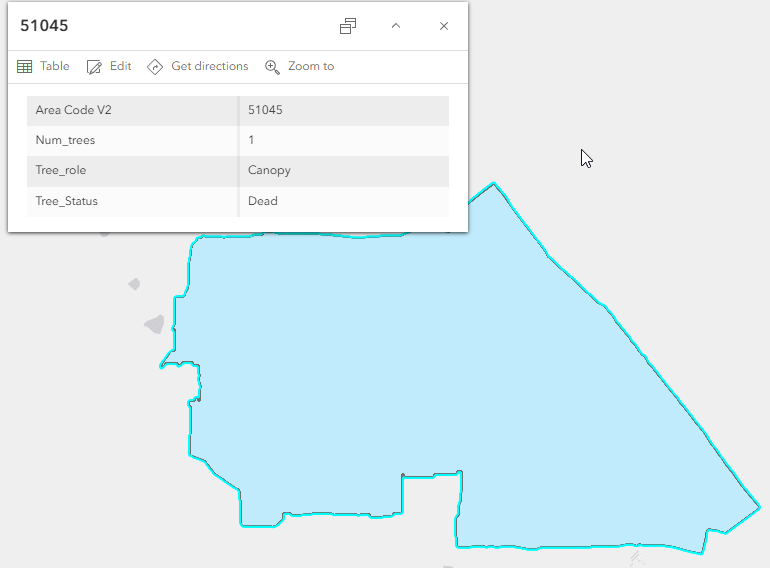
Treeexample 1.png

However the the table for this area has multiple records as shown in the image below:
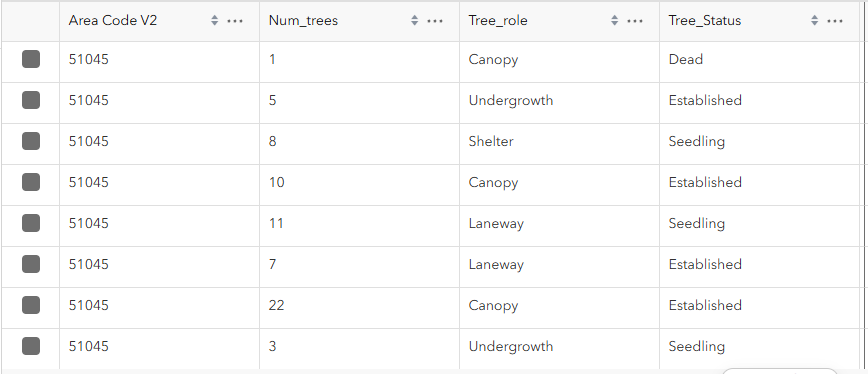
Treeexample 2.png

Ideally I would like to able to click on the area and have the pop up read something like this:

Area: 51045

Trees total: 67

There are 33 Canopy trees with 22 of them Established and 1 Dead.

Tags (3)
0 Kudos
1 Reply
KenBuja
MVP Esteemed Contributor

This will involve a couple of steps. This code uses an Arcade element in the popup.

First , the code gets all the related records for a feature with the FeatureSetByRelationshipName function (line 1).  Next, it creates an array that will contain all the output strings, starting with the area code (line 2). Then it get the First record (Line 4) of the results of a GroupBy function which gets the sum of all the num_trees values (line 5) and then get the Count attribute from that feature (line 10). This value is added to the output array (line 12).

It creates another FeatureSet (line 14) that consist of the unique combinations of Tree Role and Status (line 16), with the sum of the Num_Trees (line 17) as an added field.

It then gets the unique roles from that FeatureSet (line 20) and loops through them (line 22). In each loop, it get the records for that role with the Filter function (line 24) and loops through those records (line 27), adding up the number of trees for each status (line 28) and creating a string containing status and number of trees (line 29). Finally, it adds a string with the information about each status for the role to the output array (line 31).

The return uses the Concatenation function to put each of output strings on a separate line

var fs = FeatureSetByRelationshipName($feature, 'your relationship name', ['*'], false)
var output = [`Area: ${$feature.code}`]

var total_Count = First(
  GroupBy(
    fs,
    "code",
    { name: "Count", expression: "num_trees", statistic: "Sum" }
  )
).Count;

Push(output, `Trees total: ${total_Count}`)

var grouped = GroupBy(
  fs,
  ["Tree_Role", "Tree_Status"],
  [{ name: "Count", expression: "Num_Trees", statistic: "Sum" }]
);

var trees = Distinct(grouped, "Tree_Role");

for (var tree of trees) {
  var tree_role = tree.Tree_role;
  var filtered = Filter(grouped, "Tree_Role = @Tree_role");
  var role_Count = 0;
  var output_roles = []
  for (var role in filtered) {
    role_Count += role.Count
    Push(output_roles, `${role.Count} ${role.Tree_Status}`)
  }
  Push(output, `There are ${role_Count} ${tree_role} trees (${Concatenate(output_roles, ", ")})`)
}

return {
  type: 'Text',
  text: Concatenate(output, "<br/>")
}

This output of this code looks like this:

2026-02-20_13-51-36.PNG