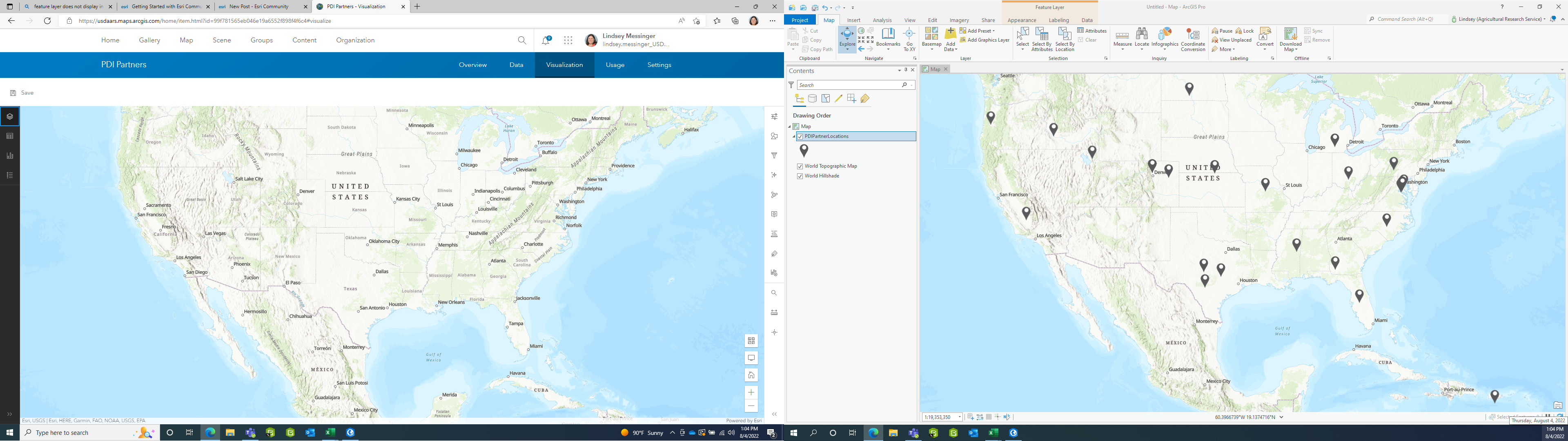
I created a feature layer in ArcGIS Pro and then published it as a web layer to AGOL. After publishing, I created a web map with the feature layer, configured pop-ups, etc. and embedded the web map into a Hub site. Everything was working as expected until I linked to the existing feature layer through Survey123 (created and published a survey via Survey123 Connect with the intent of allowing users to add data to the feature layer via survey embedded in a dashboard). The survey published without warnings, but now the feature layer geometry (points) are not visible in the web map. Additionally, the feature layer shows nothing when navigating to the item in AGOL and clicking the visualization tab. However, when I open the feature layer in ArcGIS Pro, the points display as expected.
When I use the survey to add new features, they appear in the data table but do not display within AGOL on the web map or visualization tab in the item details. However, they do display when I open the feature layer in ArcGIS Pro. I did remove the feature layer from my web map, save, then re-add. This did not solve the issue.