Select to view content in your preferred language

IMPORTANT: November AGOL Update has stripped transformations from web maps

2534
12
11-13-2024 01:57 AM
David_Brooks
MVP Regular Contributor
3 12 2,534

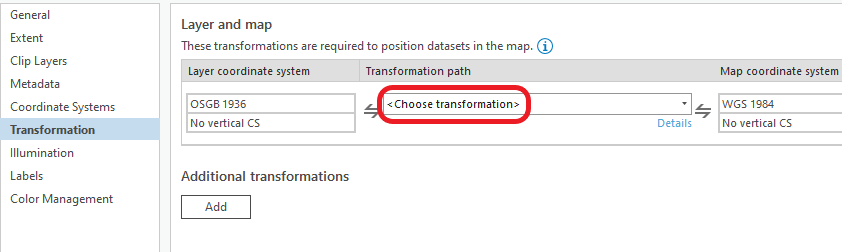
Just giving everyone a heads up, ESRI are aware that the recent AGOL update has caused an issue whereby web maps previously containing transformations are no longer assigned. You can confirm this by opening a web map in ArcGIS Pro and you'll notice that the transformaiton is empty:
David_Brooks_0-1731491741344.png

I don't have any more information on this, but hopefully others can share their experience and some can also give updates on the fix timeline.

I would be interested to know if this is confined to certain transformations and SRSs. And whether we can hot-fix with AGOL assistant somehow.


UPDATE: 

A regression bug, which is a bug introduced following an update, has been identified, fixed and logged with the appropriate product team. This bug has been attached to your case in My Esri for your reference.

  • BUG-000172218
  • Following the ArcGIS Online November Release Hosted Feature layers using British National Grid projection are reprojecting to 0,0
  • Fixed

Please note: a manual clearing of the feature layer cache may still be required to see data in the correct location. This can be done by toggling editing on and off again on a service exhibiting this issue or by performing an edit to the feature data and retrying after waiting for the cache control time to pass (default is 30 seconds)


 

Tags (3)
12 Comments
DataOfficer
Frequent Contributor

Our organisation is affected by this and I have logged it with Support. Hopefully they will be able to resolve it soon.

David_Brooks
MVP Regular Contributor

not going to try just now, but potential workaround could be to update the JSON of the web map in AGOL assistant?

eg 

"datumTransformations": [ { "wkid": 108191, "name": "WGS_1984_(ITRF08)_To_ETRS_1989" } ]
James_Shreeve
Frequent Contributor

We've got the same issue too...logged with support. Waiting to hear from them regarding a fix at this stage, could we also amend the transformation path in Pro and save the map? This isn't something i've come across before. 

James_Shreeve_0-1731493445674.png


DataOfficer
Frequent Contributor

From Esri support:

"We have now reviewed and raised a defect record which is attached to your case (BUG-000172218). The status of this can be tracked within MyEsri.

From testing the issue seems to be specific to point layers that use a BNG projection that were published to ArcGIS Online before last night's update.

The points default to 0,0 when a non-BNG basemap is being used so for working around this at the moment I would advise testing your impacted layers with a new Web Map that uses a BNG basemap, or publishing a copy of the layer as both of these workflows appear to work around the issue."

David_Brooks
MVP Regular Contributor

@James_Shreeve  Changing the transformation in pro wont update in AGOL. The only fix i can see is what @DataOfficer is suggesting above, or there may be a solution through AGOL Assistant. 

Also, from my testing, it's also affecting lines and polygons. Not just points.

AnthonyJonesRSK
Frequent Contributor

We have spotted this error too. This is not the first time this has happened either, I went and checked our support cases and we have raised this same issue twice before after AGOL updates. It's completely unacceptable for this to happen for a third time and can potentially cause havoc with our web maps and surveys. It would be very much appreciated if someone from Esri could respond and outline how this will be avoided in the future. Thanks

RobGordon1
Emerging Contributor

We also have this issue. Found a polygon layer as well as point layers, all 27700. We also have other point, line and polygon layers that are unaffected. I checked them using the visualisation tab in AGOL. All our affected layers seem to show correctly when viewing these in ArcGIS Pro.

RichardHowe
Frequent Contributor

It's almost like ESRI paid no attention to the fact this happened before:

Previous coordinate system issues post AGOL update 

Please can we get this sorted??!!

DataOfficer
Frequent Contributor

Yes it is also affecting lines and polygons for us. And we have also had this issue before as others have mentioned.

David_Brooks
MVP Regular Contributor

Myself and my clients find it completely crackers that ESRI Inc find it acceptable that the bug fix involves cycling editing settings or performing edits in order to manually clear the cache. Also, very frustrating that this was a known bug previously and clearly hasn't been accounted for in this update round.

David_Brooks
MVP Regular Contributor

@DataOfficer looks like this issue came back yesterday potentially. are you noticing anything?

DataOfficer
Frequent Contributor

@David_Brooks all showing ok for us at the moment.

Contributors
About the Author
A GIS Consultant specialising in Renewable Energy, Mobile GIS, Offline workflows, basemap caching, Drone photogrammetry and LiDAR. All things Portal, Enterprise and Pro.

