Select to view content in your preferred language

Using custom print service in app: legend doesn't show any layers

302
2
Jump to solution
03-17-2026 05:29 PM
BrandonPrice1
Frequent Contributor

I created a custom print service on a stand-alone server that's used in my ArcGIS JS SDK app (in beta): Clustering - query clusters | Sample | ArcGIS Maps SDK for JavaScript. Users can zoom all the way in and select a parcel in the map. Then they can click a popup action to create some layers.

Only issue now is the legend. I wasn’t sure how I would get the legend to come through prior to creating the service. After creating it (Task: Export Web Map), I’m still not sure (fyi-legend does show using the default print utility).

Not sure if this code needs to be adjusted or it just isn't possible. Does anyone else know?

const print = new Print({
  view: view,
  printServiceUrl: "https://rpgis.isd.lacounty.gov/arcgis/rest/services/ExportWebMap/GPServer/Export%20Web%20Map",
  templateOptions: {
    title: "EXISTING LAND USE",
    format: "pdf",
    layout: "Landscape_8.5x11_LU_Map", // Ensure you use a layout template, not MAP_ONLY
	attributionEnabled: false, 
	dynamicLegendEnabled: true
  }
});
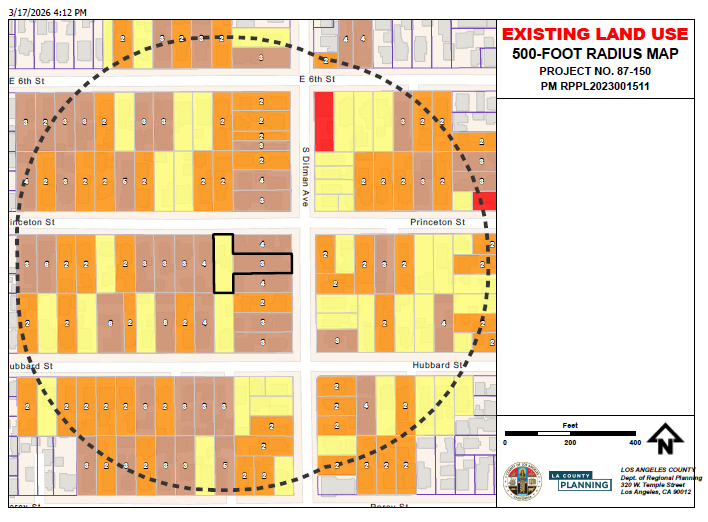

Screenshot 2026-03-17 173116.png


0 Kudos
1 Solution

Accepted Solutions
BrandonPrice1
Frequent Contributor

Hi Noah,

Yes, it worked after adding the legend options in the ArcGIS Pro layout and making sure I was pointing to the right folder with the updated layout in the Export Web Map/Get Layout Templates Info geoprocessing steps.

Screenshot 2026-03-18 185807.PNG.jpg

View solution in original post

2 Replies
Noah-Sager
Esri Regular Contributor

Hi @BrandonPrice1, thanks for posting your question here. It seems to work okay today. Did something change?


appapp


prinoutprinout


0 Kudos
BrandonPrice1
Frequent Contributor

Hi Noah,

Yes, it worked after adding the legend options in the ArcGIS Pro layout and making sure I was pointing to the right folder with the updated layout in the Export Web Map/Get Layout Templates Info geoprocessing steps.

Screenshot 2026-03-18 185807.PNG.jpg