Select to view content in your preferred language

UI issue when saving a screenshot in the Atlas Instant App

156
1
11-19-2025 01:28 PM
BrandonGuo
Frequent Contributor

When saving screenshots, if the user hasn't set a map area and clicks the Preview button directly, the toolbar may cover the button. On certain screen ratios, the button can be completely obscured, leaving no way to go back except by refreshing the entire page.
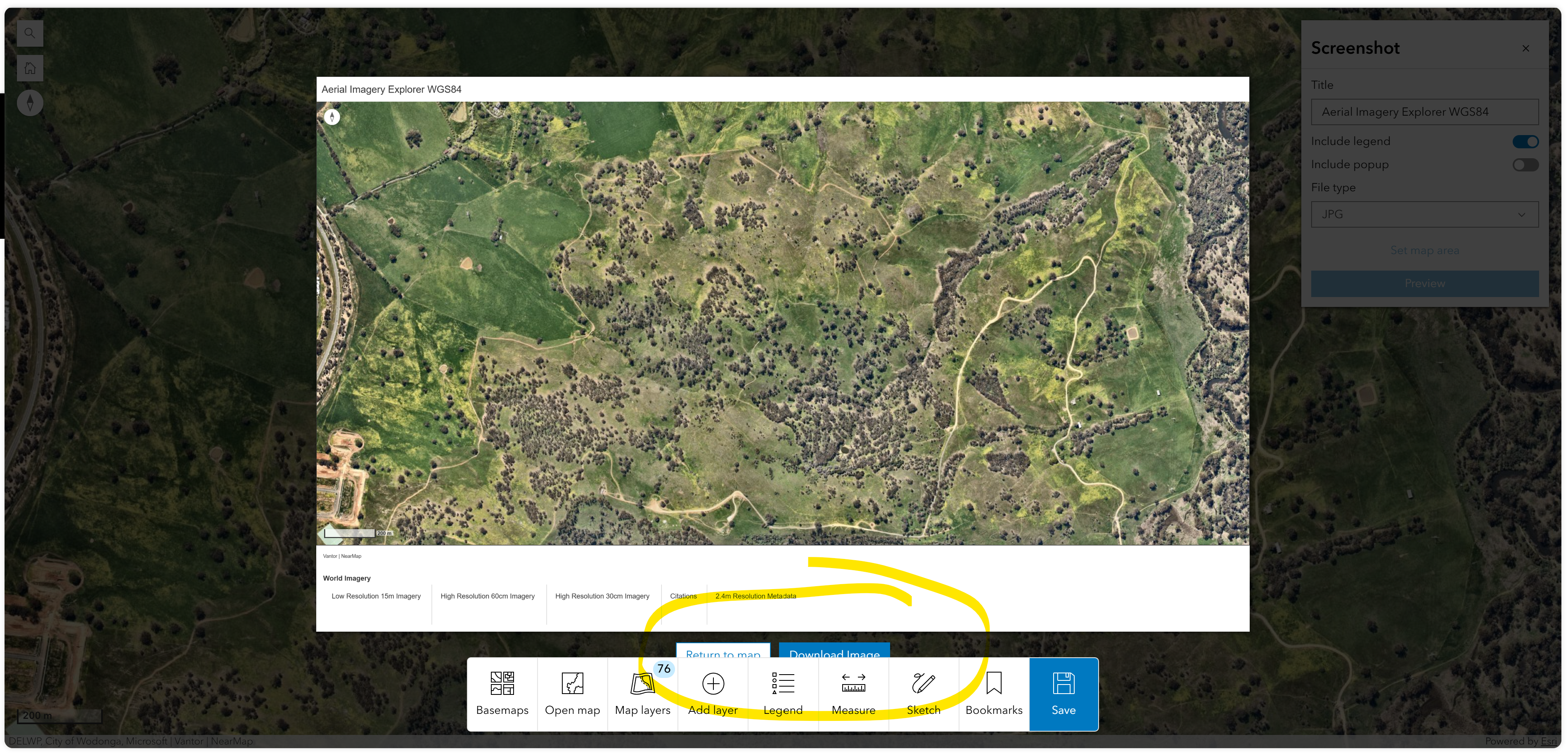
BrandonGuo_0-1763587573401.png


Tags (1)
0 Kudos
1 Reply
ClioClark
Esri Contributor

Hi Brandon,

Thank you for raising this issue. I have encountered the same problem when previewing a screenshot. I would recommend raising a case with your local distributor so we can investigate this issue further.

I found that if I resize the window so that the toolbar at the bottom of the page resizes (see below), the buttons become visible. This looks like it is only an issue when using Atlas on large screen devices. 

ClioClark_0-1765275985235.png


0 Kudos
