In the October 2023 ArcGIS Online update, many new features were added to Instant Apps (see highlights in the What's New blog). Here are the top features added to the Nearby Instant App template.
The new default Search Method is Visible Extent
Creating new apps will now default to search the map extent instead of using a search radius. This search method has become very popular, and to make it easier to configure, it is now the default option. This will have no impact on the app previously created; the search method selected will remain.
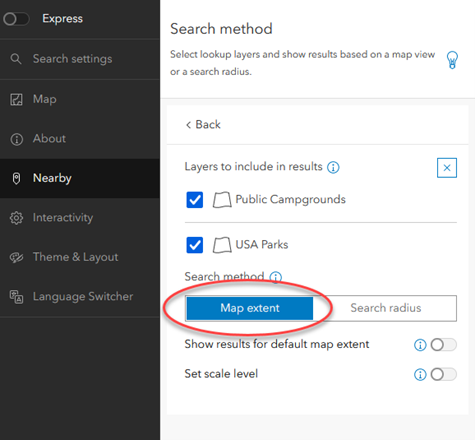
This option is located in the Nearby section.
Only show the Closest Result
This new option will only show the closest result (per layer) for each searched location. It will work with both the map and search radius.
This option is in the Nearby section < Panel Options subsection. (full setup only)
Set the Starting Extent
The new map area setting allows you to use a single webmap in many apps with different starting views. The map area setting lets you override the initial map view from the web map so that it works best for you in that app. Use this setting to adjust the starting extent and scale level. It can be used in conjunction with the navigation boundary tool, which limits how far users can navigate the map’s extent and zoom levels.
This option is in the Map section (full setup only)
Addition of the Language Switcher Setting
The new language switcher setting in the app configuration lets you publish a multilingual app that combines your translated custom text and the UI translations for supported languages. Use the options available on the Language Switcher tab in the configuration to set which languages you want to include, add in your translated text, and what icon will be used in the published app for app viewers.
This option is located in the Language Switcher section (full setup only)
Improvements to Performance
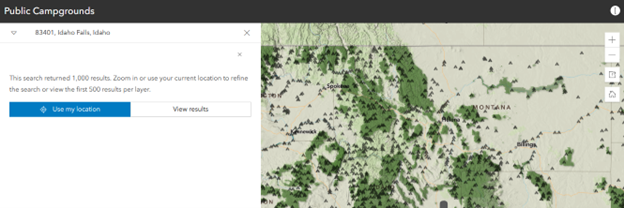
Any search with more than 500 results per layer will now include a suggestion to refine search results. This will help app users focus results on their location or specified area. Most app users are not scrolling through 500+ results, so reducing the number of results listed in the panel will improve the app's speed. Want to see the first 500, no problem; you can choose to view the results.