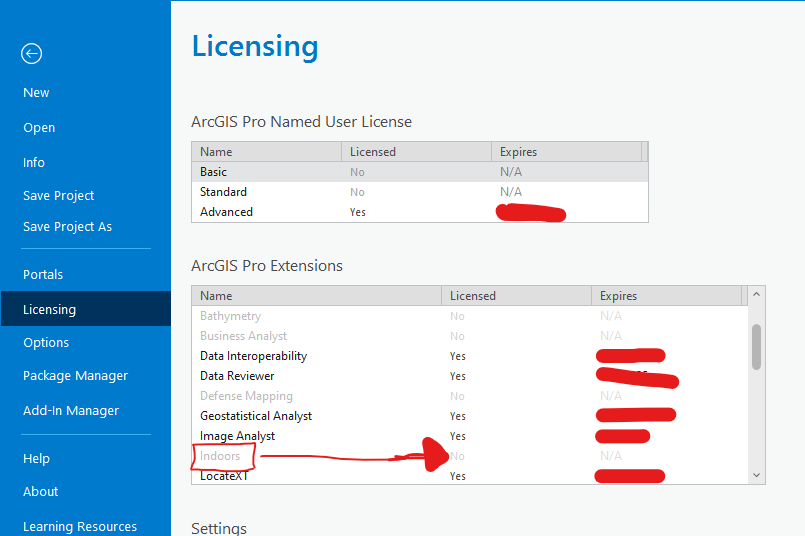
Hello esri community;
I am new to indoor tools. I need to license this tool to use it. I downloaded and installed the necessary tool from My esri;
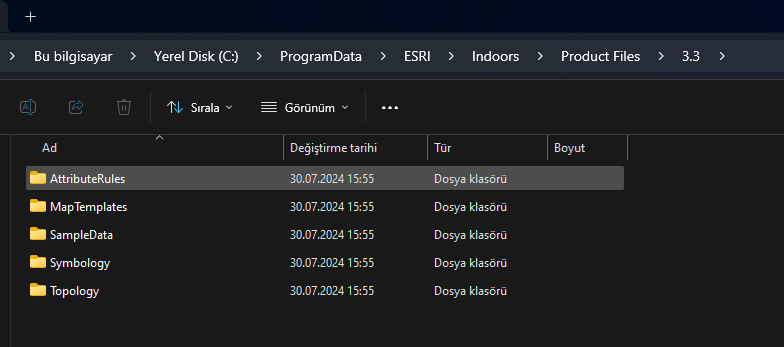
the installed file is shown in the picture.
How can I enable this tool in the arcgis extensions section.
arcgis pro version: 3.3.0

I licensed other arcgis extensions using arcgis online. But this indoor extension that I downloaded and installed does not appear on the arcgis online licensing page. I do not know much about licensing. I am not sure what to do in the document you sent.
if you are part of an organization, you may have to see who is in charge of licensing to see if it can be enabled
Hi @İbrahimEnesSağlam, the first screenshot you posted of the files you downloaded from My Esri is not licensing files. Those are the Indoors product data files that contain things like symbology, map templates, and more to help get started with creating floor-aware maps.
Regarding the second screenshot. The Indoors extension won't necessarily be set to "Yes" if you are licensing through your ArcGIS organization (it is set to "Yes" if you are licensing through a single use or concurrent use license). Instead, check in your organization to see if you have the organizational license "ArcGIS Indoors Maps" or "ArcGIS Indoors Pro" (or check with the admin). If your ArcGIS organization has an active license, ensure that it is set as your active organization in ArcGIS Pro and you should be able to access all the Indoors tools and configure floor-aware maps.