Users are adding complaint information to the collector app and the field maps app. When entering the data the information is displayed in a long one line sentence. Is there a way when inputting the data to see it in a paragraph format? See in the "Complaint" section, the sentence is just one long line. Hard to review when inputting. Our work around is to add to a word document and then attach the word document. As we cannot cut and paste into the field either.
Wondering if there is a way to make field a bigger box so we can see the data?
Thank you,
Annette
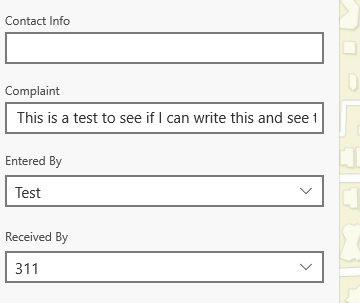
AnnettePoole1_0-1649182962927.png
Solved! Go to Solution.
In the form, you can make it a multiline Text box.
This will allow the box to grow as text is entered. Also allows for returns (enter) in there as well.
RhettZufelt_0-1649185141799.png
And will add scroll option if the text gets too large.
RhettZufelt_1-1649185292616.png
R_
In the form, you can make it a multiline Text box.
This will allow the box to grow as text is entered. Also allows for returns (enter) in there as well.
RhettZufelt_0-1649185141799.png
And will add scroll option if the text gets too large.
RhettZufelt_1-1649185292616.png
R_
Thank you! It worked on the Field Maps App for the iPhone. However, even though I selected multi-text in the classic map viewer it doesn't work in Collector.
I assume you mean New Map Viewer as Classic Map Viewer doesn't allow you to author forms.
I'm not a Collector user, but I don't think it honors the forms for Field Maps.
However, if I open the same map in Collector, it appears as if all text input boxes are multiline by default.
No scrollbar, but the text keeps wrapping and the box gets larger:
RhettZufelt_0-1649191148392.png
R_

