Select to view content in your preferred language

Print widget's scale bar not reflective of scale set

399
2
04-03-2026 07:30 AM
RobertChaney
Frequent Contributor

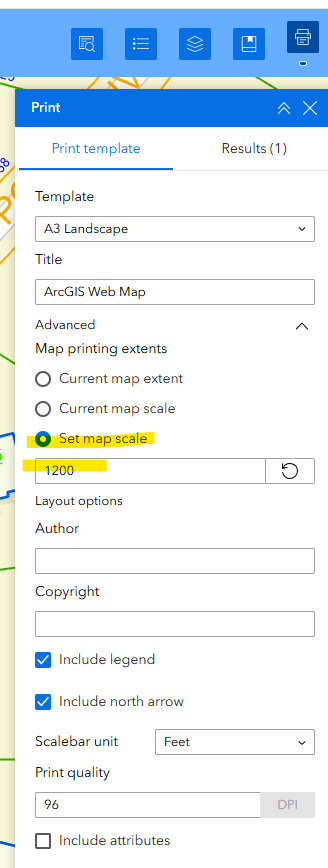
I have a experience builder app which has the print widget.  The print widget allows me to print the current map extent, current map scale or set map scale.
RobertChaney_0-1775226252805.png

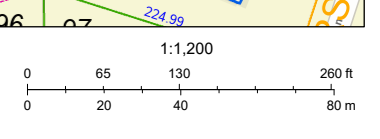
However, when I print the map at the desired scale of 1:1200 the representative scale bar on the map is not reflective of the actual 1:1200 scale that I specified.  1 inch should be 100 feet not 130 feet.
RobertChaney_1-1775226355827.png

Has anyone else come across this issue or could tell me if there's a way to manipulate the scale bar used in the print widget?

Thanks,

Robert.

AGE ver. 11.5



0 Kudos
2 Replies
MichaelVolz
Esteemed Contributor

Robert:

Is the scale bar in the map or in the layout?  I know I had similar issues with a custom print widget and I had to change properties of the Scale Bar layout element.  I would try adjusting the width of the Scale Bar layout element and see if that provides some improvement.

I believe I also tried adjusting the Divisions and Subdivisions in the Properties tab, but I don't think those adjustments helped me but something else to try.

0 Kudos
RobertChaney
Frequent Contributor

Michael,

 Thanks for your reply.  The Scale bar I'm referring to only shows on the pdf created from the print widget. There is a default scale bar that's part of the default template that I choose when creating the web app, but I don't think that has anything to do with the scale bar in the printout.  I haven't found a way within experience builder to adjust the scale bar referenced on the pdf within the print widget.  If your referring to a scale bar in a ArcGIS Pro Layout, I didn't create one, I just published a map service which I used to create a web map and then used for creating the web app.

Robert.


0 Kudos
