Pop-ups are no longer appearing the same way (or are missing content entirely) in Experience Builder

1901
29
06-26-2026 09:03 AM
NicoleJohnson
MVP

Update: This is BUG-000185982

Description: Pop-ups in the ArcGIS Experience Builder Query widget fail to display Arcade content when configured using an if statement.

---------------------------------------

Original Post:

I'm in the process of submitting a bug report for this and will update this post as I get more info. This is more of a PSA / info gathering exercise rather than a question.

The pop-up in question is composed of a text content block. Inside the text content block is text and various Arcade attribute expressions. The pop-up is viewed in Experience Builder via the map or by selecting a feature via the query widget.

In Map Viewer, the pop-ups are appearing as they always have. Specifically, there is space/visual distinction between the lines boxed in orange:
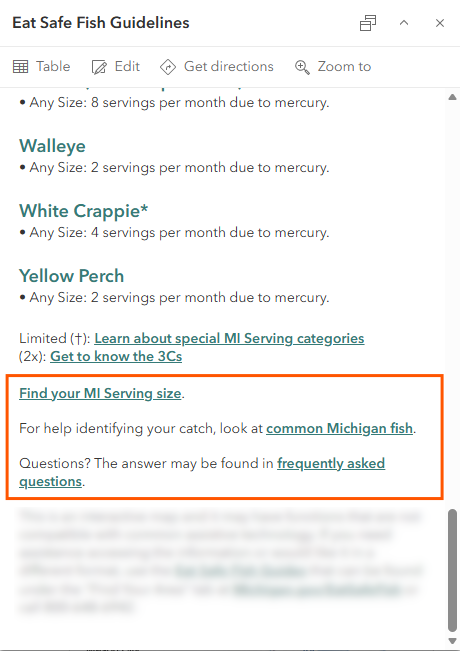
NicoleJohnson_0-1782486943012.pngNicoleJohnson_0-1782486943012.png

However, when I click on the same feature in Experience Builder (via the map widget), the spacing is different. It's like they're different lines of the same paragraph rather than individual paragraphs.
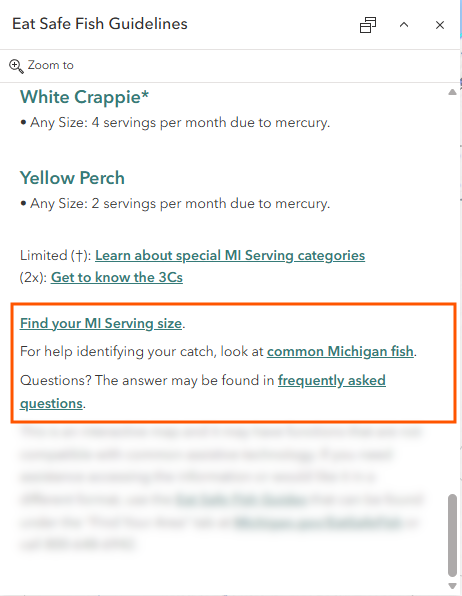
NicoleJohnson_1-1782487028927.pngNicoleJohnson_1-1782487028927.png

Additionally:

The query widget is set to return a feature's pop-up. The query widget now doesn't return the bulk of the pop-up. All of the missing content comes from attribute expressions, but not all attribute expressions are missing (e.g., the waterbody name, Lake Superior, is coming from an attribute expression).
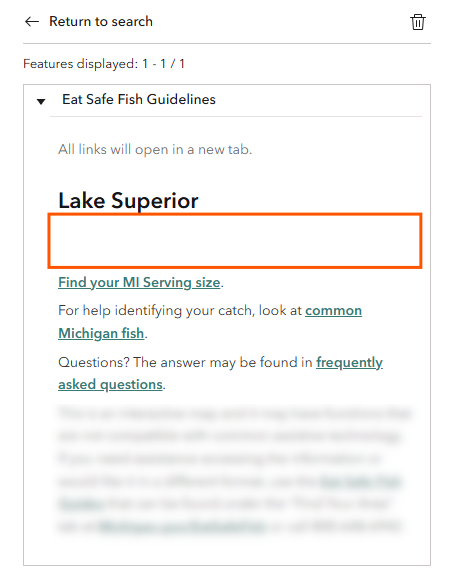
NicoleJohnson_2-1782487402819.pngNicoleJohnson_2-1782487402819.png

I've had issues before with the query widget, so I tried the feature info widget too since it seems a little more robust. That's returning the pop-up completely as I expect it to look, no weird spacing or anything.

29 Replies
RyanKelley_NA
Frequent Contributor

I am experiencing the same thing. I am opening a ticket

RyanKelley_NA
Frequent Contributor

An update to this, I did try the same experience builder app in an incognito chrome browser and the pop-ups worked fine.  I think I may wait and see on Monday how things look before investigating further.

0 Kudos
NicoleJohnson
MVP

Hmmm, thanks. Unfortunately mine are still messed up after trying incognito mode and clearing the browser's cache.

mpboyle
Honored Contributor

I came here looking to see if anyone had a similar issue.  Our pop-ups are missing entirely.  They were there yesterday, gone today.  This is only for Experience Builder.  The pop-ups are still there and look as expected in the source web map.

Ke_Xu
by Esri Regular Contributor
Esri Regular Contributor

Hi @mpboyle,

It should be working now. The reason is that the dependent API version was updated, but Experience Builder was not updated, causing this issue. Please let me know if you have any questions. Thanks.


Thanks,

Ke

0 Kudos
PKuskie
New Contributor

I'm still having the issue of pop-ups in Experience Builder not showing any fields when selected. The source map will display the pop-ups as expected

0 Kudos
JulieDel_Muto
Occasional Contributor

Still having the same issue except it is only on mobile devices when viewing experience apps that the pop ups are not showing information.

0 Kudos
Jianxia
Esri Regular Contributor

@JulieDel_Muto , thanks for letting us know. We will take a look.

0 Kudos
BigLouC
Frequent Contributor

Same here, Health Check board says everything is fine, move along



