I am trying to create a work order system for my staff to receive requests from other departments that were submitted via survey 123. I'm 95% there but I can't overcome one hurdle. Here is a screenshot for reference:
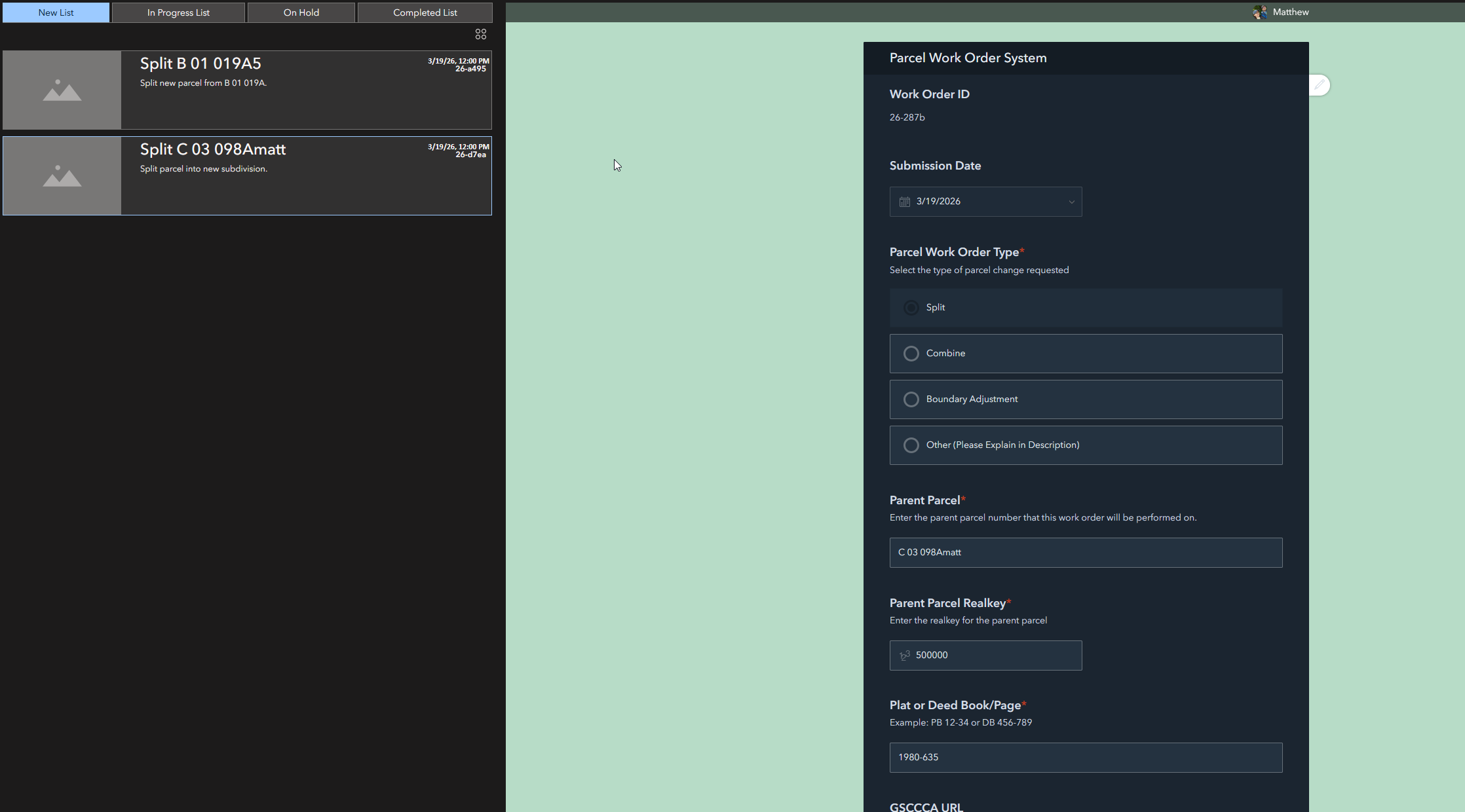
The left row is a series of lists stacked on top of each other in a grid. Each list is filtered to only show work orders that are set to a relevant status. The right panel is the survey that the user submitted. When you select a record in the left panel, the survey for that record pulls up in the right panel. My editor can then respond to the work order as needed and submit it. This is where the problem occurs. Once that work order is submitted, the list doesn't receive that update until the page is manually reloaded. This is particularly problematic because if an editor marks a 'New' work order as 'Completed', it will stay in the 'New' tab until the entire experience is reloaded. I'm hoping that there is something obvious that I am missing here.

Solved! Go to Solution.
This is a regression bug introduced in the February update. The expected behavior is that the List widget updates automatically when the data source changes. A fix is planned for the June update.
I don't think there is an option to refresh the data when something changes, but you can set up the data to auto-refresh on a set time interval. If your dataset is pretty small, it shouldn't be too bad to set this under a minute.
That won't work because it also refreshes the survey, essentially making submitting a survey impossible.
I think there is a setting for refresh on just the list widget also.
Do you know where? The only way I've found to change the refresh interval is on the data tab of the survey.
Opps I am wrong there is not one. Sorry it was a bit ago.
@MDB_GIS, I don't have the time to try this first so YMMV, but I wonder if you could have one instance of your data connected to the Edit widget and another instance connected to the List widget, then set a short refresh time on the latter? Or, if that doesn't work (i.e., the refresh happens to both instances), create a view of the data to use in the List widget (that way it would be a separate item, but you also don't have to set up anything to keep it updated).
Edit for clarity: by "two instances of your data," I don't mean actually separate data, I mean adding it twice in your data sources in Experience Builder. If you're bringing in the data via a web map, that means adding the web map twice.
Yeah I tried to do this myself a long time ago when the survey widget first became available to the Online ExB version but could never get it to work either. The communication was always one way from the (Info and / or List widgets in my case) to the Survey. I could not find a trigger action mechanism to make it work, and url parameter passing was not available yet.
Using a data view of the survey-updated data for the list widget did work, sort of. I ran into problems though with the data view not then updating an info widget in the map without a page refresh. Since you're not using a map maybe that won't be an issue for you?
Definitely interested if you solve.....
Apparently a bug that is going to be addressed in a future release. I did find a temporary workaround, however. In my case, I was only really concerned with one attribute getting updated (completed/not completed). So I hid that in the survey and added a small edit widget window to the left side of the screen. For whatever reason, when you update the attribute in the edit widget, that does trigger the list widget to update.
This is a regression bug introduced in the February update. The expected behavior is that the List widget updates automatically when the data source changes. A fix is planned for the June update.