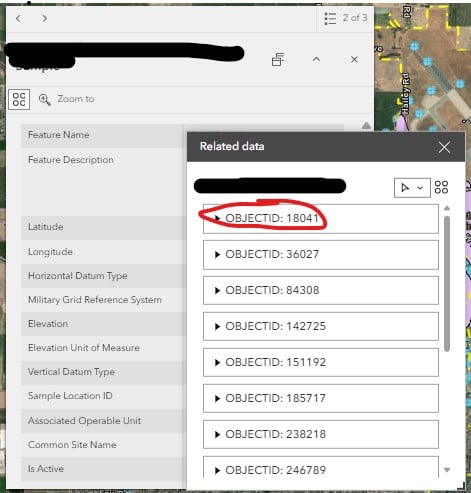
I am trying to configure the pop-up for my related data in Experience Builder to display custom fields vs defaulting to Object ID. We were previously using Web Applications and were able to get the related data pop-up to display how we wanted by configuring the pop-up in the web map. It doesn't seem to be working the same way in Experience builder. Below I've included a pic of what the pop-up looks like in the Web App vs Experience builder. We'd like to get the Experience Builder Pop-up to look like the Web App. Is there a different area to configure this information for Experience Builder beside the pop-up configuration in the web map? Any guidance is appreciated!
Has anyone had any luck with the related table pop up Title not working in Experience Builder. I am also having this issue with only OBJECTID in the related table records. I tried changing pop up settings in the map to no luck. Would love to hear of anyone's work around.
Joanne
Hi Joanne,
No...I have not seen a solution to this yet, nor have found a work around. The few suggestions given did not work for me.
Jalayne
I think they may have done an update, or I finally figured out a workaround...see my last post below.
I have the same problem
I have tried all possible solutions and workarounds: services, webmaps, etc; but there is no solution
Thanks!
version 1.18 was released today, let's hope that some progress can be made... we'll have to try it out.
I think it has something to do with setting up the Feature Info widget although i haven't tried that yet. I'm having the same issue. Here is some documentation. https://doc.arcgis.com/en/experience-builder/latest/configure-widgets/feature-info-widget.htm. In some references I've read, i'm also wondering if it has something to do with whether the map was published from ArcGIS Pro.
I have the same issue. I hope it is fixed soon. Thanks for posting.
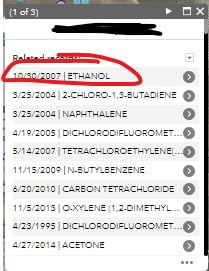
Either this was fixed or I just figured out how to resolve the issue. Instead of trying to configure the pop-up under the layer that has the related table information, I configured the pop-up for the actual table itself, and now it displays as I want it to. First I added "Related Records" to the layer pop-up. This will make it so the related records show up at the bottom of the layer pop-up window (vs using the "action" button to view related records). Then you can go to the properties for the table the related records are stored in, and configure that pop-up however you like. I've included some screenshots below that hopefully help:
This is the pop-up that I configured from the table that displays when I select the records at the bottom of the layer window:
Hope this helps some people! Let me know if you have any additional questions!