Dear Community,
is it possible in ArcGIS Enterprise Builder to control the background colors of Widget Controller buttons via the organizational colors (defined design) via an extra entry/color?
I do not want to use the predefined color values of the organizational colors for header (header background, header text), button (button background, button text), or text (text background, text, link).
The color of the organizational colors of the button background is blue in our case, but I do not want to use that, as I would like the Widget Controller buttons to have a white background. This should be controlled centrally via the organizational colors, due to changes reflecting in all apps.
It would be great if there would be additional organizational colors to add. For example add another organizational color for the button background.
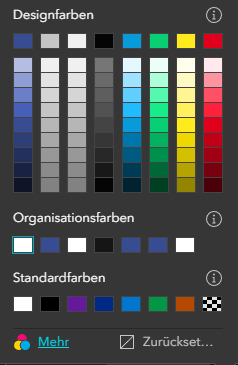
We deliberately do not use another theme (Default, Ink, Violet, etc.) because color changes would have to be manually adjusted across all other applications.
So is there any other way to apply a specific color to the Widget Controller buttons via the organizational colors (e.g. by adding an extra/additional entry in the organizational colors)?
Unfortunately, we do not have the Developer Edition.
Kind regards,
Tim

