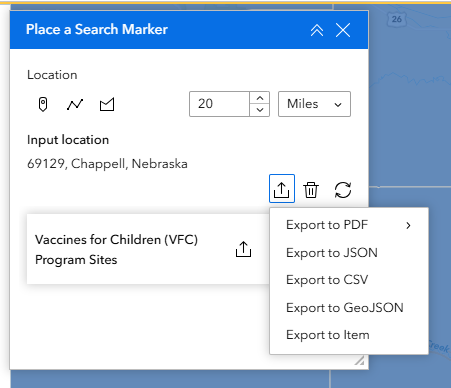
I want to be able to select the type of export that users can make from the Near Me widget. In AGOL (right now) there are FIVE options. Most of my applications are for the public and they only need ONE (the CSV). I understand that these other options may be applicable to other users. I want to decide what my users see and I want to make this as simple as possible for the end user.
I also noticed today that the top export (selected below) makes a .zip package. I'm a concerned that might be blocked by some IT standards, but I also understand that applies to the list of results. I don't have a suggestion for this one ... yet. 😊
https://community.esri.com/t5/experience-builder-tips-and-tricks/turning-off-data-exporting-or-types...
As of the last Online update (February 2025), this is an option.
Thank you for sharing this!!
I did look around in that menu - but I must have been in our enterprise portal when looking.
Is there a way to apply that to the group export?
I no longer see the list for the single return, but still get it for the group - despite have it set for the single. I also did the select all and the gear at the top - but still have that list.
Because the select all and apply didn't let me save and publish I made a small text change too - even with all this I'm still seeing the list for the group.
@Jennifer_Parmeley Try changing the settings one by one in the layers of your group and if that doesn't work consider deleting and rebuilding your Near Me Widget.
I have 65 layers showing in that Export settings window. It sure would be nice if the one at top controlled them all.
It is suppose to. It's worth a call to Support if it's not. Maybe try re-building your Near Me Widget before changing the settings on every layer.
Hi @Jennifer_Parmeley, did you get to the bottom of this?
I'm having the same issue - I turn off some/all of the export options in the Data tab, but still have all of the export options showing when I click to export the group results.
Ideally I just want users to export to PDF, but this isn't even an option in the Data tab.
I haven't. It frustrates me to write the scenario out in a support ticket and then have them call and I get "so what did you need help with" response. It's Friday tho - so maybe today. I have about 4 I need to put in.
Similar to @DebSF PDF is not an option showing for me, and I would like it to be. How do I get PDF to show up as an export option?
You must be a registered user to add a comment. If you've already registered, sign in. Otherwise, register and sign in.