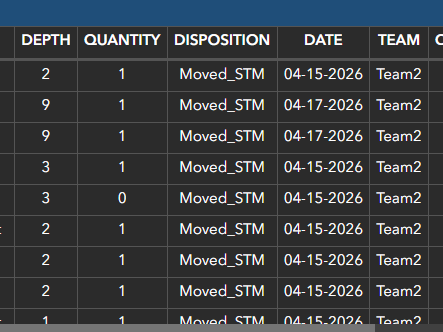
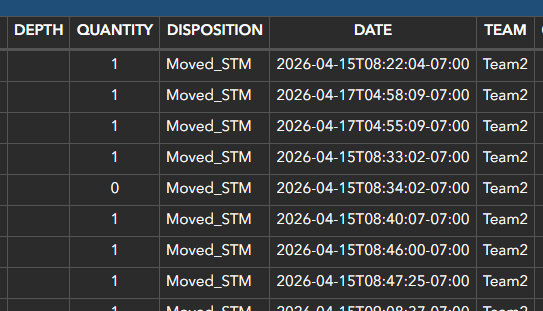
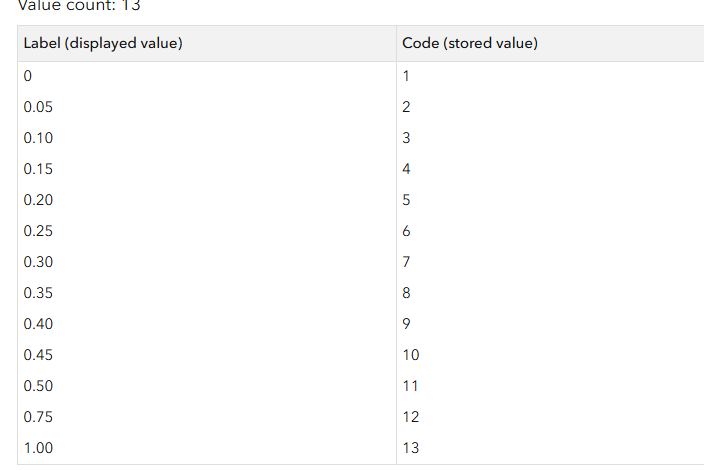
Hello. I'm using advanced formatting on a table in dashboard and the domain code is showing from my hosted feature layer rather than the displayed value.
When I set the variable for each code the data disappears all together...am i missing something here or is this a bug?
Any assistance would be greatly appreciated!
var highlight = ''
var textid1 = ''
if ($datapoint.QCStatus == 'Fail'){
highlight = 'RED'
}
if ($datapoint.Depth == '1'){
textid1 = '0.00'
}
if ($datapoint.Depth == '2'){
textid1 = '0.05'
}
if ($datapoint.Depth == '3'){
textid1 = '0.10'
}
if ($datapoint.Depth == '4'){
textid1 = '0.15'
}
if ($datapoint.Depth == '5'){
textid1 = '0.20'
}
if ($datapoint.Depth == '6'){
textid1 = '0.25'
}
if ($datapoint.Depth == '7'){
textid1 = '0.30'
}
if ($datapoint.Depth == '8'){
textid1 = '0.35'
}
if ($datapoint.Depth == '9'){
textid1 = '0.40'
}
if ($datapoint.Depth == '10'){
textid1 = '0.50'
}
return {
cells: {
ContractorDRID: {
displayText : $datapoint.ContractorDRID,
textColor: '',
backgroundColor: highlight,
textAlign: 'center',
iconName: '',
iconAlign: '',
iconColor: '',
iconOutlineColor: ''
},
AnomalyAmplitude: {
displayText : Text($datapoint['AnomalyAmplitude'], '######.00'),
textColor: '',
backgroundColor: highlight,
textAlign: 'center',
iconName: '',
iconAlign: '',
iconColor: '',
iconOutlineColor: ''
},
Tau: {
displayText : Text($datapoint['Tau'],'######.00'),
textColor: '',
backgroundColor: highlight,
textAlign: 'center',
iconName: '',
iconAlign: '',
iconColor: '',
iconOutlineColor: ''
},
Easting: {
displayText : Text($datapoint["Easting"], '######.00'),
textColor: '',
backgroundColor: highlight,
textAlign: 'center',
iconName: '',
iconAlign: '',
iconColor: '',
iconOutlineColor: ''
},
Northing: {
displayText : Text($datapoint["Northing"], '#######.00'),
textColor: '',
backgroundColor: highlight,
textAlign: 'center',
iconName: '',
iconAlign: '',
iconColor: '',
iconOutlineColor: ''
},
Legend: {
displayText : $datapoint.Legend,
textColor: '',
backgroundColor: highlight,
textAlign: 'left',
iconName: '',
iconAlign: '',
iconColor: '',
iconOutlineColor: ''
},
Comments: {
displayText : $datapoint.Comments,
textColor: '',
backgroundColor: highlight,
textAlign: 'left',
iconName: '',
iconAlign: '',
iconColor: '',
iconOutlineColor: ''
},
Depth: {
displayText : textid1,
textColor: '',
backgroundColor: highlight,
textAlign: 'center',
iconName: '',
iconAlign: '',
iconColor: '',
iconOutlineColor: ''
},
Disposition: {
displayText : $datapoint.Disposition,
textColor: '',
backgroundColor: highlight,
textAlign: 'center',
iconName: '',
iconAlign: '',
iconColor: '',
iconOutlineColor: ''
},
Team: {
displayText : $datapoint.Team,
textColor: '',
backgroundColor: highlight,
textAlign: 'center',
iconName: '',
iconAlign: '',
iconColor: '',
iconOutlineColor: ''
},
InvestigatedDate: {
displayText : Text($datapoint["InvestigatedDate"], 'MM-DD-YYYY'),
textColor: '',
backgroundColor: highlight,
textAlign: 'center',
iconName: '',
iconAlign: '',
iconColor: '',
iconOutlineColor: ''
},
QCStatus: {
displayText : $datapoint.QCStatus,
textColor: '',
backgroundColor: highlight,
textAlign: 'center',
iconName: '',
iconAlign: '',
iconColor: '',
iconOutlineColor: ''
},
QCComment: {
displayText : $datapoint.QCComment,
textColor: '',
backgroundColor: highlight,
textAlign: 'left',
iconName: '',
iconAlign: '',
iconColor: '',
iconOutlineColor: ''
},
Quantity: {
displayText : Text($datapoint.Quantity),
textColor: '',
backgroundColor: highlight,
textAlign: 'center',
iconName: '',
iconAlign: '',
iconColor: '',
iconOutlineColor: ''
},
}
}