Select to view content in your preferred language

Can non-admin users manage their own AGOL/Power Automate flows?

440
4
Jump to solution
03-17-2026 09:13 AM
Bud
by
Legendary Contributor

Background:

I'm a GIS power user, but I don't work in I.T.  In AGOL, I can create/publish items, but that's all I can do; I can't share items or perform any other admin tasks.

I want to pitch a project to I.T. — purchase Power Automate Premium licenses to facilitate the following:

  1. When a Survey123 feature is created (when the user hits submit), email a staff member.
    YouTube: Setup Webhooks in ArcGIS Survey123 using Microsoft Power Automate (Esri Canada)
  2. Similarly, when a Survey123 feature is created, automatically copy the feature to a feature layer called "record of original survey submission".

I believe I.T. would set up an ArcGIS Online Power Automate connector.

Both 1 & 2 would require webhooks in Survey123. It looks like I'd be able to set up webhooks myself using my current AGOL privileges; nothing's greyed out:
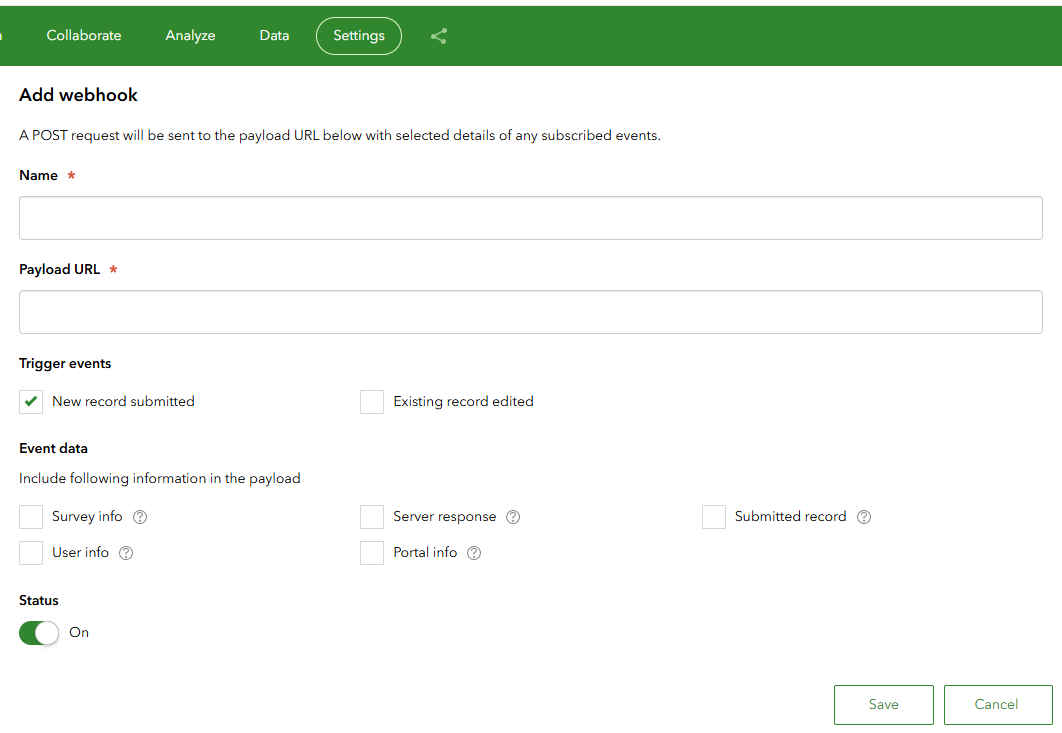
webhook.png

Question:

Once I.T. sets up the connector, would I be able to create and manage my own AGOL/Power Automate flows going forward, assuming I get a Power Automate Premium license?

I want to understand how it would work and understand what I'm asking for. Would I need to ask administrators to do everything for me going forward, such as create or modify flows? Or would I be able to manage my own flows?


0 Kudos
1 Solution

Accepted Solutions
abureaux
MVP Frequent Contributor

Yes, the word "use" applies to you in this case.

Power Automate premium license aside, as you've covered that, the new ArcGIS connections need to be maintained (every 2 weeks). You will need an account with sufficient permissions to do so. And given how often these need to be updated, you would need to do it yourself. As an idea for those permission levels, and from MS's ArcGIS Connector document

  • GeoEnrichment → requires the GeoEnrichment privilege
  • Find address candidate → requires the Geocoding privilege
  • Geocode addresses → requires the Geocoding privilege
  • Point‑to‑point routing → requires the Network Analysis privilege
  • Create feature layer → requires the Publish hosted feature layers privilege

Given this, a custom roll should be possible if your current roll doesn't cover all of the required permissions. 

The old ArcGIS Connector (may work, but I much prefer the new connectors and am almost done phasing this one out) doesn't need to be updated ever (unless the login credentials change). This is also a much more limited option though.

Unsure if this is what you were considering, but I feel this is always worth mentioning... If you are going for a large-scale deployment and long-term solution, I would advise against using personal accounts to manage automations. A better alternative would be a service account that can be swapped to a new user if the original maker changes positions/responsibilities or leaves the company.

View solution in original post

4 Replies
Bud
by
Legendary Contributor

I believe, in general, users can manage their own flows in Power Automate. But the wording in the Esri docs seems unclear to me:

Introduction to ArcGIS Connectors for Power Automate

To use 
ArcGIS Connectors for Power Automate, you must have an ArcGIS organizational account, an ArcGIS Enterprise login, or API key credentials. See the Microsoft ArcGIS Connectors topic in the Microsoft Power Automate documentation to learn about ArcGIS Connectors for Power Automate.

Does the word "use" apply to me, a user, or is it referring to the initial connector setup? As a non-admin, it goes without saying that I don't have access to API key credentials.

0 Kudos
abureaux
MVP Frequent Contributor

Yes, the word "use" applies to you in this case.

Power Automate premium license aside, as you've covered that, the new ArcGIS connections need to be maintained (every 2 weeks). You will need an account with sufficient permissions to do so. And given how often these need to be updated, you would need to do it yourself. As an idea for those permission levels, and from MS's ArcGIS Connector document

  • GeoEnrichment → requires the GeoEnrichment privilege
  • Find address candidate → requires the Geocoding privilege
  • Geocode addresses → requires the Geocoding privilege
  • Point‑to‑point routing → requires the Network Analysis privilege
  • Create feature layer → requires the Publish hosted feature layers privilege

Given this, a custom roll should be possible if your current roll doesn't cover all of the required permissions. 

The old ArcGIS Connector (may work, but I much prefer the new connectors and am almost done phasing this one out) doesn't need to be updated ever (unless the login credentials change). This is also a much more limited option though.

Unsure if this is what you were considering, but I feel this is always worth mentioning... If you are going for a large-scale deployment and long-term solution, I would advise against using personal accounts to manage automations. A better alternative would be a service account that can be swapped to a new user if the original maker changes positions/responsibilities or leaves the company.

Bud
by
Legendary Contributor

@abureaux  Thanks. That’s very helpful.

For my notes, I found this blurb in Frequently asked questions:

…if an ArcGIS API key is used to create and maintain flows, there is no need to refresh the connection, as API keys do not require additional authentication once they are configured.

See the Quick Tip: Keeping the ArcGIS Connectors for Power Automate Refresh Token Valid Esri Community blog for a way to keep the token valid.


How reliable are ArcGIS Online webhooks?

Bud
by
Legendary Contributor

A related blurb from @rsun_TQB in Power Automate workflow using Survey123 Connector from 2023:

Our approach of using Power Automate + Survey123 is to use "Power Automate per user plan" to run unlimited flows using one centralized Microsoft account, and also manage all automations using this account as well. We have 2FA setup for the user, and we also make sure multiple users (IT & GIS) can manage it anytime with security key. This is the best approach for us, but maybe not for you.

You will also have to "refresh" your Survey123 connection every two weeks by reentering credential of the account. The maximum life of access token is 2 weeks by design...so make sure that you set up reminder on you and your team's calendar to refresh before your conneciton is expired.

0 Kudos