In Scene Viewer, for groups of layers, you have the option to present them to the user as a single item in the layer control. Looking at the following ESRI example: https://developers.arcgis.com/javascript/latest/sample-code/widgets-layerlist/live/, the 'Transit lines in service' layer item is actually two separate layers: a point layer for stops and a line layer for routes.
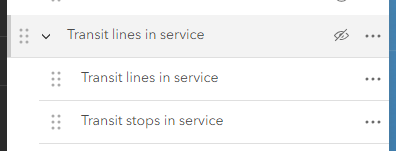
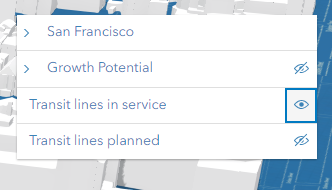
But the user is presented with a single item in the layers panel so that the two layers are always viewed together:
In Scene Viewer, this is configured by selecting the Merge option from the menu accessed by clicking on the three dots next to the group item:
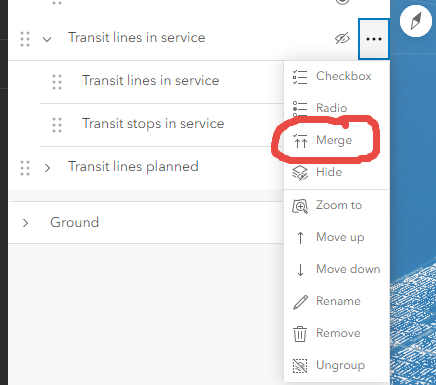
This works great in Scene Viewer, but I'm trying to replicate the exact same functionality in Map Viewer, but the 'merge' option isn't there (neither is the 'checkbox' or 'radio' or 'hide' options - all of which would be useful additions to Map Viewer).
At the moment, the best we can do is group the two individual layers and set the individual layers to be turned on by default and have the group layer turned off by default so end users just need to interact with the group layer. Whilst this works users can still expand the group layer and turn the individual layers on/off independently. We're displaying bus stops and routes, so the scenario is identical to the ESRI Scene Viewer example (but we're using a web map rather than a scene):
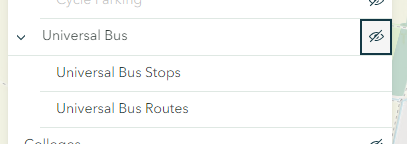
We just want end users to see a single item called 'Universal Bus', and not the two layers that make up this group.
Does anyone know of a workaround for this in Map Viewer? Or does anyone from ESRI know if there are plans to implement the same controls in Map Viewer as there are in Scene Viewer as I can see all the functions currently in Scene Viewer but not in Map Viewer (checkbox, radio, merge, hide) being useful in Map Viewer.


