Howdy,
I'm trying to query a feature layer that I got added succesfully into a map.
My program is very much like that of the sample program on ESRI tutorial page, query a map feature layer: https://developers.arcgis.com/net/query/tutorials/query-a-feature-layer-sql/
I'm not using the sample's provided parcel endpoint, I've supplied my own feature service REST API endpoint.
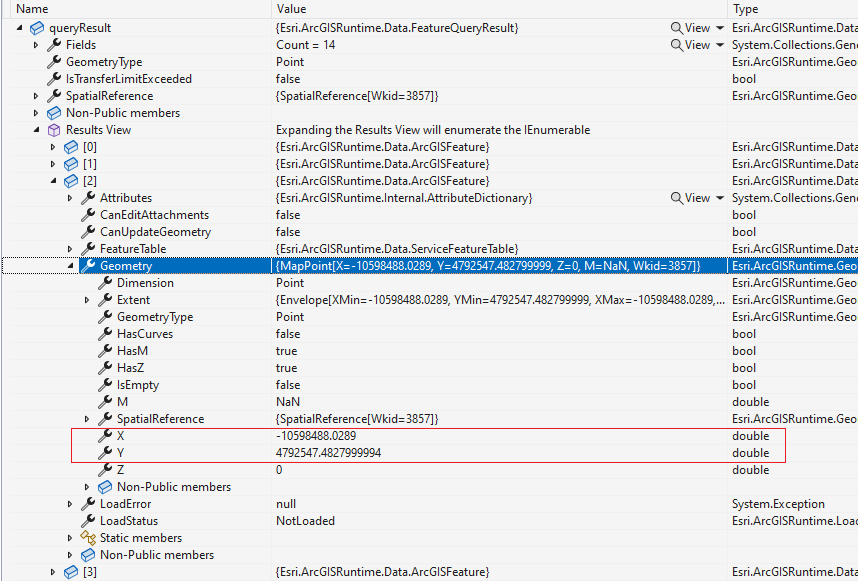
The query went through and returned about some hundred of points. The issue is I can't seem to grab the X and Y even though they are shown clearly in the debug window under Geometry. Only a handful of properties such as HasM, HasZ, HasCurves shown up in the context menu/visual-studio IntelliSense.
I couldn't help but am thinking this may be a known bug ? [as it happened to a software vendor our company had before and it didn't get fixed until later version] or am I missing something? Can you please help me straighten this up?
Such a torture I can't extract the coordinates - using a simple foreach loop - knowing they're there.
// Query the table and get the list of features in the result.
var queryResult = await featureTableToQuery.QueryFeaturesAsync(queryParams);

// Loop over each feature from the query result.
foreach (Feature feature in queryResult)
{
      double tempX = feature.Geometry.X // error
      bool tempChecked = feature.Geometry.HasZ // okay
      // Select each feature.
      // featureLayerToQuery!.SelectFeature(feature);

}
Thank you.

