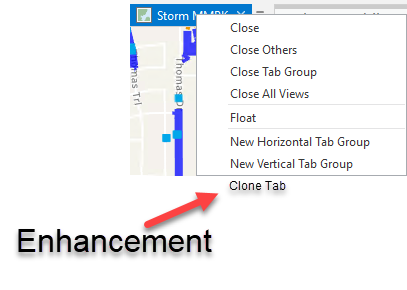
The ability to clone map tabs so you can keep configuration. This is helpful when publishing several MMPKs with offline basemaps that are identical. Makes it way more efficient to configure and publish many maps (MMPKs) without needing to reset map settings. arcgispro
Thank you for submitting this idea Luke Savage Does opening the same map not achieve what you're looking for?
Or specifically you're looking for that from the tab's context menu?
Thanks!
Yes Kory it is but is an awkward place to perform that function. The UI for right click on the map tab is managing that tab. Plus, it's more cohesive and logical for the user if in the tab management UI. If the catalog pane is not open, you can't add it within the tab experience.
Thanks for the clarification, Luke! This also helps to understand that a copy of the map isn't needed, just a second view pointing to the same map.
Cheers
Please save us time and a few clicks by adding a duplicate map / layout when you click on a tab in ArcGIS Pro. Right click - Duplicate - Done. Instead of finding the map in the table of contents, right clicking to copy, right clicking to paste...
This would work similar to duplicating a tab in Google Chrome.
ArcGIS Pro:
Google Chrome (better way):
Agreed. This would be a great feature!
i also agree.
this would be a huge help instead of having to open a new map and populate it the same as already done... apply symbology etc etc, just to, for example make a new layout.
clone map is a great idea.
Thank you for the comment @NigelBaker I took a look and it doesn't appear that you added your kudos to the idea. While comments are important, kudos (the number of votes) that an idea receives is one of the primary pieces of data that we use to determine traction and trends as we monitor idea activity over time.
Please see https://community.esri.com/t5/custom/page/page-id/arcgis-ideas for a high level overview of how ArcGIS Ideas works, and for more information. I wanted to make sure that you were aware of how ArcGIS Ideas works, and the importance of voting on ideas that you would like to see implemented in the software.
Thank you for your participation in the community and for helping us prioritize future development efforts for ArcGIS Pro.
Cheers,
Kory
How would one copy a map tab and paste it as a new map (preferably including symbology)? Is there a way to that in Pro?
@DavidNelson3 Are you asking how to duplicate a map? "copy a map tab"... that map tab is a view of a map. So if you just copy/paste the source map, is that what you're asking?
You could hold ctrl and click+drag/drop to duplicate the map. Or just a normal copy/paste. Please let us know if that isn't what you were asking...
@KoryKramerI am looking at the tabs in the main display window in ArcPro. I'd like to be able to copy a map tab (as opposed to a layout tab) in it's entirety and paste it in the same window. Then I would change some of the layers, symbology etc. within the new tab. That would be a very efficient process.
Thank You,
David
Thanks @DavidNelson3 If you support this idea, please add your kudos!
Just a note that when I originally asked for clarification from the OP he said he did not want to duplicate the map, just the view. Subsequent comments indicate that users are looking for the ability to actually duplicate the source map, with that action taking place from the view tab. These are two different things. From your description of "then I would change some of the layers, symbology, etc." I'm assuming that you want that to be in a different map. Is that true?
For example, if I duplicate the view (which continues to reference the same source map), here is what I get:
I can do things to the second view like change the scale, orientation and so on:
And when I turn another layer on, change symbology... that happens in both views because they are both pointed at the same map:
So are you interested in just duplicating the view tab (maintaining the reference to the same source map), or is your expectation that you duplicate the view tab but have the duplicated tab reference a duplicate of the original map? If the former, the current option is to simply open the same map again. If the latter, you would duplicate the map in the project first, and then open the duplicate map in its own view. Hope this helps, and please provide any further details on your expectations.
@ KoryKramer I guess the reason why it is hard to describe is due to my focusing on an outcome rather than a limitation. I want to be able to duplicate a map tab entirely, except changes in the new tab will not be duplicated in the original tab. It's like being able to resymbolize a duplicate layer without changing the symbology of the original. I would also like to add or remove layers in the duplicate map tab without changing the original tab.
Similarly, it would be useful to be able to reproject all layers in the new map tab without changing the contents of the original tab.
In that case, you would duplicate the map and that request would match up with some of the other comments on this thread. i.e. From the tab's dropdown > Duplicate tab with duplicate map all as a single operation. For now, you would duplicate the existing map and open the duplicate map.
I would also like to the ability to do this. For example, in ArcMap I will create a map, adding and symbolizing all the layers I need. If I then need to make a new map using all or some of the same layers, but need to symbolize differently, add a definition query, display different layers, etc. I will Save As and create a new mxd file that I can now edit without changing the original map and layout. I want to utilize the functionality in ArcPro of having multiple maps and layouts in a single project, but if I need a new layout that requires changes in symbology, etc, I'd like an easy way to duplicate an existing map to base that layout on. This is surprisingly difficult to explain, but also surprising there is not an easy way (similar to duplicating a layout) to create a duplicate map within a project. Please let me know if this is possible and I am overlooking it.
@ErinGilbert1 For what you're describing, I don't think it is related to wanting to duplicate the tab, you just want to easily duplicate the map in the project, so that you can then change symbology, etc. in the second map. Just do this:
@KoryKramer Thanks for showing me this. It looks like a new feature in Pro version 3.2. I just updated from 3.1 and viola, this option appeared. Much appreciated!
Thanks, @KoryKramer but ideally it would be on the map (or layout) tab at the top. This would prevent having to find it or open the catalog pane, then find the map you need to duplicate, especially if you have lots of maps with similar names. Once you are in the catalog pane already it is just as easy to ctrl-drag as it is to right click.
Hi @KoryKramer
From what I can see, the methods outlined here creates a pointer to the source map.I would like to be able to copy a map to a new tab, but then change its sources (as in, moving from a QA map to a production map). But this method above doesn't work, if I change the source in my new copy, the original source is changed as well.
I can copy each individual layer into a new blank map, but this is much more tedious when I am working with several layers.
Is there another way to do what I am asking?
@JasonFitzsimmons
I often encounter the issue of needing to change the components of a Layout, but want to preserve the existing Layout as well. Making the changes to the Map will change the existing Layout, which I don't want. What I do is duplicate and rename both the Layout and the Map in the Project Catalog pane. I then go into the Map Frame properties of the new Layout, and set the Map Frame to the new Map. For some reason the extent always zooms way out, but if I zoom to a layer within the map, I can return to exactly the same extent (if that is not sufficient I can duplicate the Map Frame location settings of the existing Layout). I then have a new Layout pointing to a new Map that I can change without changing the existing Layout I want to keep. It's not as easy as it should be but it works.
@ErinGilbert1
I’m not sure if by Map you mean Layout. I will duplicate both the Layout and the Map, the new Layout I will then set to point to the new Map (you do this in Map Frame properties of the new Layout). Then I can make changes to that Layout (and the underlying Map) without messing up or changing previous Layouts I’ve created. I have tried using the functionality of basing multiple Layouts on a single Map, but have found the utility is really limited. Most things I want to change in a duplicate Layout also end up changing the Map, and thus any other Layouts.
hi @ErinGilbert1 , I am not looking at Layouts. I am only look at the Maps in a Project.
What I would like to do is copy a Map (say, copy a QA map to create a new Production map), then keep the layer order, symbology, definition queries, but point the underlying data to a new source in the new Map. this is a common workflow in my office, and is/was easy using stand alone mxds. and using catalog to change the data source.
I don't see a way to do this; if I copy or clone a map, and then i change the data source in a new map, both the original and copy's data source are changed. the only way I see to create a new Map with the same layers symbology and such is to create from scratch (I can save each layer as a layer file and then import to the new Map, but this is a bit tedious for maps with many layers).
@JasonFitzsimmons , thanks for the explanation. I understand your issue now, and have not tried doing that or experienced that issue. Not ideal probably, but have you tried duplicating the entire project using Save As, then changing the data source? Apologies if this was already mentioned earlier in the thread.
@ErinGilbert1 that is probably possible, but I would like to utilize the advantages of the project template, and have dev QA and prod all in one project.
@JasonFitzsimmons - If I understand your desired workflow correctly, I think I know how you can do one small addition to the workflow to change just the data sources for the new map, not the original one also.
After you have the "Data Sources" tab opened for the project, open the "Maps" folder under the Catalog View, to the left of where all the data sources are listed for the project.
Select the new map you duplicated. Only the data sources for that particular map will be listed to the right. You can change those sources, and it will not affect the original map's data sources.
Give it a try, it works for me in Pro 3.4.4.
thanks for the suggestion @alex_friant , I 'll try that.l
I agree, it would be more intuitive to be able to right-click a map tab and duplicate it. I had to search how to do this.
Sign in to post, follow content, and more. New here? Register for free.