If you've ever had to show the density of point features on a map, you may already be familiar with the concept of a heat map, which allows you to generalize the display of points according to their density. A heat map provides an excellent tool for discovering patterns in your data. In addition to looking at density of point location, you can also provide a field in your dataset with which to weight the density. This allows you to look at the density of things like sales (dollars, for example) instead of just the density of customers over an area.
Heat maps are displayed with a color ramp that usually shows dense areas with a darker color (red, for example) and sparse areas with a light color (such as yellow). You may have used a heat map renderer to display your point data in the ArcGIS Online map viewer or ArcGIS Pro. The heat map below shows the density of earthquakes weighted with a field that contains the magnitude.
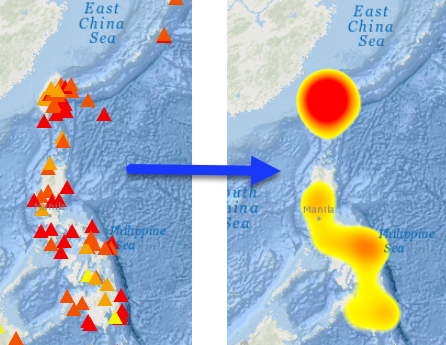
"Sounds great". You might be saying. "I'm excited to try it in my ArcGIS Runtime for .NET app"!
"Um, yeah. About that." I would say, sheepishly looking at my shoes.
While there is support in ArcGIS Runtime for reading things like a heat map renderer from a web map, there's no API exposed (as of v100.2.1) that allows you to construct one and apply it to a point layer without crafting the raw JSON definition. Fortunately, with a little effort, there's a way to make it much easier to work with.
In a previous blog, I described how to create a serializable class to define labeling properties to apply to a layer. I'll describe the same technique here to define a heat map renderer class that can be serialized to JSON and applied to your point layer. If you don't really care about the details and just want to start using it, you can download the completed class and sample project and give it a try.
- Start Visual Studio and create a new ArcGIS Runtime SDK for .NET app.
- Use the NuGet Package Manager to add the Newtonsoft.Json package to the project.
- Add a new class to the project. Let's name it HeatMapRenderer.cs. Add the following using statements at the top of the class.
<SPAN class="keyword token">using</SPAN> Newtonsoft<SPAN class="punctuation token">.</SPAN>Json<SPAN class="punctuation token">;</SPAN>
<SPAN class="keyword token">using</SPAN> System<SPAN class="punctuation token">;</SPAN>
<SPAN class="keyword token">using</SPAN> System<SPAN class="punctuation token">.</SPAN>Collections<SPAN class="punctuation token">.</SPAN>Generic<SPAN class="punctuation token">;</SPAN>
<SPAN class="keyword token">using</SPAN> System<SPAN class="punctuation token">.</SPAN>Windows<SPAN class="punctuation token">.</SPAN>Media<SPAN class="punctuation token">;</SPAN><SPAN class="line-numbers-rows"><SPAN></SPAN><SPAN></SPAN><SPAN></SPAN><SPAN></SPAN></SPAN>
- Create properties for everything expected in the JSON definition of the heat map renderer class. This information is defined under heatmapRenderer in the Web map specification. The specification defines a "blurRadius" value, for example. This could be implemented with the following simple long property. Note that the name of the property in the class does not need to match the name in the specification.
<SPAN class="keyword token">public</SPAN> <SPAN class="keyword token">long</SPAN> BlurRadius <SPAN class="punctuation token">{</SPAN> <SPAN class="keyword token">get</SPAN><SPAN class="punctuation token">;</SPAN> <SPAN class="keyword token">set</SPAN><SPAN class="punctuation token">;</SPAN> <SPAN class="punctuation token">}</SPAN><SPAN class="line-numbers-rows"><SPAN></SPAN></SPAN>Based on the specification, here are the properties (and corresponding data type) needed for the heat map renderer class:- blurRadius (long)
- colorStops (list of objects)
- field (string)
- maxPixelIntensity (double)
- minPixelIntensity (double)
- type (string).
- OK, the list above looks pretty straightforward, except for the property that returns a list of objects. Go ahead and create properties for everything except colorStops (we'll circle back to that one).
- The Type property needs to be set with "heatmap" as the default, as shown here.
<SPAN class="keyword token">public</SPAN> <SPAN class="keyword token">string</SPAN> Type <SPAN class="punctuation token">{</SPAN> <SPAN class="keyword token">get</SPAN><SPAN class="punctuation token">;</SPAN> <SPAN class="keyword token">set</SPAN><SPAN class="punctuation token">;</SPAN> <SPAN class="punctuation token">}</SPAN> <SPAN class="operator token">=</SPAN> <SPAN class="string token">"heatmap"</SPAN><SPAN class="punctuation token">;</SPAN><SPAN class="line-numbers-rows"><SPAN></SPAN></SPAN> - After you've defined the properties, in order to make them serializable you'll need to decorate them with the JsonProperty attribute. The string you supply will be used in the output JSON and must match the name used in the Web map specification. Add the appropriate JsonProperty attribute to all properties, as shown below for the BlurRadius property.
<SPAN class="punctuation token">[</SPAN><SPAN class="token function">JsonProperty</SPAN><SPAN class="punctuation token">(</SPAN><SPAN class="string token">"blurRadius"</SPAN><SPAN class="punctuation token">)</SPAN><SPAN class="punctuation token">]</SPAN>
<SPAN class="keyword token">public</SPAN> <SPAN class="keyword token">long</SPAN> BlurRadius <SPAN class="punctuation token">{</SPAN> <SPAN class="keyword token">get</SPAN><SPAN class="punctuation token">;</SPAN> <SPAN class="keyword token">set</SPAN><SPAN class="punctuation token">;</SPAN> <SPAN class="punctuation token">}</SPAN><SPAN class="line-numbers-rows"><SPAN></SPAN><SPAN></SPAN></SPAN> - The colorStops value is defined with a list of objects. What kind of object do we need here? In the specification, the JSON describes a colorStop class with two properties: color and ratio. You'll therefore need to create a new class with those properties. Let's call the class ColorStop.
<SPAN class="keyword token">public</SPAN> <SPAN class="keyword token">partial</SPAN> <SPAN class="keyword token">class</SPAN> <SPAN class="token class-name">ColorStop</SPAN>
<SPAN class="punctuation token">{</SPAN>
<SPAN class="punctuation token">[</SPAN><SPAN class="token function">JsonProperty</SPAN><SPAN class="punctuation token">(</SPAN><SPAN class="string token">"ratio"</SPAN><SPAN class="punctuation token">)</SPAN><SPAN class="punctuation token">]</SPAN>
<SPAN class="keyword token">public</SPAN> <SPAN class="keyword token">double</SPAN> Ratio <SPAN class="punctuation token">{</SPAN> <SPAN class="keyword token">get</SPAN><SPAN class="punctuation token">;</SPAN> <SPAN class="keyword token">set</SPAN><SPAN class="punctuation token">;</SPAN> <SPAN class="punctuation token">}</SPAN>
<SPAN class="punctuation token">[</SPAN><SPAN class="token function">JsonProperty</SPAN><SPAN class="punctuation token">(</SPAN><SPAN class="string token">"color"</SPAN><SPAN class="punctuation token">)</SPAN><SPAN class="punctuation token">]</SPAN>
<SPAN class="keyword token">public</SPAN> <SPAN class="keyword token">int</SPAN><SPAN class="punctuation token">[</SPAN><SPAN class="punctuation token">]</SPAN> Color <SPAN class="punctuation token">{</SPAN> <SPAN class="keyword token">get</SPAN><SPAN class="punctuation token">;</SPAN> <SPAN class="keyword token">set</SPAN><SPAN class="punctuation token">;</SPAN> <SPAN class="punctuation token">}</SPAN>
<SPAN class="punctuation token">}</SPAN><SPAN class="line-numbers-rows"><SPAN></SPAN><SPAN></SPAN><SPAN></SPAN><SPAN></SPAN><SPAN></SPAN><SPAN></SPAN><SPAN></SPAN><SPAN></SPAN></SPAN> - The ratio property is a double. Color is a four value array (R, G, B, A). The constructor for ColorStop will accept a ratio (double) and a Color. The color values are used to set the array.
<SPAN class="keyword token">public</SPAN> <SPAN class="token function">ColorStop</SPAN><SPAN class="punctuation token">(</SPAN><SPAN class="keyword token">double</SPAN> ratio<SPAN class="punctuation token">,</SPAN> Color color<SPAN class="punctuation token">)</SPAN>
<SPAN class="punctuation token">{</SPAN>
Ratio <SPAN class="operator token">=</SPAN> ratio<SPAN class="punctuation token">;</SPAN>
Color <SPAN class="operator token">=</SPAN> <SPAN class="keyword token">new</SPAN> <SPAN class="token class-name">int</SPAN><SPAN class="punctuation token">[</SPAN><SPAN class="punctuation token">]</SPAN> <SPAN class="punctuation token">{</SPAN> color<SPAN class="punctuation token">.</SPAN>R<SPAN class="punctuation token">,</SPAN> color<SPAN class="punctuation token">.</SPAN>G<SPAN class="punctuation token">,</SPAN> color<SPAN class="punctuation token">.</SPAN>B<SPAN class="punctuation token">,</SPAN> color<SPAN class="punctuation token">.</SPAN>A <SPAN class="punctuation token">}</SPAN><SPAN class="punctuation token">;</SPAN>
<SPAN class="punctuation token">}</SPAN><SPAN class="line-numbers-rows"><SPAN></SPAN><SPAN></SPAN><SPAN></SPAN><SPAN></SPAN><SPAN></SPAN></SPAN> - Return to the HeatMapRenderer class and add a property to hold the color stops. Initialize the property with an empty list of color stops.
<SPAN class="punctuation token">[</SPAN><SPAN class="token function">JsonProperty</SPAN><SPAN class="punctuation token">(</SPAN><SPAN class="string token">"colorStops"</SPAN><SPAN class="punctuation token">)</SPAN><SPAN class="punctuation token">]</SPAN>
<SPAN class="keyword token">public</SPAN> List<SPAN class="operator token"><</SPAN>ColorStop<SPAN class="operator token">></SPAN> ColorStops <SPAN class="punctuation token">{</SPAN> <SPAN class="keyword token">get</SPAN><SPAN class="punctuation token">;</SPAN> <SPAN class="keyword token">set</SPAN><SPAN class="punctuation token">;</SPAN> <SPAN class="punctuation token">}</SPAN> <SPAN class="operator token">=</SPAN> <SPAN class="keyword token">new</SPAN> <SPAN class="token class-name">List</SPAN><SPAN class="operator token"><</SPAN>ColorStop<SPAN class="operator token">></SPAN><SPAN class="punctuation token">(</SPAN><SPAN class="punctuation token">)</SPAN><SPAN class="punctuation token">;</SPAN><SPAN class="line-numbers-rows"><SPAN></SPAN><SPAN></SPAN></SPAN> - Add some helper methods to add or clear color stops in the collection.
<SPAN class="keyword token">public</SPAN> <SPAN class="keyword token">void</SPAN> <SPAN class="token function">AddColorStop</SPAN><SPAN class="punctuation token">(</SPAN><SPAN class="keyword token">double</SPAN> ratio<SPAN class="punctuation token">,</SPAN> Color color<SPAN class="punctuation token">)</SPAN>
<SPAN class="punctuation token">{</SPAN>
<SPAN class="keyword token">if</SPAN> <SPAN class="punctuation token">(</SPAN>ratio <SPAN class="operator token">></SPAN> <SPAN class="number token">1.0</SPAN> <SPAN class="operator token">||</SPAN> ratio <SPAN class="operator token"><</SPAN> <SPAN class="number token">0.0</SPAN><SPAN class="punctuation token">)</SPAN> <SPAN class="punctuation token">{</SPAN> <SPAN class="keyword token">throw</SPAN> <SPAN class="keyword token">new</SPAN> <SPAN class="token class-name">Exception</SPAN><SPAN class="punctuation token">(</SPAN><SPAN class="string token">"Argument 'ratio' must be a value between 0 and 1."</SPAN><SPAN class="punctuation token">)</SPAN><SPAN class="punctuation token">;</SPAN> <SPAN class="punctuation token">}</SPAN><SPAN class="punctuation token">;</SPAN>
ColorStop stop <SPAN class="operator token">=</SPAN> <SPAN class="keyword token">new</SPAN> <SPAN class="token class-name">ColorStop</SPAN><SPAN class="punctuation token">(</SPAN>ratio<SPAN class="punctuation token">,</SPAN> color<SPAN class="punctuation token">)</SPAN><SPAN class="punctuation token">;</SPAN>
ColorStops<SPAN class="punctuation token">.</SPAN><SPAN class="token function">Add</SPAN><SPAN class="punctuation token">(</SPAN>stop<SPAN class="punctuation token">)</SPAN><SPAN class="punctuation token">;</SPAN>
<SPAN class="punctuation token">}</SPAN>
<SPAN class="keyword token">public</SPAN> <SPAN class="keyword token">void</SPAN> <SPAN class="token function">ClearColorStops</SPAN><SPAN class="punctuation token">(</SPAN><SPAN class="punctuation token">)</SPAN>
<SPAN class="punctuation token">{</SPAN>
ColorStops<SPAN class="punctuation token">.</SPAN><SPAN class="token function">Clear</SPAN><SPAN class="punctuation token">(</SPAN><SPAN class="punctuation token">)</SPAN><SPAN class="punctuation token">;</SPAN>
<SPAN class="punctuation token">}</SPAN><SPAN class="line-numbers-rows"><SPAN></SPAN><SPAN></SPAN><SPAN></SPAN><SPAN></SPAN><SPAN></SPAN><SPAN></SPAN><SPAN></SPAN><SPAN></SPAN><SPAN></SPAN><SPAN></SPAN><SPAN></SPAN><SPAN></SPAN></SPAN> - Finally, add a ToJson method that returns the JSON representation of the class.
<SPAN class="keyword token">public</SPAN> <SPAN class="keyword token">string</SPAN> <SPAN class="token function">ToJson</SPAN><SPAN class="punctuation token">(</SPAN><SPAN class="punctuation token">)</SPAN>
<SPAN class="punctuation token">{</SPAN>
<SPAN class="keyword token">return</SPAN> JsonConvert<SPAN class="punctuation token">.</SPAN><SPAN class="token function">SerializeObject</SPAN><SPAN class="punctuation token">(</SPAN><SPAN class="keyword token">this</SPAN><SPAN class="punctuation token">)</SPAN><SPAN class="punctuation token">;</SPAN>
<SPAN class="punctuation token">}</SPAN><SPAN class="line-numbers-rows"><SPAN></SPAN><SPAN></SPAN><SPAN></SPAN><SPAN></SPAN></SPAN> - You should now be able to use the new HeatMapRenderer class to write code like the following to apply a heat map renderer to a point feature layer!
<SPAN class="comment token">// Create a new HeatMapRenderer with info provided by the user.</SPAN>
HeatMapRenderer heatMapRendererInfo <SPAN class="operator token">=</SPAN> <SPAN class="keyword token">new</SPAN> <SPAN class="token class-name">HeatMapRenderer</SPAN>
<SPAN class="punctuation token">{</SPAN>
BlurRadius <SPAN class="operator token">=</SPAN> blurRadius<SPAN class="punctuation token">,</SPAN>
MinPixelIntensity <SPAN class="operator token">=</SPAN> minIntensity<SPAN class="punctuation token">,</SPAN>
MaxPixelIntensity <SPAN class="operator token">=</SPAN> maxIntensity
<SPAN class="punctuation token">}</SPAN><SPAN class="punctuation token">;</SPAN>
<SPAN class="comment token">// Use a selected field to weight the point density if the user chooses to do so.</SPAN>
<SPAN class="keyword token">if</SPAN> <SPAN class="punctuation token">(</SPAN>UseFieldCheckBox<SPAN class="punctuation token">.</SPAN>IsChecked <SPAN class="operator token">==</SPAN> <SPAN class="keyword token">true</SPAN><SPAN class="punctuation token">)</SPAN>
<SPAN class="punctuation token">{</SPAN>
heatMapRendererInfo<SPAN class="punctuation token">.</SPAN>Field <SPAN class="operator token">=</SPAN> <SPAN class="punctuation token">(</SPAN>FieldComboBox<SPAN class="punctuation token">.</SPAN>SelectedValue <SPAN class="keyword token">as</SPAN> Field<SPAN class="punctuation token">)</SPAN><SPAN class="punctuation token">.</SPAN>Name<SPAN class="punctuation token">;</SPAN>
<SPAN class="punctuation token">}</SPAN>
<SPAN class="comment token">// Add the chosen color stops (plus transparent for empty areas).</SPAN>
heatMapRendererInfo<SPAN class="punctuation token">.</SPAN><SPAN class="token function">AddColorStop</SPAN><SPAN class="punctuation token">(</SPAN><SPAN class="number token">0.0</SPAN><SPAN class="punctuation token">,</SPAN> Colors<SPAN class="punctuation token">.</SPAN>Transparent<SPAN class="punctuation token">)</SPAN><SPAN class="punctuation token">;</SPAN>
heatMapRendererInfo<SPAN class="punctuation token">.</SPAN><SPAN class="token function">AddColorStop</SPAN><SPAN class="punctuation token">(</SPAN><SPAN class="number token">0.10</SPAN><SPAN class="punctuation token">,</SPAN> <SPAN class="punctuation token">(</SPAN>Color<SPAN class="punctuation token">)</SPAN>StartColorComboBox<SPAN class="punctuation token">.</SPAN>SelectedValue<SPAN class="punctuation token">)</SPAN><SPAN class="punctuation token">;</SPAN>
heatMapRendererInfo<SPAN class="punctuation token">.</SPAN><SPAN class="token function">AddColorStop</SPAN><SPAN class="punctuation token">(</SPAN><SPAN class="number token">1.0</SPAN><SPAN class="punctuation token">,</SPAN> <SPAN class="punctuation token">(</SPAN>Color<SPAN class="punctuation token">)</SPAN>EndColorComboBox<SPAN class="punctuation token">.</SPAN>SelectedValue<SPAN class="punctuation token">)</SPAN><SPAN class="punctuation token">;</SPAN>
<SPAN class="comment token">// Get the JSON representation of the renderer class.</SPAN>
<SPAN class="keyword token">string</SPAN> heatMapJson <SPAN class="operator token">=</SPAN> heatMapRendererInfo<SPAN class="punctuation token">.</SPAN><SPAN class="token function">ToJson</SPAN><SPAN class="punctuation token">(</SPAN><SPAN class="punctuation token">)</SPAN><SPAN class="punctuation token">;</SPAN>
<SPAN class="comment token">// Use the static Renderer.FromJson method to create a new renderer from the JSON string.</SPAN>
<SPAN class="keyword token">var</SPAN> heatMapRenderer <SPAN class="operator token">=</SPAN> Renderer<SPAN class="punctuation token">.</SPAN><SPAN class="token function">FromJson</SPAN><SPAN class="punctuation token">(</SPAN>heatMapJson<SPAN class="punctuation token">)</SPAN><SPAN class="punctuation token">;</SPAN>
<SPAN class="comment token">// Apply the renderer to a point layer in the map.</SPAN>
_quakesLayer<SPAN class="punctuation token">.</SPAN>Renderer <SPAN class="operator token">=</SPAN> heatMapRenderer<SPAN class="punctuation token">;</SPAN><SPAN class="line-numbers-rows"><SPAN></SPAN><SPAN></SPAN><SPAN></SPAN><SPAN></SPAN><SPAN></SPAN><SPAN></SPAN><SPAN></SPAN><SPAN></SPAN><SPAN></SPAN><SPAN></SPAN><SPAN></SPAN><SPAN></SPAN><SPAN></SPAN><SPAN></SPAN><SPAN></SPAN><SPAN></SPAN><SPAN></SPAN><SPAN></SPAN><SPAN></SPAN><SPAN></SPAN><SPAN></SPAN><SPAN></SPAN><SPAN></SPAN><SPAN></SPAN><SPAN></SPAN><SPAN></SPAN><SPAN></SPAN></SPAN>
I'd agree with you if you think this is a lot of code to write to implement a heat map renderer. But remember, this class can be used in all your ArcGIS Runtime for .NET apps when you want to apply heat map rendering.
Apologies if you were unable to successfully follow the steps above. Fortunately, the attached project contains the HeatMapRenderer class, as well as a WPF app for testing the heat map renderer.
