Gisele Mounzer
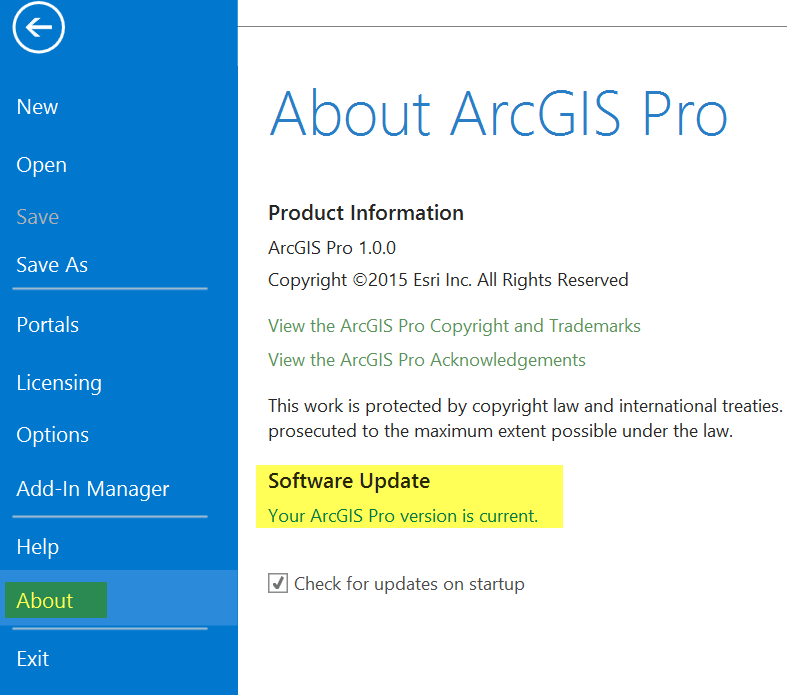
Update: <\/SPAN><\/SPAN><\/SPAN>you no longer need to sign in to ArcGIS Online to receive an ArcGIS Pro update notification. <\/SPAN><\/SPAN>However, you must sign in to ArcGIS Online to download and install the update.<\/SPAN><\/SPAN><\/EM><\/STRONG><\/P>When a new ArcGIS Pro software update is available, here is how to apply it.<\/SPAN><\/SPAN><\/P>If you have already installed ArcGIS Pro and kept the default option to receive notifications when an update is available, you will see a notification when you start ArcGIS Pro (you must sign in to ArcGIS Online to see the update notification). <\/SPAN><\/SPAN>You can click Download Now to start the software update process or close the message box to dismiss the notification.<\/SPAN><\/SPAN><\/P><\/P>If you unchecked the box for ArcGIS Pro to check for updates at startup, or if you are in the middle of a session and want to check if software updates are available, you can click the Project tab and click About. <\/SPAN><\/SPAN>If updates are available, you can run the update process (in the image below, there are no software updates waiting to be installed).<\/SPAN><\/SPAN><\/P><\/P>Note that in any case, you decide whether you want to install an ArcGIS Pro software update. <\/SPAN><\/SPAN>An update is never installed automatically.<\/SPAN><\/SPAN><\/P>A couple of things to keep in mind:<\/SPAN><\/SPAN><\/P>To install the software update, your ArcGIS Pro license must be registered (not offline).<\/SPAN><\/SPAN><\/LI>If your ArcGIS Pro license is installed and managed through Portal for ArcGIS, your portal administrator must download and install the ArcGIS Pro software update for your organization.<\/SPAN><\/SPAN><\/LI><\/UL><\/DIV><\/DIV><\/BODY><\/HTML>
Signed in members can post, follow updates, and more. New here? Register a free account.
Find useful guides, FAQs, and documents to help you navigate and make the most of Esri Community.