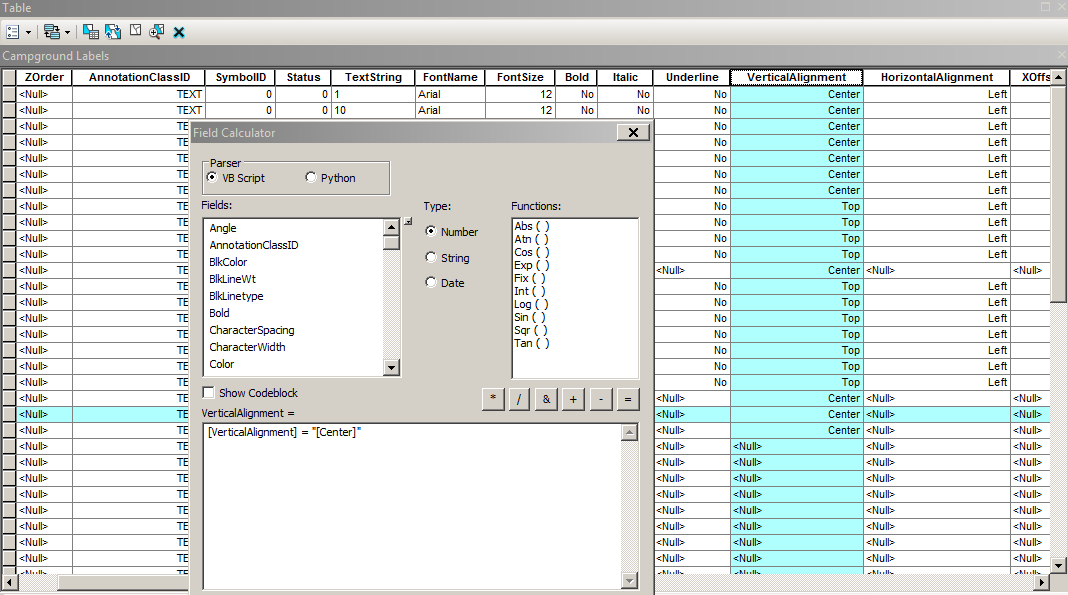
Hi,
I am trying to calculate this annotation table I have here and wanted to change the vertical Alignment from top to Center ? Is there a way around for me to fix this or some kind of special requirement since it is an annotation in geodatabase ? I tried and it would not change to center.
How do I do that ?
Thanks !
first, query or select all the "top" that you want to be changed and then enter "center" as the expression. the field you are calculating can't contain itself in the expression...if you want it to say "center" just enter that as the expression
I tried and I am getting errors that it would not process it. What might I go wrong here...
The Vertical Alignment has drop down that you can select top, center, and so on...
If this isn't being done in the field calculator, then use the selection from the dropdown
If you're in an edit session and have the records selected, you can use the 'attribute window' to change all the selected records at once using the drop down domains...if you're having issues with field calculator.
Have you tried the values of the Domain for those alignment tokens?
Example:
Horizontal Vertical
0 - Left 0 - Top
1 - Center 1 - Center
2 - Right 2 - Baseline
3 - Full 3 - Bottom
Updating your selected values for the alignment column in question to a 1 (which 'center' represents)
By the way, your syntax in the picture of your field calculator is not correct. That might be your true issue. You need to remove the [VerticalAlignment]=, and you do not use brackets on the word center. Just use the domains as Ted mentioned below. Right click the vertical alignment field, choose field calculator, and just enter the number 1 in the box. No quotes, brackets, etc.
Signed in members can post, follow updates, and more. New here? Register a free account.
Find useful guides, FAQs, and documents to help you navigate and make the most of Esri Community.