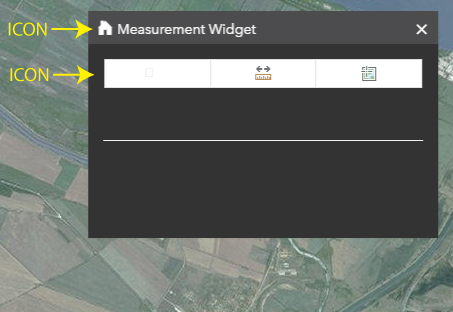
Is there a way to replace the Measurement Widget icons with these beautiful ESRI icons ?
I managed to insert a ESRI icon in my ESRI Calcite Maps panel, but inside the Measurement widget the ESRI icon is not recognized:
#dijit_form_ToggleButton_0<SPAN class="punctuation token">:</SPAN>before <SPAN class="punctuation token">{</SPAN>
content<SPAN class="punctuation token">:</SPAN> <SPAN class="string token">"\e600"</SPAN><SPAN class="punctuation token">;</SPAN>
<SPAN class="punctuation token">}</SPAN>
<SPAN class="punctuation token">.</SPAN>calcite <SPAN class="punctuation token">.</SPAN>esriMeasurement <SPAN class="punctuation token">.</SPAN>areaIcon <SPAN class="punctuation token">{</SPAN>
visibility<SPAN class="punctuation token">:</SPAN> hidden<SPAN class="punctuation token">;</SPAN>
<SPAN class="punctuation token">}</SPAN><SPAN class="line-numbers-rows"><SPAN></SPAN><SPAN></SPAN><SPAN></SPAN><SPAN></SPAN><SPAN></SPAN><SPAN></SPAN></SPAN>My project is available on JS Bin.
Thank you,
Michelle.



