Using ArcMap 10.5.1 and Python 2.7, I have a script that finds a text box in map layout of an MXD(s) by two key words "PRINT DATE" and changes the text to new text. I believe the script is doing what I want it to and it runs with no error. However, the resulting text in the text box is illegible.
Script:
<SPAN class="keyword token">import</SPAN> arcpy<SPAN class="punctuation token">,</SPAN> os
<SPAN class="keyword token">from</SPAN> arcpy <SPAN class="keyword token">import</SPAN> env
arcpy<SPAN class="punctuation token">.</SPAN>env<SPAN class="punctuation token">.</SPAN>workspace <SPAN class="operator token">=</SPAN> ws <SPAN class="operator token">=</SPAN> r<SPAN class="string token">"path\to\TestFolder"</SPAN>
<SPAN class="comment token"># format new text</SPAN>
txtBlock <SPAN class="operator token">=</SPAN> <SPAN class="punctuation token">[</SPAN>
<SPAN class="string token">'Prepared by the Will County GIS Division'</SPAN><SPAN class="punctuation token">,</SPAN>
<SPAN class="string token">'302 N Chicago St. Joliet, Il 60432'</SPAN><SPAN class="punctuation token">,</SPAN>
<SPAN class="string token"><SPAN>'T:(815) 774-6343, E:</SPAN><A class="jive-link-email-small" href="mailto:gis@willcountyillinois.com" rel="nofollow noopener noreferrer" target="_blank">gis@willcountyillinois.com</A><SPAN>'</SPAN></SPAN><SPAN class="punctuation token">,</SPAN>
<SPAN class="string token">'Print date: <dyn type=\"date\" format=\"\"/>'</SPAN>
<SPAN class="punctuation token">]</SPAN>
<SPAN class="comment token"># create variable that joins lines together with new line character</SPAN>
newTxt <SPAN class="operator token">=</SPAN> <SPAN class="string token">"\n"</SPAN><SPAN class="punctuation token">.</SPAN>join<SPAN class="punctuation token">(</SPAN>txtBlock<SPAN class="punctuation token">)</SPAN>
<SPAN class="comment token"># list the mxds of the workspace folder</SPAN>
<SPAN class="keyword token">for</SPAN> mxdname <SPAN class="keyword token">in</SPAN> arcpy<SPAN class="punctuation token">.</SPAN>ListFiles<SPAN class="punctuation token">(</SPAN><SPAN class="string token">"*.mxd"</SPAN><SPAN class="punctuation token">)</SPAN><SPAN class="punctuation token">:</SPAN>
<SPAN class="keyword token">print</SPAN> <SPAN class="string token">"checking document: {}"</SPAN><SPAN class="punctuation token">.</SPAN>format<SPAN class="punctuation token">(</SPAN>mxdname<SPAN class="punctuation token">)</SPAN>
mxd <SPAN class="operator token">=</SPAN> arcpy<SPAN class="punctuation token">.</SPAN>mapping<SPAN class="punctuation token">.</SPAN>MapDocument<SPAN class="punctuation token">(</SPAN>ws <SPAN class="operator token">+</SPAN> <SPAN class="string token">"\\"</SPAN> <SPAN class="operator token">+</SPAN> mxdname<SPAN class="punctuation token">)</SPAN>
<SPAN class="comment token"># find textbox by keywords and give it the new text</SPAN>
<SPAN class="keyword token">for</SPAN> elm <SPAN class="keyword token">in</SPAN> arcpy<SPAN class="punctuation token">.</SPAN>mapping<SPAN class="punctuation token">.</SPAN>ListLayoutElements<SPAN class="punctuation token">(</SPAN>mxd<SPAN class="punctuation token">,</SPAN> <SPAN class="string token">"TEXT_ELEMENT"</SPAN><SPAN class="punctuation token">)</SPAN><SPAN class="punctuation token">:</SPAN>
<SPAN class="keyword token">if</SPAN> <SPAN class="string token">"PRINT DATE"</SPAN> <SPAN class="keyword token">in</SPAN> elm<SPAN class="punctuation token">.</SPAN>text<SPAN class="punctuation token">.</SPAN>upper<SPAN class="punctuation token">(</SPAN><SPAN class="punctuation token">)</SPAN><SPAN class="punctuation token">:</SPAN>
elm<SPAN class="punctuation token">.</SPAN>text <SPAN class="operator token">=</SPAN> newTxt<SPAN class="line-numbers-rows"><SPAN></SPAN><SPAN></SPAN><SPAN></SPAN><SPAN></SPAN><SPAN></SPAN><SPAN></SPAN><SPAN></SPAN><SPAN></SPAN><SPAN></SPAN><SPAN></SPAN><SPAN></SPAN><SPAN></SPAN><SPAN></SPAN><SPAN></SPAN><SPAN></SPAN><SPAN></SPAN><SPAN></SPAN><SPAN></SPAN><SPAN></SPAN><SPAN></SPAN><SPAN></SPAN><SPAN></SPAN><SPAN></SPAN><SPAN></SPAN><SPAN></SPAN></SPAN>
Text box before:
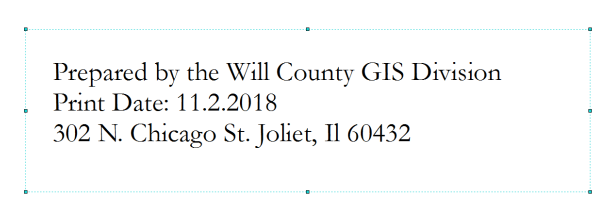
and after:
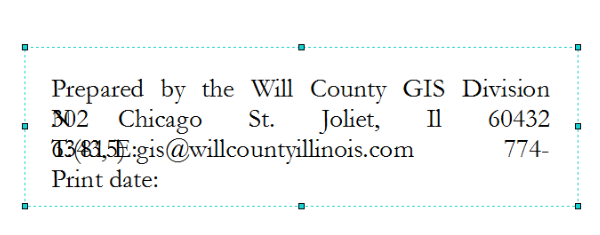
The following trouble shoots were suggested on my previous post: find text element in MXD with wildcard?
1. I printed out the context of the text box before it was replaced and after using the repr() class:
<SPAN class="keyword token">for</SPAN> elm <SPAN class="keyword token">in</SPAN> arcpy<SPAN class="punctuation token">.</SPAN>mapping<SPAN class="punctuation token">.</SPAN>ListLayoutElements<SPAN class="punctuation token">(</SPAN>mxd<SPAN class="punctuation token">,</SPAN> <SPAN class="string token">"TEXT_ELEMENT"</SPAN><SPAN class="punctuation token">)</SPAN><SPAN class="punctuation token">:</SPAN>
<SPAN class="keyword token">if</SPAN> <SPAN class="string token">"PRINT DATE"</SPAN> <SPAN class="keyword token">in</SPAN> elm<SPAN class="punctuation token">.</SPAN>text<SPAN class="punctuation token">.</SPAN>upper<SPAN class="punctuation token">(</SPAN><SPAN class="punctuation token">)</SPAN><SPAN class="punctuation token">:</SPAN>
<SPAN class="keyword token">print</SPAN> str<SPAN class="punctuation token">(</SPAN>elm<SPAN class="punctuation token">.</SPAN>text<SPAN class="punctuation token">)</SPAN> <SPAN class="operator token">+</SPAN> <SPAN class="string token">"\n"</SPAN>
<SPAN class="keyword token">print</SPAN> <SPAN class="string token">"++++++++++++++below is repr+++++++++++++++++++++"</SPAN>
elm<SPAN class="punctuation token">.</SPAN>text <SPAN class="operator token">=</SPAN> newTxt
<SPAN class="keyword token">print</SPAN> repr<SPAN class="punctuation token">(</SPAN>elm<SPAN class="punctuation token">.</SPAN>text<SPAN class="punctuation token">)</SPAN><SPAN class="line-numbers-rows"><SPAN></SPAN><SPAN></SPAN><SPAN></SPAN><SPAN></SPAN><SPAN></SPAN><SPAN></SPAN></SPAN>
Print out:
Prepared by the Will County GIS Division
Print Date: 11.2.2018
302 N. Chicago St. Joliet, Il 60432
++++++++++++++below is repr+++++++++++++++++++++
u'Prepared by the Will County GIS Division\n302 N Chicago St. Joliet, Il 60432\nT:(815) 774-6343, E:gis@willcountyillinois.com\nPrint date: <dyn type="date" format=""/>'<SPAN class="line-numbers-rows"><SPAN></SPAN><SPAN></SPAN><SPAN></SPAN><SPAN></SPAN><SPAN></SPAN><SPAN></SPAN></SPAN>
2. I ran the MXD through the MXD Doctor and Documet Defragmenter. There was no corrupted element and running the script on a defragmented copy of the MXD made no difference.
3. There were no changes to the font, font size or centering in the Properties of the text box from old to new. As in, the Properties weren't affected.
5. I gave the text box element a name, 'PrintDate'. This didn't seem to have any effect as using the "PRINT DATE" keywords were enough.
<SPAN class="keyword token">for</SPAN> elm <SPAN class="keyword token">in</SPAN> arcpy<SPAN class="punctuation token">.</SPAN>mapping<SPAN class="punctuation token">.</SPAN>ListLayoutElements<SPAN class="punctuation token">(</SPAN>mxd<SPAN class="punctuation token">,</SPAN> <SPAN class="string token">"TEXT_ELEMENT"</SPAN><SPAN class="punctuation token">)</SPAN><SPAN class="punctuation token">:</SPAN>
<SPAN class="keyword token">if</SPAN> <SPAN class="string token">"PRINT DATE"</SPAN> <SPAN class="keyword token">in</SPAN> elm<SPAN class="punctuation token">.</SPAN>text<SPAN class="punctuation token">.</SPAN>upper<SPAN class="punctuation token">(</SPAN><SPAN class="punctuation token">)</SPAN><SPAN class="punctuation token">:</SPAN>
elm<SPAN class="punctuation token">.</SPAN>name <SPAN class="operator token">==</SPAN> <SPAN class="string token">'PrintDate'</SPAN><SPAN class="line-numbers-rows"><SPAN></SPAN><SPAN></SPAN><SPAN></SPAN></SPAN>
6. I know the script works. I tested the script on a new MXD with similar text in a text box. The script ran fine and the resulting new text was displayed correctly! I also had a second text box in the MXD that had the word "date" among the text . I ran the script once with only "DATE" as a key word and it found both text boxes. It knowingly changed both. The odd thing was that while the one I'm after came out illegible again, the second text box was displayed correctly!
I'm wondering if anyone has seen this behaviour before?


