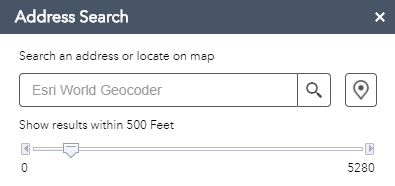
I have succeeded in hiding the set location hover icon on the map ( ) but then the set location icon appears on NearMe widget tool bar which users can click . How can I comment out the code to hide/remove the set location icon from the map so that users cannot find it.
Thanks Simon.
Simon,
In the Widget.js file comment out the contents of the _connectMapEventHandler function.
_connectMapEventHandler<SPAN class="punctuation token">:</SPAN> <SPAN class="keyword token">function</SPAN> <SPAN class="punctuation token">(</SPAN><SPAN class="punctuation token">)</SPAN> <SPAN class="punctuation token">{</SPAN> <SPAN class="comment token">// if (!this._mapClickHandler) {</SPAN> <SPAN class="comment token">// this._disableWebMapPopup();</SPAN> <SPAN class="comment token">// //handle map click</SPAN> <SPAN class="comment token">// this._mapClickHandler = this.own(this.map.on("click", lang.hitch(this,</SPAN> <SPAN class="comment token">// this._onMapClick)))[0];</SPAN> <SPAN class="comment token">// //handle mouse move on map to show tooltip only on non-touch devices</SPAN> <SPAN class="comment token">// if ("ontouchstart" in document.documentElement) {</SPAN> <SPAN class="comment token">// domStyle.set(this._mapTooltip, "display", "none");</SPAN> <SPAN class="comment token">// } else {</SPAN> <SPAN class="comment token">// this._mapMoveHandler = this.own(this.map.on("mouse-move", lang.hitch(</SPAN> <SPAN class="comment token">// this, this._onMapMouseMove)))[0];</SPAN> <SPAN class="comment token">// this.own(this.map.on("mouse-out", lang.hitch(this, function () {</SPAN> <SPAN class="comment token">// domStyle.set(this._mapTooltip, "display", "none");</SPAN> <SPAN class="comment token">// })));</SPAN> <SPAN class="comment token">// }</SPAN> <SPAN class="comment token">// }</SPAN> <SPAN class="punctuation token">}</SPAN><SPAN class="punctuation token">,</SPAN><SPAN class="line-numbers-rows"><SPAN></SPAN><SPAN></SPAN><SPAN></SPAN><SPAN></SPAN><SPAN></SPAN><SPAN></SPAN><SPAN></SPAN><SPAN></SPAN><SPAN></SPAN><SPAN></SPAN><SPAN></SPAN><SPAN></SPAN><SPAN></SPAN><SPAN></SPAN><SPAN></SPAN><SPAN></SPAN><SPAN></SPAN><SPAN></SPAN></SPAN>
Just un-check the "Set location button" in the widgets settings > search settings tab.
Hello Robert, thanks for the prompt reply. I had tried this before, it worked but then presented a new challenge/issue. When the ‘set location button’ is turned off, you don’t see this icon on the NearMe widget which is what I need but users are able to hover over map using the ‘set location’[cid:image003.png@01D55429.E5615050] . To summarize it all, by default, the set location button is turn off, users can hover over map and use the set location ( I do not want users to be able set location on the map). When the ‘set location’ is turned on, users cannot hover over the map and set location (what I want), but then the set location icon appears on the NearMe widget which then allow users to click and set location (I do not want this either).
Thanks,
Simon.
Thanks Robert, It worked as expected.
Signed in members can post, follow updates, and more. New here? Register a free account.
Find useful guides, FAQs, and documents to help you navigate and make the most of Esri Community.