Hi,
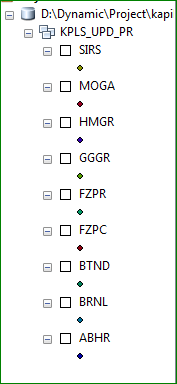
I have 200 cities data in different feature class in one FGDB. My problem is i want to export data according to cities in different different folder and GDB in modal builder. so please tell me how to do this. Thanks in advance
Input is show below...
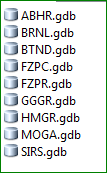
Output that i Want
I'm struggling to understand your question, are you wanting to give the gdb a name other than the name of the feature class? If so, what naming convention?
i have one question to give parameter on above modal.
which parameter are useful to use other user. because gdb name are not same in other data.so what we do to give parameter.
Curtis on the far right side I noted the precondition you may have to scroll to see it(see above). Thanks
Thanks for help
Curtis Price is correct see below.
tnx
But its create Only gdb. its not transfor data that we have.
Thanks Curtis Price for help me
But copy feature tool are not work. so tell me how to use this tool in model builder & which function are used in copy feature tool.
Thanks in advance
Wes, I think the model you set up needs one more step, a Copy Features tool to copy the input points to the newly created feature class.
Just for fun I tested tested Chris Donohue, GISP suggestiion your model would look similar to the one in the graphic below. You will not need an in-line variable the iterate Feature tool output is available for use in the name for create File Geodatabase tool.
Moved to Managing Data
since this is not Education specific
In Modelbuilder one way to do this would be to use an Iterator to loop through the Feature Dataset, then have a function to create a new geodatabase as it loops each time. The name could be transferred across from the iteration to your new geodatabases through the use of a in-line variable substitution.
Iterator examples
ArcGIS Desktop
In-line variable substitution
ArcGIS Help (10.2, 10.2.1, and 10.2.2)
Chris Donohue, GISP
Signed in members can post, follow updates, and more. New here? Register a free account.
Find useful guides, FAQs, and documents to help you navigate and make the most of Esri Community.