I am working on a story map journal and after several posts on here as well as some HTML5 and bootstrap courses I have been able to dive in and be somewhat successful in the coding world....
I created a bootstrap grid that goes from 4 columns on a large screen to 1 on mobile that consisted of project types that one could click on and a main stage action would display the desired project. I decided that it would be nice if each project text was paired with an image icon. I went back, found some code and pushed it up on my server. While the images are there, along with the caption, each image has expand arrows on them. See below
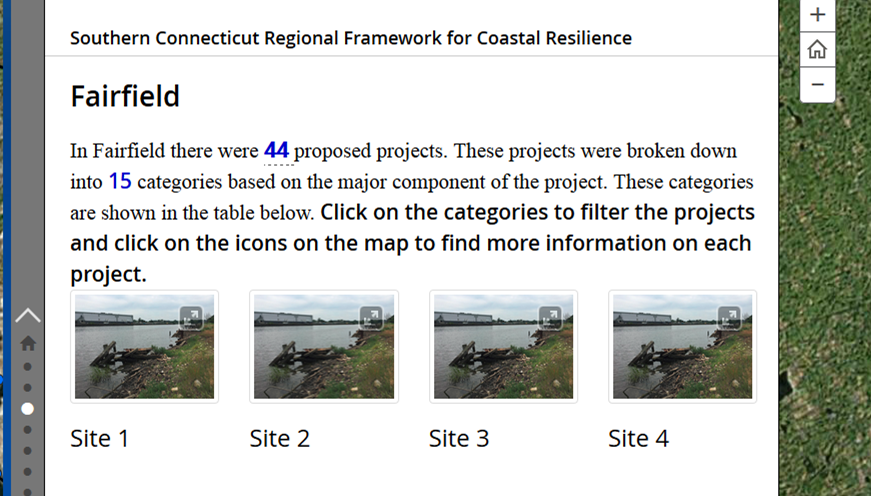
I am not sure where these arrows are coming from. The example code I found on-line did not have them and when i put the code in an editor like w3 school the arrows are not there. Below is my code for this page.
<div class="row">
<div class="col-sm-6 col-md-3">
<div class="thumbnail"><img alt="Generic placeholder thumbnail" src="http://s3.amazonaws.com/nfwf-photos/medium/232.jpg" /></div>
<div class="caption">
<h3>Site 1</h3>
</div>
</div>
<div class="col-sm-6 col-md-3">
<div class="thumbnail"><img alt="Generic placeholder thumbnail" src="http://s3.amazonaws.com/nfwf-photos/medium/232.jpg" /></div>
<div class="caption">
<h3>Site 2</h3>
</div>
</div>
<div class="col-sm-6 col-md-3">
<div class="thumbnail"><img alt="Generic placeholder thumbnail" src="http://s3.amazonaws.com/nfwf-photos/medium/232.jpg" /></div>
<div class="caption">
<h3>Site 3</h3>
</div>
</div>
<div class="col-sm-6 col-md-3">
<div class="thumbnail"><img alt="Generic placeholder thumbnail" src="http://s3.amazonaws.com/nfwf-photos/medium/232.jpg" /></div>
<div class="caption">
<h3>Site 4</h3>
</div>
</div>
</div>
Unfortunately I am unable to make this story map public at this time. Any advice would be greatly appreciated.
Thank You
