Hello:
I have this service:
Query: Parcels (ID: 0)
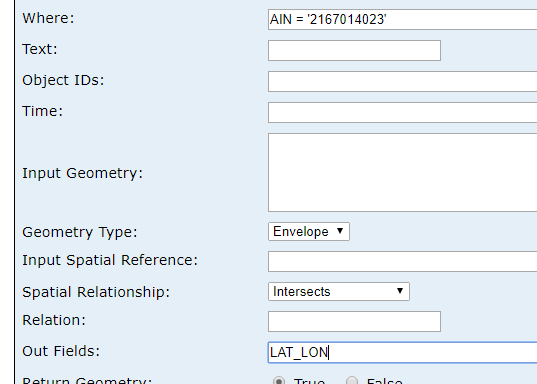
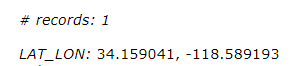
I want to get the coordinates where AIN or APN is specified and send that to a google map page I have that is locally hosted. The user will enter the AIN or APN on another site I also locally host which will then be sent to the google map page.
A query example:
How do I make a call for this in the script where the user enter the AIN or APN and then send the lat/long to the google map script using the ArcGIS JS API?
ArcGIS REST API
ArcGIS Server with JavaScript API
You could try changing this part
<SPAN class="punctuation token">.</SPAN><SPAN class="token function">then</SPAN><SPAN class="punctuation token">(</SPAN><SPAN class="punctuation token">(</SPAN>results<SPAN class="punctuation token">)</SPAN> <SPAN class="operator token">=</SPAN><SPAN class="operator token">></SPAN> <SPAN class="punctuation token">{</SPAN> <SPAN class="keyword token">const</SPAN> latlon <SPAN class="operator token">=</SPAN> results<SPAN class="punctuation token">.</SPAN>features<SPAN class="punctuation token">[</SPAN><SPAN class="number token">0</SPAN><SPAN class="punctuation token">]</SPAN><SPAN class="punctuation token">.</SPAN>attributes<SPAN class="punctuation token">.</SPAN>LAT_LON<SPAN class="punctuation token">;</SPAN> console<SPAN class="punctuation token">.</SPAN><SPAN class="token function">log</SPAN><SPAN class="punctuation token">(</SPAN><SPAN class="string token">'results: '</SPAN><SPAN class="punctuation token">,</SPAN> latlon<SPAN class="punctuation token">)</SPAN><SPAN class="punctuation token">;</SPAN> resultNode<SPAN class="punctuation token">.</SPAN>innerHTML <SPAN class="operator token">=</SPAN> latlon <SPAN class="keyword token">const</SPAN> gmaps <SPAN class="operator token">=</SPAN> <SPAN class="string token">'https://www.google.com/maps/search/?api=1&query='</SPAN> <SPAN class="operator token">+</SPAN> latlon<SPAN class="punctuation token">;</SPAN> window<SPAN class="punctuation token">.</SPAN><SPAN class="token function">open</SPAN><SPAN class="punctuation token">(</SPAN>gmaps<SPAN class="punctuation token">,</SPAN> <SPAN class="string token">'_blank'</SPAN><SPAN class="punctuation token">)</SPAN><SPAN class="punctuation token">;</SPAN> <SPAN class="punctuation token">}</SPAN><SPAN class="punctuation token">)</SPAN><SPAN class="line-numbers-rows"><SPAN></SPAN><SPAN></SPAN><SPAN></SPAN><SPAN></SPAN><SPAN></SPAN><SPAN></SPAN><SPAN></SPAN><SPAN></SPAN></SPAN>
to
<SPAN class="punctuation token">.</SPAN><SPAN class="token function">then</SPAN><SPAN class="punctuation token">(</SPAN><SPAN class="punctuation token">(</SPAN>results<SPAN class="punctuation token">)</SPAN> <SPAN class="operator token">=</SPAN><SPAN class="operator token">></SPAN> <SPAN class="punctuation token">{</SPAN> <SPAN class="keyword token">const</SPAN> latlon <SPAN class="operator token">=</SPAN> results<SPAN class="punctuation token">.</SPAN>features<SPAN class="punctuation token">[</SPAN><SPAN class="number token">0</SPAN><SPAN class="punctuation token">]</SPAN><SPAN class="punctuation token">.</SPAN>attributes<SPAN class="punctuation token">.</SPAN>LAT_LON<SPAN class="punctuation token">;</SPAN> <SPAN class="keyword token">const</SPAN> arr <SPAN class="operator token">=</SPAN> latlon<SPAN class="punctuation token">.</SPAN><SPAN class="token function">split</SPAN><SPAN class="punctuation token">(</SPAN><SPAN class="string token">','</SPAN><SPAN class="punctuation token">)</SPAN><SPAN class="punctuation token">;</SPAN> <SPAN class="keyword token">const</SPAN> y <SPAN class="operator token">=</SPAN> Double<SPAN class="punctuation token">.</SPAN><SPAN class="token function">parseDouble</SPAN><SPAN class="punctuation token">(</SPAN>arr<SPAN class="punctuation token">[</SPAN><SPAN class="number token">0</SPAN><SPAN class="punctuation token">]</SPAN><SPAN class="punctuation token">)</SPAN><SPAN class="punctuation token">;</SPAN> <SPAN class="keyword token">const</SPAN> x <SPAN class="operator token">=</SPAN> Double<SPAN class="punctuation token">.</SPAN><SPAN class="token function">parseDouble</SPAN><SPAN class="punctuation token">(</SPAN>arr<SPAN class="punctuation token">[</SPAN><SPAN class="number token">1</SPAN><SPAN class="punctuation token">]</SPAN><SPAN class="punctuation token">)</SPAN><SPAN class="punctuation token">;</SPAN> map<SPAN class="punctuation token">.</SPAN><SPAN class="token function">setCenter</SPAN><SPAN class="punctuation token">(</SPAN><SPAN class="punctuation token">{</SPAN>lat<SPAN class="punctuation token">:</SPAN> x<SPAN class="punctuation token">,</SPAN> lng<SPAN class="punctuation token">:</SPAN> y<SPAN class="punctuation token">}</SPAN><SPAN class="punctuation token">)</SPAN> <SPAN class="punctuation token">}</SPAN><SPAN class="punctuation token">)</SPAN><SPAN class="line-numbers-rows"><SPAN></SPAN><SPAN></SPAN><SPAN></SPAN><SPAN></SPAN><SPAN></SPAN><SPAN></SPAN><SPAN></SPAN></SPAN>
The 'sendReq()' function I created could be integrated into the button you already have. You could define the url inside of the button function using the ain from the text input like you said above.
Edit: I just saw that the google maps script is separate. In that case you would need to do a post. It may be easier to integrate the two apps if they will be communicating with each other often.
Hi Brandon,
You can use query task and query the features.
Below is the example and reference
https://developers.arcgis.com/javascript/3/jsapi/querytask-amd.html
https://developers.arcgis.com/javascript/3/jssamples/query_nomap.html
And based on the result, you can make the google map url, and open it with
window.open('[your new url]', '_blank');
This is how you create google map url
https://www.google.com/maps/search/?api=1&query=58.698017,-152.522067
Here is a working example using the rest api
<SPAN class="operator token"><</SPAN><SPAN class="operator token">!</SPAN>DOCTYPE html<SPAN class="operator token">></SPAN> <SPAN class="operator token"><</SPAN>html<SPAN class="operator token">></SPAN> <SPAN class="operator token"><</SPAN>head<SPAN class="operator token">></SPAN> <SPAN class="operator token"><</SPAN>meta charset<SPAN class="operator token">=</SPAN><SPAN class="string token">"utf-8"</SPAN> <SPAN class="operator token">/</SPAN><SPAN class="operator token">></SPAN> <SPAN class="operator token"><</SPAN>meta name<SPAN class="operator token">=</SPAN><SPAN class="string token">"viewport"</SPAN> content<SPAN class="operator token">=</SPAN><SPAN class="string token">"initial-scale=1,maximum-scale=1,user-scalable=no"</SPAN> <SPAN class="operator token">/</SPAN><SPAN class="operator token">></SPAN> <SPAN class="operator token"><</SPAN>title<SPAN class="operator token">></SPAN>AIN to Google Maps<SPAN class="operator token"><</SPAN><SPAN class="operator token">/</SPAN>title<SPAN class="operator token">></SPAN> <SPAN class="operator token"><</SPAN>h1<SPAN class="operator token">></SPAN>AIN to Google Maps<SPAN class="operator token"><</SPAN><SPAN class="operator token">/</SPAN>h1<SPAN class="operator token">></SPAN> <SPAN class="operator token"><</SPAN>button id<SPAN class="operator token">=</SPAN>requestButton<SPAN class="operator token">></SPAN>Request<SPAN class="operator token"><</SPAN><SPAN class="operator token">/</SPAN>button<SPAN class="operator token">></SPAN> <SPAN class="operator token"><</SPAN>div id<SPAN class="operator token">=</SPAN><SPAN class="string token">"result"</SPAN><SPAN class="operator token">></SPAN><SPAN class="operator token"><</SPAN><SPAN class="operator token">/</SPAN>div<SPAN class="operator token">></SPAN> <SPAN class="operator token"><</SPAN>script<SPAN class="operator token">></SPAN> <SPAN class="keyword token">const</SPAN> ain <SPAN class="operator token">=</SPAN> <SPAN class="number token">272079004031</SPAN><SPAN class="punctuation token">;</SPAN> <SPAN class="comment token">// you can change the AIN here</SPAN> <SPAN class="keyword token">let</SPAN> url <SPAN class="operator token">=</SPAN> <SPAN class="string token">"http://cache.gis.lacounty.gov/cache/rest/services/LACounty_Cache/LACounty_Parcel/MapServer/0/query?where=AIN+%3D+%"</SPAN> <SPAN class="operator token">+</SPAN> ain <SPAN class="operator token">+</SPAN> <SPAN class="string token">"%27&t&outFields=LAT_LON&f=pjson"</SPAN><SPAN class="punctuation token">;</SPAN> <SPAN class="keyword token">const</SPAN> button <SPAN class="operator token">=</SPAN> document<SPAN class="punctuation token">.</SPAN><SPAN class="token function">getElementById</SPAN><SPAN class="punctuation token">(</SPAN><SPAN class="string token">"requestButton"</SPAN><SPAN class="punctuation token">)</SPAN><SPAN class="punctuation token">;</SPAN> button<SPAN class="punctuation token">.</SPAN>onclick <SPAN class="operator token">=</SPAN> <SPAN class="keyword token">function</SPAN> <SPAN class="punctuation token">(</SPAN><SPAN class="punctuation token">)</SPAN> <SPAN class="punctuation token">{</SPAN> <SPAN class="token function">sendReq</SPAN><SPAN class="punctuation token">(</SPAN><SPAN class="punctuation token">)</SPAN> <SPAN class="punctuation token">}</SPAN><SPAN class="punctuation token">;</SPAN> <SPAN class="keyword token">let</SPAN> resultNode <SPAN class="operator token">=</SPAN> document<SPAN class="punctuation token">.</SPAN><SPAN class="token function">getElementById</SPAN><SPAN class="punctuation token">(</SPAN><SPAN class="string token">"result"</SPAN><SPAN class="punctuation token">)</SPAN><SPAN class="punctuation token">;</SPAN> <SPAN class="keyword token">function</SPAN> <SPAN class="token function">sendReq</SPAN><SPAN class="punctuation token">(</SPAN><SPAN class="punctuation token">)</SPAN> <SPAN class="punctuation token">{</SPAN> <SPAN class="token function">fetch</SPAN><SPAN class="punctuation token">(</SPAN>url<SPAN class="punctuation token">,</SPAN> <SPAN class="punctuation token">{</SPAN> method<SPAN class="punctuation token">:</SPAN> <SPAN class="string token">"GET"</SPAN> <SPAN class="punctuation token">}</SPAN><SPAN class="punctuation token">)</SPAN> <SPAN class="punctuation token">.</SPAN><SPAN class="token function">then</SPAN><SPAN class="punctuation token">(</SPAN><SPAN class="punctuation token">(</SPAN>response<SPAN class="punctuation token">)</SPAN> <SPAN class="operator token">=</SPAN><SPAN class="operator token">></SPAN> <SPAN class="punctuation token">{</SPAN> <SPAN class="keyword token">if</SPAN> <SPAN class="punctuation token">(</SPAN>response<SPAN class="punctuation token">.</SPAN>status <SPAN class="operator token">===</SPAN> <SPAN class="number token">200</SPAN><SPAN class="punctuation token">)</SPAN> <SPAN class="punctuation token">{</SPAN> console<SPAN class="punctuation token">.</SPAN><SPAN class="token function">log</SPAN><SPAN class="punctuation token">(</SPAN><SPAN class="string token">"200 ok"</SPAN><SPAN class="punctuation token">)</SPAN><SPAN class="punctuation token">;</SPAN> <SPAN class="keyword token">return</SPAN> response<SPAN class="punctuation token">.</SPAN><SPAN class="token function">json</SPAN><SPAN class="punctuation token">(</SPAN><SPAN class="punctuation token">)</SPAN><SPAN class="punctuation token">;</SPAN> <SPAN class="punctuation token">}</SPAN> <SPAN class="punctuation token">}</SPAN><SPAN class="punctuation token">)</SPAN> <SPAN class="punctuation token">.</SPAN><SPAN class="token function">then</SPAN><SPAN class="punctuation token">(</SPAN><SPAN class="punctuation token">(</SPAN>results<SPAN class="punctuation token">)</SPAN> <SPAN class="operator token">=</SPAN><SPAN class="operator token">></SPAN> <SPAN class="punctuation token">{</SPAN> <SPAN class="keyword token">const</SPAN> latlon <SPAN class="operator token">=</SPAN> results<SPAN class="punctuation token">.</SPAN>features<SPAN class="punctuation token">[</SPAN><SPAN class="number token">0</SPAN><SPAN class="punctuation token">]</SPAN><SPAN class="punctuation token">.</SPAN>attributes<SPAN class="punctuation token">.</SPAN>LAT_LON<SPAN class="punctuation token">;</SPAN> console<SPAN class="punctuation token">.</SPAN><SPAN class="token function">log</SPAN><SPAN class="punctuation token">(</SPAN><SPAN class="string token">'results: '</SPAN><SPAN class="punctuation token">,</SPAN> latlon<SPAN class="punctuation token">)</SPAN><SPAN class="punctuation token">;</SPAN> resultNode<SPAN class="punctuation token">.</SPAN>innerHTML <SPAN class="operator token">=</SPAN> latlon <SPAN class="keyword token">const</SPAN> gmaps <SPAN class="operator token">=</SPAN> <SPAN class="string token">'https://www.google.com/maps/search/?api=1&query='</SPAN> <SPAN class="operator token">+</SPAN> latlon<SPAN class="punctuation token">;</SPAN> window<SPAN class="punctuation token">.</SPAN><SPAN class="token function">open</SPAN><SPAN class="punctuation token">(</SPAN>gmaps<SPAN class="punctuation token">,</SPAN> <SPAN class="string token">'_blank'</SPAN><SPAN class="punctuation token">)</SPAN><SPAN class="punctuation token">;</SPAN> <SPAN class="punctuation token">}</SPAN><SPAN class="punctuation token">)</SPAN> <SPAN class="punctuation token">.</SPAN><SPAN class="keyword token">catch</SPAN><SPAN class="punctuation token">(</SPAN><SPAN class="punctuation token">(</SPAN>err<SPAN class="punctuation token">)</SPAN> <SPAN class="operator token">=</SPAN><SPAN class="operator token">></SPAN> <SPAN class="punctuation token">{</SPAN> console<SPAN class="punctuation token">.</SPAN><SPAN class="token function">log</SPAN><SPAN class="punctuation token">(</SPAN><SPAN class="string token">"failed with: "</SPAN><SPAN class="punctuation token">,</SPAN> err<SPAN class="punctuation token">)</SPAN><SPAN class="punctuation token">;</SPAN> <SPAN class="punctuation token">}</SPAN><SPAN class="punctuation token">)</SPAN><SPAN class="punctuation token">;</SPAN> <SPAN class="punctuation token">}</SPAN> <SPAN class="operator token"><</SPAN><SPAN class="operator token">/</SPAN>script<SPAN class="operator token">></SPAN> <SPAN class="operator token"><</SPAN><SPAN class="operator token">/</SPAN>head<SPAN class="operator token">></SPAN> <SPAN class="operator token"><</SPAN>body<SPAN class="operator token">></SPAN> <SPAN class="operator token"><</SPAN><SPAN class="operator token">/</SPAN>body<SPAN class="operator token">></SPAN> <SPAN class="operator token"><</SPAN><SPAN class="operator token">/</SPAN>html<SPAN class="operator token">></SPAN><SPAN class="line-numbers-rows"><SPAN></SPAN><SPAN></SPAN><SPAN></SPAN><SPAN></SPAN><SPAN></SPAN><SPAN></SPAN><SPAN></SPAN><SPAN></SPAN><SPAN></SPAN><SPAN></SPAN><SPAN></SPAN><SPAN></SPAN><SPAN></SPAN><SPAN></SPAN><SPAN></SPAN><SPAN></SPAN><SPAN></SPAN><SPAN></SPAN><SPAN></SPAN><SPAN></SPAN><SPAN></SPAN><SPAN></SPAN><SPAN></SPAN><SPAN></SPAN><SPAN></SPAN><SPAN></SPAN><SPAN></SPAN><SPAN></SPAN><SPAN></SPAN><SPAN></SPAN><SPAN></SPAN><SPAN></SPAN><SPAN></SPAN><SPAN></SPAN><SPAN></SPAN><SPAN></SPAN><SPAN></SPAN><SPAN></SPAN><SPAN></SPAN><SPAN></SPAN><SPAN></SPAN><SPAN></SPAN><SPAN></SPAN><SPAN></SPAN><SPAN></SPAN><SPAN></SPAN><SPAN></SPAN></SPAN>
Thanks Ben. This is awesome. I will have to take a look and see how I can use this with what I am trying to do. Have a good weekend.
Brandon Price
Geographic Information Systems Technician II
Los Angeles County Public Works
(626) 458-7092
bprice@pw.lacounty.gov<mailto:bprice@pw.lacounty.gov>
Your feedback is important to us. We encourage you to complete the
Customer Feedback Form at the following link: http://dpw.lacounty.gov/go/MPMSURVEY
If you have any questions about it implementing it for your use case let me know. I'm happy to help.
I already have a button in place that is running multiple functions from getting the ain value with a text input.
I would like to use something like const ain =$("#text").val(); to get the ain and fetch the lat longs with the url variable you made and send them to a google map script that I am locally hosting directly without adding any lat long results to the inner html. The google map script is very basic.The html and js for it is below. I would need maybe a postmessage to send the lat longs and an event listener to receive them unless there is a better way. I would then have to most likely use the map.setCenter({lat: x, lng: y}); method found in the google map api to re center the map with the coordinates received. The google map is an iframe on the page with the text input that I am trying to update when the user submits an ain value.
<SPAN class="token tag"><SPAN class="token tag"><SPAN class="punctuation token"><</SPAN>div</SPAN> <SPAN class="attr-name token">id</SPAN><SPAN class="attr-value token"><SPAN class="punctuation token">=</SPAN><SPAN class="punctuation token">"</SPAN>floating-panel<SPAN class="punctuation token">"</SPAN></SPAN><SPAN class="punctuation token">></SPAN></SPAN> <SPAN class="token tag"><SPAN class="token tag"><SPAN class="punctuation token"><</SPAN>input</SPAN> <SPAN class="attr-name token">id</SPAN><SPAN class="attr-value token"><SPAN class="punctuation token">=</SPAN><SPAN class="punctuation token">"</SPAN>address<SPAN class="punctuation token">"</SPAN></SPAN> <SPAN class="attr-name token">type</SPAN><SPAN class="attr-value token"><SPAN class="punctuation token">=</SPAN><SPAN class="punctuation token">"</SPAN>textbox<SPAN class="punctuation token">"</SPAN></SPAN> <SPAN class="attr-name token">value</SPAN><SPAN class="attr-value token"><SPAN class="punctuation token">=</SPAN><SPAN class="punctuation token">"</SPAN>900 S Fremont Ave<SPAN class="punctuation token">"</SPAN></SPAN><SPAN class="punctuation token">></SPAN></SPAN> <SPAN class="token tag"><SPAN class="token tag"><SPAN class="punctuation token"><</SPAN>input</SPAN> <SPAN class="attr-name token">id</SPAN><SPAN class="attr-value token"><SPAN class="punctuation token">=</SPAN><SPAN class="punctuation token">"</SPAN>submit<SPAN class="punctuation token">"</SPAN></SPAN> <SPAN class="attr-name token">type</SPAN><SPAN class="attr-value token"><SPAN class="punctuation token">=</SPAN><SPAN class="punctuation token">"</SPAN>button<SPAN class="punctuation token">"</SPAN></SPAN> <SPAN class="attr-name token">value</SPAN><SPAN class="attr-value token"><SPAN class="punctuation token">=</SPAN><SPAN class="punctuation token">"</SPAN>Search<SPAN class="punctuation token">"</SPAN></SPAN><SPAN class="punctuation token">></SPAN></SPAN> <SPAN class="token tag"><SPAN class="token tag"><SPAN class="punctuation token"></</SPAN>div</SPAN><SPAN class="punctuation token">></SPAN></SPAN> <SPAN class="token tag"><SPAN class="token tag"><SPAN class="punctuation token"><</SPAN>div</SPAN> <SPAN class="attr-name token">id</SPAN><SPAN class="attr-value token"><SPAN class="punctuation token">=</SPAN><SPAN class="punctuation token">"</SPAN>map<SPAN class="punctuation token">"</SPAN></SPAN><SPAN class="punctuation token">></SPAN></SPAN><SPAN class="token tag"><SPAN class="token tag"><SPAN class="punctuation token"></</SPAN>div</SPAN><SPAN class="punctuation token">></SPAN></SPAN> <SPAN class="language-javascript script token"><SPAN class="token tag"><SPAN class="token tag"><SPAN class="punctuation token"><</SPAN>script</SPAN><SPAN class="punctuation token">></SPAN></SPAN> <SPAN class="keyword token">function</SPAN> <SPAN class="token function">initMap</SPAN><SPAN class="punctuation token">(</SPAN><SPAN class="punctuation token">)</SPAN> <SPAN class="punctuation token">{</SPAN> <SPAN class="keyword token">var</SPAN> map <SPAN class="operator token">=</SPAN> <SPAN class="keyword token">new</SPAN> <SPAN class="token class-name">google<SPAN class="punctuation token">.</SPAN>maps<SPAN class="punctuation token">.</SPAN>Map</SPAN><SPAN class="punctuation token">(</SPAN>document<SPAN class="punctuation token">.</SPAN><SPAN class="token function">getElementById</SPAN><SPAN class="punctuation token">(</SPAN><SPAN class="string token">'map'</SPAN><SPAN class="punctuation token">)</SPAN><SPAN class="punctuation token">,</SPAN> <SPAN class="punctuation token">{</SPAN> zoom<SPAN class="punctuation token">:</SPAN> <SPAN class="number token">18</SPAN><SPAN class="punctuation token">,</SPAN> center<SPAN class="punctuation token">:</SPAN> <SPAN class="punctuation token">{</SPAN>lat<SPAN class="punctuation token">:</SPAN> <SPAN class="number token">34.084914</SPAN><SPAN class="punctuation token">,</SPAN> lng<SPAN class="punctuation token">:</SPAN> <SPAN class="operator token">-</SPAN><SPAN class="number token">118.150043</SPAN><SPAN class="punctuation token">}</SPAN><SPAN class="punctuation token">,</SPAN> mapTypeId<SPAN class="punctuation token">:</SPAN> google<SPAN class="punctuation token">.</SPAN>maps<SPAN class="punctuation token">.</SPAN>MapTypeId<SPAN class="punctuation token">.</SPAN>HYBRID<SPAN class="punctuation token">,</SPAN> labels<SPAN class="punctuation token">:</SPAN> <SPAN class="keyword token">true</SPAN><SPAN class="punctuation token">,</SPAN> tilt<SPAN class="punctuation token">:</SPAN> <SPAN class="number token">0</SPAN> <SPAN class="punctuation token">}</SPAN><SPAN class="punctuation token">)</SPAN><SPAN class="punctuation token">;</SPAN> <SPAN class="keyword token">var</SPAN> geocoder <SPAN class="operator token">=</SPAN> <SPAN class="keyword token">new</SPAN> <SPAN class="token class-name">google<SPAN class="punctuation token">.</SPAN>maps<SPAN class="punctuation token">.</SPAN>Geocoder</SPAN><SPAN class="punctuation token">(</SPAN><SPAN class="punctuation token">)</SPAN><SPAN class="punctuation token">;</SPAN> document<SPAN class="punctuation token">.</SPAN><SPAN class="token function">getElementById</SPAN><SPAN class="punctuation token">(</SPAN><SPAN class="string token">'submit'</SPAN><SPAN class="punctuation token">)</SPAN><SPAN class="punctuation token">.</SPAN><SPAN class="token function">addEventListener</SPAN><SPAN class="punctuation token">(</SPAN><SPAN class="string token">'click'</SPAN><SPAN class="punctuation token">,</SPAN> <SPAN class="keyword token">function</SPAN><SPAN class="punctuation token">(</SPAN><SPAN class="punctuation token">)</SPAN> <SPAN class="punctuation token">{</SPAN> <SPAN class="token function">geocodeAddress</SPAN><SPAN class="punctuation token">(</SPAN>geocoder<SPAN class="punctuation token">,</SPAN> map<SPAN class="punctuation token">)</SPAN><SPAN class="punctuation token">;</SPAN> <SPAN class="punctuation token">}</SPAN><SPAN class="punctuation token">)</SPAN><SPAN class="punctuation token">;</SPAN> <SPAN class="punctuation token">}</SPAN> <SPAN class="keyword token">function</SPAN> <SPAN class="token function">geocodeAddress</SPAN><SPAN class="punctuation token">(</SPAN>geocoder<SPAN class="punctuation token">,</SPAN> resultsMap<SPAN class="punctuation token">)</SPAN> <SPAN class="punctuation token">{</SPAN> <SPAN class="keyword token">var</SPAN> address <SPAN class="operator token">=</SPAN> document<SPAN class="punctuation token">.</SPAN><SPAN class="token function">getElementById</SPAN><SPAN class="punctuation token">(</SPAN><SPAN class="string token">'address'</SPAN><SPAN class="punctuation token">)</SPAN><SPAN class="punctuation token">.</SPAN>value<SPAN class="punctuation token">;</SPAN> geocoder<SPAN class="punctuation token">.</SPAN><SPAN class="token function">geocode</SPAN><SPAN class="punctuation token">(</SPAN><SPAN class="punctuation token">{</SPAN><SPAN class="string token">'address'</SPAN><SPAN class="punctuation token">:</SPAN> address<SPAN class="punctuation token">}</SPAN><SPAN class="punctuation token">,</SPAN> <SPAN class="keyword token">function</SPAN><SPAN class="punctuation token">(</SPAN>results<SPAN class="punctuation token">,</SPAN> status<SPAN class="punctuation token">)</SPAN> <SPAN class="punctuation token">{</SPAN> <SPAN class="keyword token">if</SPAN> <SPAN class="punctuation token">(</SPAN>status <SPAN class="operator token">===</SPAN> <SPAN class="string token">'OK'</SPAN><SPAN class="punctuation token">)</SPAN> <SPAN class="punctuation token">{</SPAN> resultsMap<SPAN class="punctuation token">.</SPAN><SPAN class="token function">setCenter</SPAN><SPAN class="punctuation token">(</SPAN>results<SPAN class="punctuation token">[</SPAN><SPAN class="number token">0</SPAN><SPAN class="punctuation token">]</SPAN><SPAN class="punctuation token">.</SPAN>geometry<SPAN class="punctuation token">.</SPAN>location<SPAN class="punctuation token">)</SPAN><SPAN class="punctuation token">;</SPAN> <SPAN class="keyword token">var</SPAN> marker <SPAN class="operator token">=</SPAN> <SPAN class="keyword token">new</SPAN> <SPAN class="token class-name">google<SPAN class="punctuation token">.</SPAN>maps<SPAN class="punctuation token">.</SPAN>Marker</SPAN><SPAN class="punctuation token">(</SPAN><SPAN class="punctuation token">{</SPAN> map<SPAN class="punctuation token">:</SPAN> resultsMap<SPAN class="punctuation token">,</SPAN> position<SPAN class="punctuation token">:</SPAN> results<SPAN class="punctuation token">[</SPAN><SPAN class="number token">0</SPAN><SPAN class="punctuation token">]</SPAN><SPAN class="punctuation token">.</SPAN>geometry<SPAN class="punctuation token">.</SPAN>location <SPAN class="punctuation token">}</SPAN><SPAN class="punctuation token">)</SPAN><SPAN class="punctuation token">;</SPAN> <SPAN class="punctuation token">}</SPAN> <SPAN class="keyword token">else</SPAN> <SPAN class="punctuation token">{</SPAN> <SPAN class="token function">alert</SPAN><SPAN class="punctuation token">(</SPAN><SPAN class="string token">'Search was not successful for the following reason: '</SPAN> <SPAN class="operator token">+</SPAN> status<SPAN class="punctuation token">)</SPAN><SPAN class="punctuation token">;</SPAN> <SPAN class="punctuation token">}</SPAN> <SPAN class="punctuation token">}</SPAN><SPAN class="punctuation token">)</SPAN><SPAN class="punctuation token">;</SPAN> <SPAN class="punctuation token">}</SPAN> <SPAN class="token tag"><SPAN class="token tag"><SPAN class="punctuation token"></</SPAN>script</SPAN><SPAN class="punctuation token">></SPAN></SPAN></SPAN><SPAN class="line-numbers-rows"><SPAN></SPAN><SPAN></SPAN><SPAN></SPAN><SPAN></SPAN><SPAN></SPAN><SPAN></SPAN><SPAN></SPAN><SPAN></SPAN><SPAN></SPAN><SPAN></SPAN><SPAN></SPAN><SPAN></SPAN><SPAN></SPAN><SPAN></SPAN><SPAN></SPAN><SPAN></SPAN><SPAN></SPAN><SPAN></SPAN><SPAN></SPAN><SPAN></SPAN><SPAN></SPAN><SPAN></SPAN><SPAN></SPAN><SPAN></SPAN><SPAN></SPAN><SPAN></SPAN><SPAN></SPAN><SPAN></SPAN><SPAN></SPAN><SPAN></SPAN><SPAN></SPAN><SPAN></SPAN><SPAN></SPAN><SPAN></SPAN><SPAN></SPAN><SPAN></SPAN></SPAN>
Any suggestions would be greatly appreciated. Thanks for the great help Ben.
excellent Ben. This was awesome. I will post the final code soon hopefully. I will just run a function automatically when the postmessage is sent to the separate page.
Sorry. Just wondering if you had any last suggestions on the postmessage:
I am not sure if the postmessage is being sent because there is no callback although I believe it is going through. The event listener I know is wrong and needs work.
I am little concerned because nothing happens to the iframe even when I replace the receiveMessage function with the following alert: "alert("Hello! I am an alert box!!");".
Partial Solution:
from parent:
document<SPAN class="punctuation token">.</SPAN><SPAN class="token function">getElementById</SPAN><SPAN class="punctuation token">(</SPAN><SPAN class="string token">'street'</SPAN><SPAN class="punctuation token">)</SPAN><SPAN class="punctuation token">.</SPAN>contentWindow<SPAN class="punctuation token">.</SPAN><SPAN class="token function">moveToLoc</SPAN><SPAN class="punctuation token">(</SPAN>latt<SPAN class="punctuation token">,</SPAN> lon<SPAN class="punctuation token">)</SPAN><SPAN class="punctuation token">;</SPAN><SPAN class="line-numbers-rows"><SPAN></SPAN></SPAN>
to child (to run on receipt):
<SPAN class="keyword token">function</SPAN> <SPAN class="token function">moveToLoc</SPAN><SPAN class="punctuation token">(</SPAN>lat<SPAN class="punctuation token">,</SPAN> lng<SPAN class="punctuation token">)</SPAN><SPAN class="punctuation token">{</SPAN> <SPAN class="keyword token">var</SPAN> moveto <SPAN class="operator token">=</SPAN> <SPAN class="keyword token">new</SPAN> <SPAN class="token class-name">google<SPAN class="punctuation token">.</SPAN>maps<SPAN class="punctuation token">.</SPAN>LatLng</SPAN><SPAN class="punctuation token">(</SPAN>lat<SPAN class="punctuation token">,</SPAN> lng<SPAN class="punctuation token">)</SPAN><SPAN class="punctuation token">;</SPAN> map<SPAN class="punctuation token">.</SPAN><SPAN class="token function">panTo</SPAN><SPAN class="punctuation token">(</SPAN>moveto<SPAN class="punctuation token">)</SPAN><SPAN class="punctuation token">;</SPAN> <SPAN class="punctuation token">}</SPAN><SPAN class="line-numbers-rows"><SPAN></SPAN><SPAN></SPAN><SPAN></SPAN><SPAN></SPAN></SPAN>
I just need to add a marker when the maps re-centers when the moveToLoc function is ran
Signed in members can post, follow updates, and more. New here? Register a free account.
Find useful guides, FAQs, and documents to help you navigate and make the most of Esri Community.