I think ESRI overthought the Basemap Gallery Widget and showing the default Basemap in the Widget.
Currently the Basemap Gallery widget automatically displays the default Basemap that was saved in the Web Map no matter which Basemap Settings was selected.
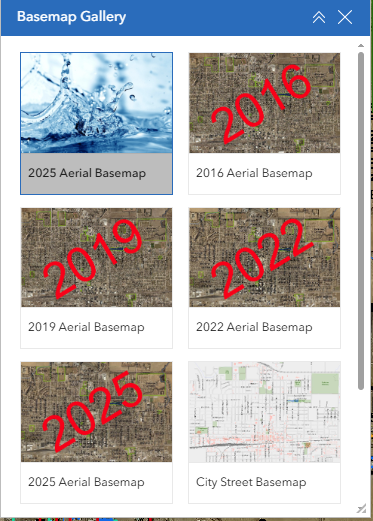
The problem I have is if I have Synchronize with the Basemap Gallery setting of your organization. Then I have the same basemap twice. For example if I have my map set to my 2025 aerials it shows that as the first selection in the Widget. But my 2025 Aerials is also in my Basemap Gallery. So now that basemap is listed twice. In addition the first listing which is the Maps default Basemap shows just a small display of the map and not the actual Basemap Thumbnail that was set for it.
The workaround I have found is I could set the Widget settings to configure Custom Basemaps and only choose the ones out of my Gallery, except for the default Basemap of the Map so there is not two listed. Then to fix the thumbnail issue is a set the Thumbnail of the Web Map to the same as the Basemap.
I don't think is a viable solution for the below reasons.
- I prefer for it to sync to the Gallery so if I add a new Basemap to the Gallery (say we fly new aerials and create a new basemap, I want it automatically load into all applications), instead with Custom Basemaps selected I would have to go one by one to each of my Experience Builder applications and add it as another Custom Basemap to show. I have a LOT of Applications and that would be time consuming and I could potentially miss one.
- I also have a few web maps that are being utilized in both an Experience Builder applications and in Field Maps. If I set the thumbnail of the web map to the Basemap thumbnail so it shows "pretty" in Experience Builder then this is the same thumbnail that is being displayed in Field Maps, making it incredibly confusing for the end user. For example my 2025 Aerial Basemap Thumbnail says 2025 Aerials over the Aerials. So in Field Maps they would see that thumbnail next to the Words Water Network Map.
We had similar issues via Web Map Viewer Classic and WebAppBuilder where it would duplicate the web map's basemap with the Gallery Basemaps. The solution was if the Basemap was named exactly the same way as the Actual Basemap in the Gallery it would ignore the default basemap and don't show duplication.
I would be fine with a workaround like that if it worked, otherwise there needs to be an option within the Basemap Gallery Widget settings to ignore default basemap so it doesn't show. I saw on one post it is always shown so the end user can go back to the original basemap and that makes sense. But how many of us is using custom basemaps in the majority of our applications that aren't in our gallery. So giving us an option to check would take care of both sides of ones that are custom and ones that are just a gallery basemap.
Picture of how I have mine set up with an appropriate Thumbnail for the Webmap for my Field Maps User but still showing a duplicate in the Experience Builder Widget. Again Not Ideal.
A couple other posts on this same issue in the Questions Section.
https://community.esri.com/t5/arcgis-experience-builder-questions/basemap-widget-in-new-experience-builder/m-p/1598321#M18070
https://community.esri.com/t5/arcgis-experience-builder-questions/basemap-gallery-items-duplicated-how-to-remove-one/m-p/1473943


