Dear all,
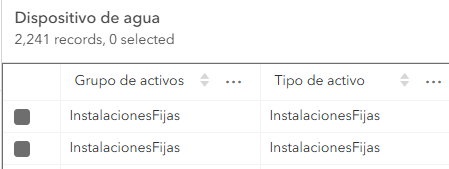
There is an issue I am not able to overcome and I am not really sure how to solve it. I have shared a Utility Network web Feature Layer from ArcGIS Pro into a portal and all the layers: Water Device, Water Junction, Water Line, etc. have their correspondent textual names when either opening the attribute table or clicking in a pop-up in Map Viewer: Tanks, Junctions, Lines, or whatever name they might have. (Please see the first screenshot below for the "InstalacionesFijas" layer within Water Device - be aware the names are in Spanish-)
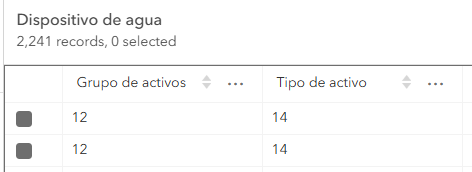
However, when sharing a Web Map from ArcGIS Pro, into the same portal, using these Feature Layers as the data source, having symbology, grouped layers, etc. the textual names are overwritten by the coded domains IDs, and instead of InstalacionesFijas, ID number 12 and 14 are displayed (Please see the second screenshot below for a Water Device layer):
FYI: When firstly sharing the Feature Layer, I have increased the "Max number of coded domains" to 1000000 just in case, but this hasn´t seem to made any difference whatsoever.
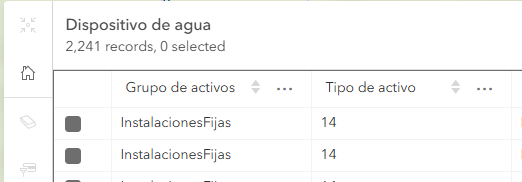
Going furhter and publishing a Web Map only using the raw Feature Layer dragged into an ArcGIS Pro map (with no symbology, or grouped layers, no filters, etc.) the attribute table in Map Viewer shows the textual Asset Group name (InstalacionesFijas) and the coded domain ID (14):
Please be aware this occurs through many other layers, there are no definition queries set and the above one is just an example. Additionally some of the maps had Subtype Group Layers added and we originally thought the root of the issue was that, but we have ruled it out.
I am stuck with this and any help would be much appreciated.
Thanks,
Carlos



