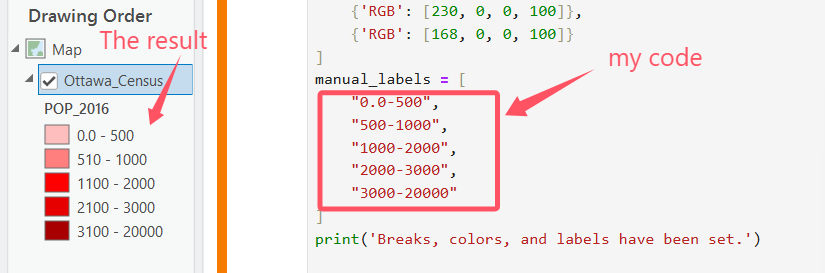
Hi there, I was doing some ArcPy coding (ArcGIS Pro 3.4.2). I was applying GraduatedColorRenderer + Manual + 5 classes + customized colors and labels to a feature layer. Everything of the result was good except the labels, not what I expected from my code (below).
'''
I want to apply the GraudatedColorRenderer to my feature layer using the manual classification method.
I also want to use my own colors and labels for each class.
However, the result show different labels and I cannot figure what the problem is.
'''

import arcpy

arcpy.env.overwriteOutput = True

# Obtain the current project and map
project = arcpy.mp.ArcGISProject("CURRENT")
map = project.listMaps("Map")[0]

# Obtain the feature layer
layer = map.listLayers("Ottawa_Census")[0]

# Use GraduatedColorsRenderer
sym = layer.symbology
sym.updateRenderer('GraduatedColorsRenderer')
print('Renderer has been updated to GraudatedColorRenderer')

# Set the classification field, method, and the number of classes
sym.renderer.classificationField = "POP_2016"
sym.renderer.classificationMethod = "Manual"
sym.renderer.breakCount = 5
print('Classification field, method, and breakcount have been set.')

# Customized settings
manual_breaks = [500, 1000, 2000, 3000, 20000]
manual_colors = [
    {'RGB': [255, 190, 190, 100]},
    {'RGB': [255, 127, 127, 100]},
    {'RGB': [255, 0, 0, 100]},
    {'RGB': [230, 0, 0, 100]},
    {'RGB': [168, 0, 0, 100]}
]
manual_labels = [
    "0.0-500",
    "500-1000",
    "1000-2000",
    "2000-3000",
    "3000-20000"
]
print('Breaks, colors, and labels have been set.')

# Apply the above settings
for i, brk in enumerate(sym.renderer.classBreaks):
    brk.label = manual_labels[i]
    brk.symbol.color = manual_colors[i]
    brk.upperBound = manual_breaks[i]


layer.symbology = sym

project.save()
pdf = arcpy.mp.CreateExportFormat('PDF', r'D:\Learning ArcPy\challenge\layout_export.pdf')
project.listLayouts()[0].export(pdf)
print("Task done!")


