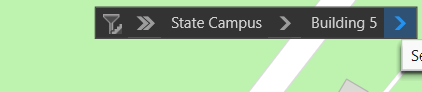
I'm having an issue where the Floor Filter dropdowns in an ArcGIS Pro web map allow me to choose the Site and Facility, but I don't get an option to choose the Level. By default, I can see the map is automatically filtering to the Level that is set as 0 in the Vertical order. The Level IDs and Facility IDs match across layers from what I can tell. If it matters, the ID format I'm using across layers looks like this.
| Site ID | Facility ID | Level ID |
| S1 | S1.B1 | S1.B1.LG |
| S1 | S1.B1 | S1.B1.L1 |
| S1 | S1.B1 | S1.B1.L2 |
I'm seeing this behavior in both ArcGIS Pro 3.2.2 and 3.4.2. I have another map with different data where the filter works fine for the Level, so I'm assuming this is user error or a very obscure bug. I've tried changing to the ID format I'm using to match the working map (simple numbers, no letters or periods), and it still doesn't work. Have tried closing and reopening both the map and project a few times and have played with the Vertical Order field—which updates what shows on the map by default, but I still never get the option to choose a different floor from a dropdown. The dropdown after Facility just doesn't appear at all.
Any ideas?