Hello,
I created a fishnet in ArcGIS Pro using the parameters shown in Screenshot 1.
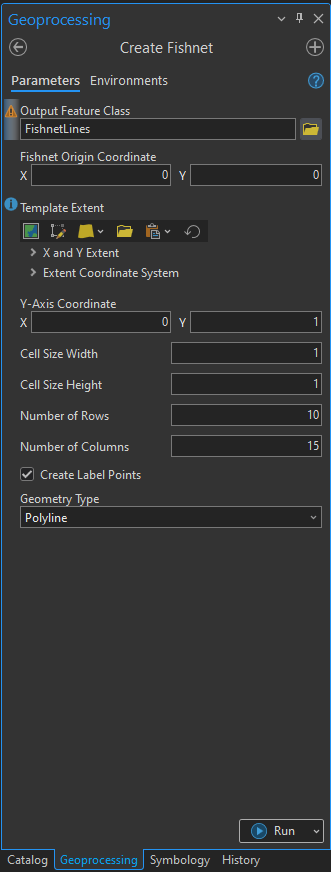
When I try to convert the operation to a Python script using the "Copy Python Command" tool, it generates the following code:
arcpy.management.CreateFishnet(
    out_feature_class=r"Path_to_Fishnet",
    origin_coord=0,
    y_axis_coord=1,
    cell_width=1,
    cell_height=1,
    number_rows=10,
    number_columns=15,
    corner_coord=None,
    labels="LABELS",
    template="DEFAULT",
    geometry_type="POLYLINE"
)
However, this command does not work and results in the following error:
arcgisscripting.ExecuteError: ERROR 000622: Failed to execute (Create Fishnet). Parameters are not valid.
ERROR 000628: Cannot set input into parameter origin_coord.
Could you please look into this issue?
version is ArcGIS Pro 3.3.2

