Issue Description:
This issue appears in the ArcGIS JavaScript API version 4.30 related to the Editor widget during feature editing on a versioned service.
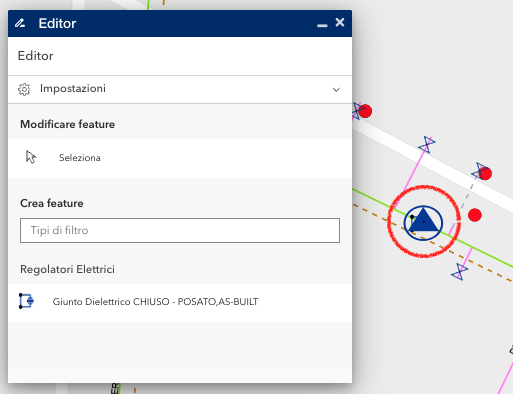
When using the Editor widget to create a new feature, after performing a startEditing on a version, the feature is added successfully on the map. However, after clicking the save button (and after applyEdits request), additional symbols from other layers incorrectly appear on the map, overlapping with the new feature's symbol. This visualization issue persists until stopEditing is executed.
Error Message:
Occasionally, but not always, the following error appears in the console:
saveWorkflow @ Editor.js:576 Uncaught (in promise) e {name: 'missing-parameters', details: undefined, message: 'CreateFeaturesWorkflow requires a view and creationInfo.'}
Version Affected:
This issue occurs only in version 4.30 of the ArcGIS JavaScript API. The same code works as expected in version 4.29, where the problem is not present. The problem persists using any browser.
Steps to Reproduce:
- Perform startEditing on a version.
- Use the Editor widget to create a new feature.
- Click the save button on the form.
- The feature is saved, but additional, incorrect symbols from other layers appear on the map.
- Until stopEditing is called, the error persists.

