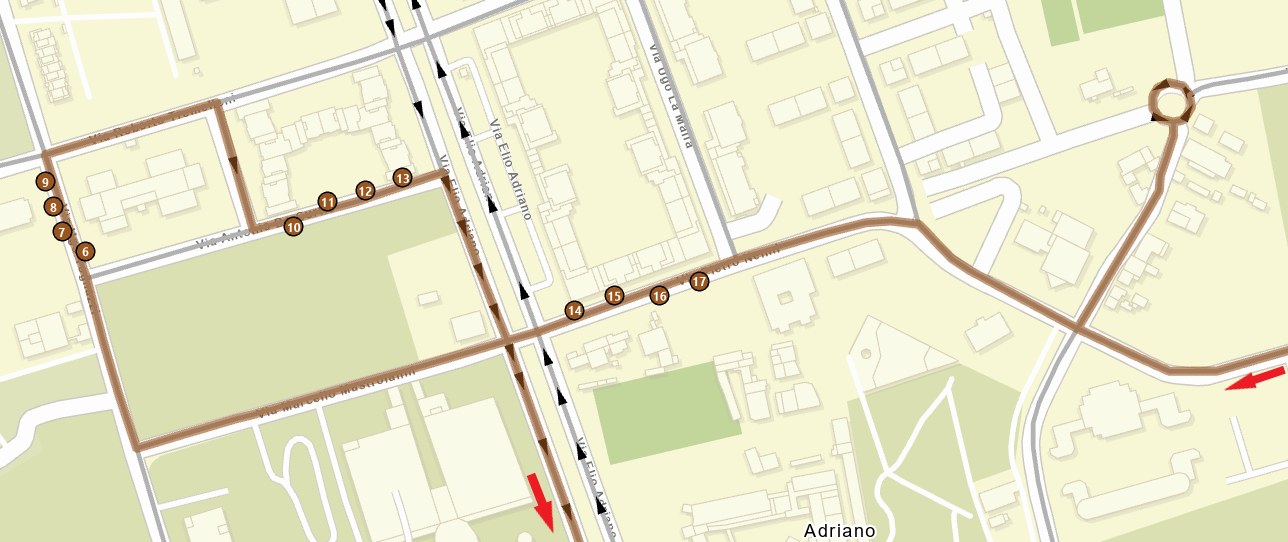
Hi, I am trying to solve a route optimization problem with the Route solver in ArcGIS Pro (3.1). The problem is quite simple, and there are no complicated parameters or configurations involved.
When executed, the tool creates a solution that scolves the problem, but this solution is not the best. I can state this with certainty because by manually setting the sequence of stops to be executed instead of using the "Preserve first-last" option, the tool manages to solve the problem with a lower cost. Specifically, there is a precise area along the route that is not optimized. As seen in the screenshot, the proposed solution involves arriving from the right side of the image, passing over stops 14-15-16-17 (which are NOT executed now), continuing to stops 6-7-8-9-10-11-12-13, and then returning on the previously crossed road to execute stops 14-15-16-17. After executing these last 4 stops, the solution proposes turning at the roundabout (no U-turns at junctions) to get back and continuing south.
The optimal solution would instead be to execute stops 14-15-16-17 on the first pass, so that you can immediately head south after executing stop 13.
The value for the Curb Approach parameter is "No U-Turns", so the stops should be executed on the first pass without considering the side of the street.
Any ideas?
Thank you