We are pleased to share the latest update for ArcGIS for Excel 2023.2.0.0.20 which has bug fixes and quality of mapping improvements.
Updates should be seen at once. If you do not see the changes, you may need to refresh or close Excel and restart it.
Several bugs have been fixed, including:
- Clustered symbology causes the selection to fail.
- Undefined user error message with an ArcGIS Connection in a disconnected environment.
- Sign-in issue with PKI/IWA portal due to certificate authentication.
- The gray background of the Get Started screen when the screen resolution is 1366x768.
- The redundant number "0" is displayed at the bottom under the Share map pane.
Quality of Mapping:
- Improved Infographic card search results.
- Enhanced Spatial reference UX.
- Increment/decrement in decimal value when increasing/decreasing time interval for auto-refresh (1345)
- ARCGIS.ADDHEADERS function argument is now optional.
- Refreshing ArcGIS attribute table will update without re-creating the worksheet.
- Remove excessive gray background when ArcGIS for Excel panel text overflows.
- Added banner for Help option when using ArcGIS for Excel in a disconnected environment.
- Improved IWA/LDAP/PKI portal sign-in UI/UX
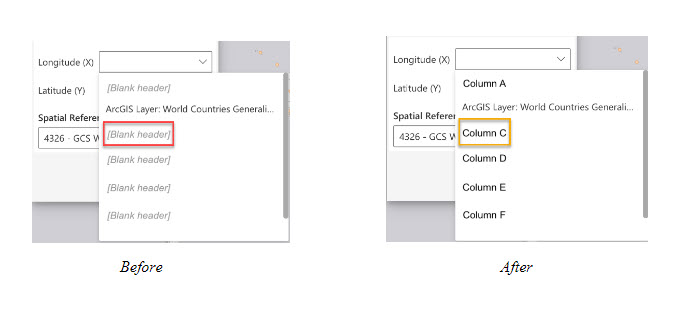
- A placeholder will appear for every blank field alias when selecting from field dropdowns. See below:
Feature updates:
- Add from Excel will Auto-select dataset for users. See below:

Be sure to check out our latest case study, Map and assess crosswalks using ArcGIS for Excel , our resource video, and blog on Add and Edit ArcGIS Layer Attribute data in an Excel worksheet.
If there are other areas of improvement for ArcGIS for Excel that you would like to see covered in a future blog post, please leave a comment below. Additionally, we would love to hear your feedback, whether it be an idea or if something is broken.
Till next time!
