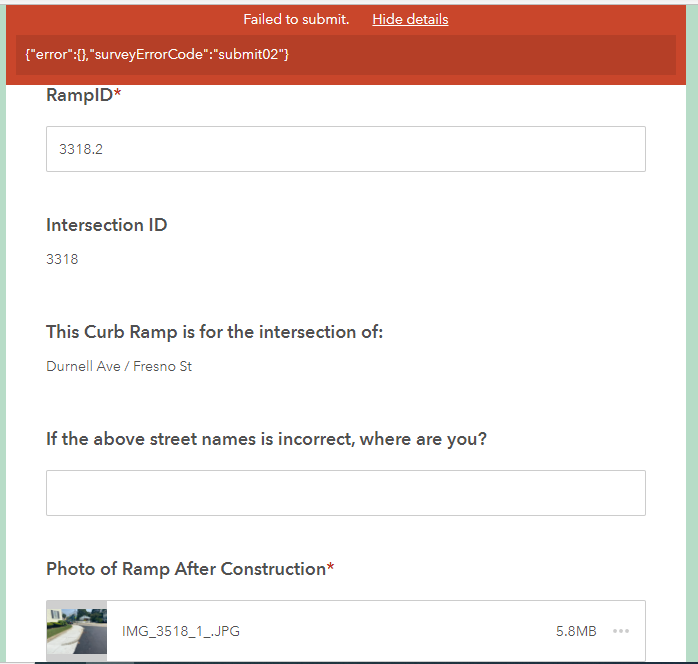
The field inspectors have been having this issue off and on every so often and the internet does not seem to know what's going on... my leading theory is that it is an issue with the photo because of the submit#2 issues but I don't know how to confirm or fix that.
Any help?
In my testing, the issue is happening because of an image-type file upload detail. The underscores that are created as part of my phone's image naming scheme were causing this error. I also found that spaces caused this issue, so there's probably many others as well.
To address this for a public-facing form, I used the bind::esri:parameters field to give the photo being uploaded a default name of "img". You can see the details here and my syntax below. You could be fancier and use info from your form, but I didn't need that; be careful of special character issues if you do.
filename="img"
Hi, I had the same error. I uploaded 21 photos to my survey. I reduced the number to 12 and was able to submit. The issue seems to be the number of attachements specified in the form.
Let me know if that sorts your issue.
Nat
Did you get an answer cause I have got the same issue
Forgot to mention that make sure the user's device is new enough that its OS is compatible with survey app.
If in doubt, ask them to submit from another newer device.
Hi Mikhayla,
I have observed that if the survey submissions were successful in past and only few individuals are encountering issues now, majority of it is to do with the submission contents/formats.
I would recommend to check following:
- Make sure the characters in text type questions are not exceeding character limits
- Attachments are named properly, i.e. No special characters and File extensions are properly specified (should not be FileName.pdf.pdf, FileName.jpg.pdf, etc)
Curious if you ever resolved this issue? I had a citizen encounter this same error on a public survey with attachments required. We have had dozens of submissions with this being the first problem.
We have also encountered the same error. This seems to be a systemic (Esri) issue? The intent of the survey in question is to upload photos on existing records, so not including attachments isn't an option. There are no requiered fields in the survey.
The user is opening S123 in a browser. @ZacharySutherby any further thoughts on this issue?
Thanks!
We also encountered this same error - reported by only one user at this point.
The error appeared when user was trying to submit a survey with attachment/s in it. Without attachments, the same user was able to submit a survey successfully!
We are having the same issue. Only one of our users is reporting this, but others are able to submit the survey correctly.
The user was trying to submit with a picture, but got someone else to log in for her and was able to complete the exact same request with the picture under a different account.
We are having this issue also. The survey is public and allows anonymous submissions. First submission was 9/19/22. After 53 submissions this is the first time we have seen this error. The author submitted anonymously, after the failed submission from the public, and it worked.
I am having this issue as well. Were you able to isolate what the problem was?
Hello @MichaelSinclairStantec,
If the survey was published from Survey123 Connect would you be able to share the XLSForm for the survey for testing on our end?
If you remove the required from the image question does the same issue occur if no image is uploaded? Do you see the same issue in the Survey123 field app, or is it specific to the Survey123 web app?
Signed in members can post, follow updates, and more. New here? Register a free account.
Find useful guides, FAQs, and documents to help you navigate and make the most of Esri Community.