Hi all,
I have written a CGA code for a building, and I want to divide the left side of the building's facade into three segments and write different codes for each segment. However, I'm facing an issue where CityEngine (CE) divides the facade into segments but repeats the same rule for the first segment for the other segments.
To divide the left facade into different segments, I used the "split" command along the x-axis and assigned the length of each segment as an attribute (attr tile_width). Then, I assigned a new code for each segment. However, it still starts the code of each segment with the code of the first segment and continues with the rest of the codes.
Interestingly, the "split" command works fine for dividing the floors through the y-axis and I can write different code for each section, But when it comes to the x-axis, it doesn't apply them correctly to each segment.
here is my code for the ground floor of the left facade:
attr tile_width1 = 16.33 #lenght of the 1st segment
attr tile_width2 = 43.54 #lenght of the 2nd segment
attr tile_width3 = 17.10 #lenght of the 3rd segment
attr height = 5.68
Lot -->
extrude(height) Building
Building -->
comp(f){ front : FrontFacade | right : RightFacade | left : LeftFacade| back : BackFacade | top : Roof}
LeftFacade -->
setupProjection(0, scope.xy, 1.5, 1, 0, 0, 1)
setupProjection(2, scope.xy, scope.sx, scope.sy)
split(y){ groundfloor_height: GroundfloorleftSide | { ~floor_height: FloorLeftside }* }
texture(textureLeft)
projectUV(0)
GroundfloorleftSide -->
split(x) { tile_width1 : FrontSeg1 | tile_width2 : FrontSeg2 | tile_width3 : FrontSeg3 }
FloorLeftside -->
split(x) { tile_width1 : FrontSeg4 | tile_width2 : FrontSeg5 | tile_width3 : FrontSeg6 }
## LeftFacade
FrontSeg1 -->
split(x){ 3 : Wall
| 1.4 : split(y){ ~1: Wall | 1.2: Window | ~0.4: Wall }
| 2 : Wall
| 1.2 : split(y){ 0.03: Porchfloor | 2.3: Door | 0.1 : PorchShade | ~2: SolidWall }
| 4 : Wall
| 1.4 : split(y){ ~1: Wall | 1.2: Window | ~0.4: Wall }
| 0.6 : Wall
| 1.2 : split(y){ 0.03: Porchfloor | 2.3: Door | 0.1 : PorchShade | ~2: SolidWall }
| 4 : Wall
| 1.2 : split(y){ 0.03: Porchfloor | 2.3: Door | 0.1 : PorchShade | ~2: SolidWall }
| 5 : Wall
| 1.4 : split(y){ ~1: Wall | 1.2: Window | ~0.4: Wall }
| 5 : Wall }
FrontSeg2 -->
split(x){ 0.2 : Wall
| 1.4 : split(y){ ~1: Wall | 1.2: Window | ~0.4: Wall }
| 0.6 : Wall
| 1.4 : split(y){ ~1: Wall | 1.2: Window | ~0.4: Wall }
| 0.6 : Wall}
FrontSeg3 -->
split(x){ 0.2 : Wall
| 1.4 : split(y){ ~1: Wall | 1.2: Window | ~0.4: Wall }
| 0.6 : Wall
| 1.2 : split(y){ 0.03: Porchfloor | 2.3: Door | 0.1 : PorchShade | ~2: SolidWall }
| 5 : Wall
| 1.4 : split(y){ ~1: Wall | 1.2: Window | ~0.4: Wall }
| 0.6 : Wall}
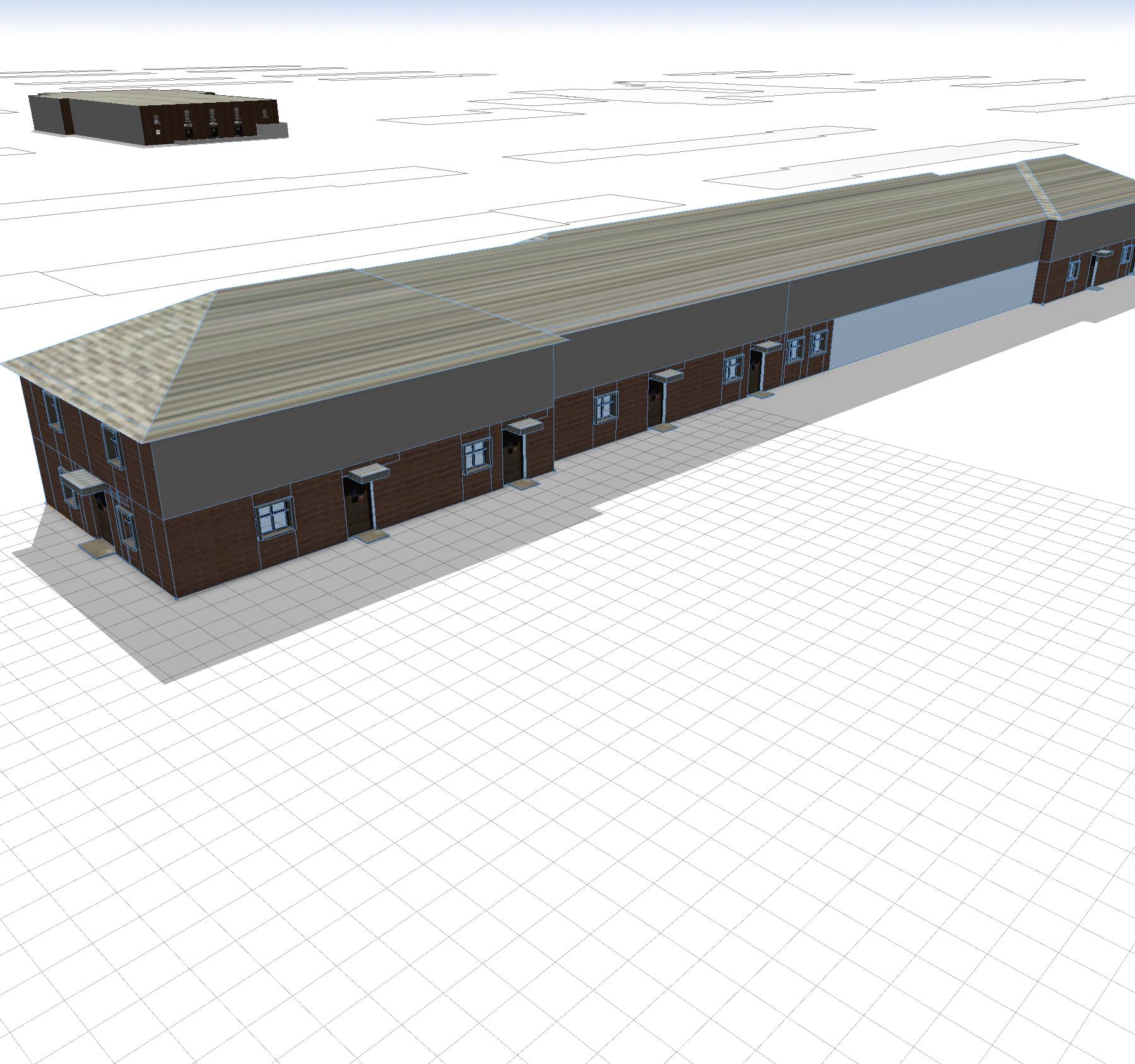
In the attached picture, CE repeats the code for FrontSeg1 not only for the first segment but also for the second and third segments. In other words, for each segment, CE applies all three FrontSeg1, FrontSeg2, and FrontSeg3 together (starting from FrontSeg1). However, I only want FrontSeg1 code for the first segment, only FrontSeg2 for the second segment, and FrontSeg3 for the third segment without any repetition.
I would really appreciate your help. Thank you in advance!
Mahnoush