Hello,
I have a geocode service which assists with looking up our local parcel numbers. I was wondering if there is a way I can add this to the ArcGIS Earth platform?
Thanks in advance for any assistance.
Amanda
Hello @ABishop ,
Currently, we recommend our users to configure their own locator services as portal admin. For detailed instructions, you can refer to ArcGIS Online's public document: Geocoding.Once you added the locator in your portal, you will be able use your own geocode service in the geocoder dropdown:
Feel free to get back to us if there's still any confusions.
Bing'An
Hi, if you are using a "portal" (ArcGIS Online organizational or an Enterprise Portal) you could make this geocode service available through the portal and it is there when logging in with Earth
Hello Pal_Herman_Sund,
Yes, I am aware that it can be hosted through portal for ArcGIS. I probably should have been more specific. We do not have portal and I have this geocode service hosted through my ArcGIS Server. I also tried adding the service as content to my ArcGIS Online account in hopes that I could see it and add it while in ArcGIS Earth, but it did not show up as an item to add. Any other suggestions?
Thank you @Bing_AnChen
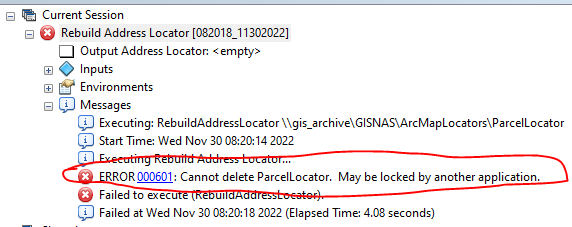
Another question... what is the best method to updating locators that have been published as services? Because we do not have portal yet, I could not share the locator as a service through ArcGIS Pro, so I had to publish the service from ArcMap to our ArcGIS Server. I then used the REST endpoint URL to add to our Geocoding services through AGOL admin settings. After confirming that the locator service worked, I attempted to rebuild the locator in ArcMap, which is the source of the published service, and I received this error:
Hello @ABishop. There is another way.
Your locator will be added in the Search dropdown.
Hello @GeoffroyRicher-Lalonde
Thank you for your suggestion. If I do this, how will the locator get updated?
@GeoffroyRicher-Lalonde
OK, so I did what you said in your most recent post. I opened ArcGIS Pro and made a project called ParcelLocator.aprx. Then, I used the ParcelLocator.aprx to create the ParcelLocator.mmpk and added it to ArcGIS Earth. It worked but gave me some funny numbers in my search result outside of the parcel number, which I believe is the field attributes of the highway shields point feature class I added to the project. I went back to the ParcelLocator.aprx and unchecked the fields in the feature class so that they wouldn't be searchable with the locator, saved it, and then tried to rewrite the .mmpk. I received this error:
Did you close ArcGIS Earth before trying to rewrite the MMPK ? The lock may be from there. I suggest you write the MMPK in a folder A, copy it in a folder B, and use the file from folder B to add to ArcGIS Earth.
If your locator is to be used by a large number of people, updating it might be a problem for you. Because every single user of your MMPK must close ArcGIS Earth at the same time for you to overwrite the file. You could do it outside of working hours, but if a user left his session opened with an ArcGIS Earth program running, it will lock the file.
Hi Geoffroy,
Yes, I closed ArcGIS Earth and then it allowed me to overwrite the .mmpk and the locator itself, only issue I have with that is that the staff who will be using this locator may or may not exit their programs each day in order for me to perform the necessary updates. The suggestion you made about writing the MMPK and to folder A and then pointing ArcGIS Earth to folder B, etc., I don't believe will work, because after you update the .mmpk in folder A, you then have to overwrite the .mmpk in folder B, which will present the same problem? Or am I overthinking this one?
You are right : a user might lock your file.
The only advantage with the folder A, folder B thing is that the update of your MMPK will always work as planned in folder A. But you might have trouble overwriting the file in folder B...
Signed in members can post, follow updates, and more. New here? Register a free account.
Find useful guides, FAQs, and documents to help you navigate and make the most of Esri Community.