the following polygon fill renders incorrectly (the polygon is oriented vertically)
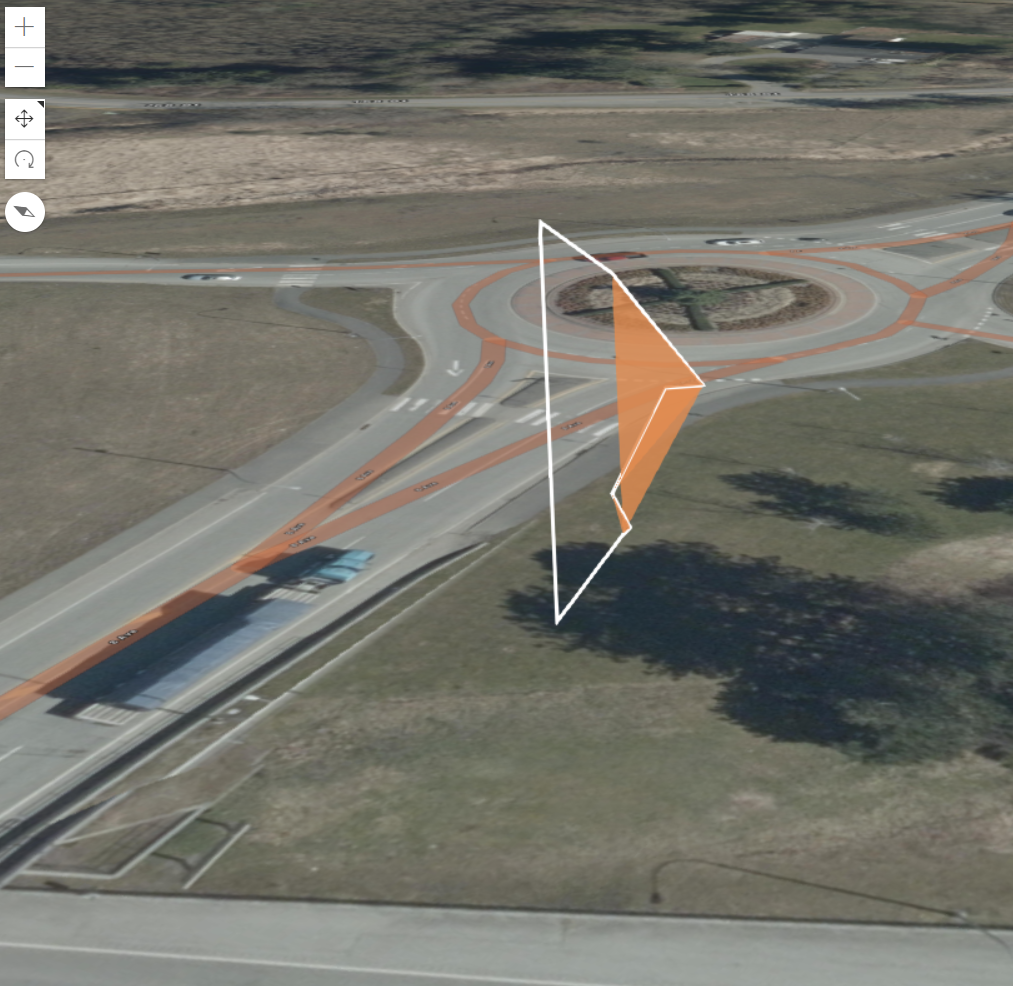
<script>
require([
"esri/Map",
"esri/views/SceneView",
"esri/layers/GraphicsLayer",
"esri/Graphic"
], (Map, SceneView, GraphicsLayer, Graphic) => {
const map = new Map({
basemap: "hybrid"
});
const view = new SceneView({
container: "viewDiv",
map: map,
camera: {
// autocasts as new Camera()
position: {
// autocasts as new Point()
x: -122.7600058172586,
y: 49.01613625727473,
z: 36.28960603238933
},
heading: 63,
tilt: 67.7126064292701
}
});
const graphicsLayer = new GraphicsLayer();
map.add(graphicsLayer);
const polygon = {
type: "polygon", // autocasts as new Polygon()
rings: [
[-122.75920881,49.01650073,10.46],
[-122.75918975212072,49.01648150497291,13.86],
[-122.75918771772683,49.0164794527363,14.11],
[-122.75919250348161,49.01648428046471,15.46],
[-122.75917743373131,49.016469078544624,19.41],
[-122.75916729312918,49.016458849003996,19.46],
[-122.75919081188758,49.01648257403449,23.61],
[-122.75920881,49.01650073,25.46],
[-122.75920881,49.01650073,10.46]
]
};
const fillSymbol = {
type: "simple-fill", // autocasts as new SimpleFillSymbol()
color: [227, 139, 79, 0.8],
outline: {
// autocasts as new SimpleLineSymbol()
color: [255, 255, 255],
width: 2
}
};
const polygonGraphic = new Graphic({
geometry: polygon,
symbol: fillSymbol
});
graphicsLayer.add(polygonGraphic);
});
</script>




