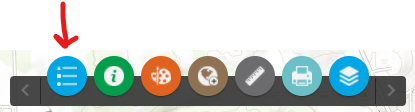
I am experimenting the the WAB Launchpad theme and would like to open/close various widgets programmatically. I have attempted to fire the onclick event in the following code but cannot seam to access the needed node. I am not a web developer and only have a little experience with JavaScript and none using dojo.
Also, I can understand how to access the widget information when using "this" in the widget code itself, but how do you access "this" for the widget from outside the widget. I have experimented with the dom but the onclick event is not accessible via my crude attempts.
<div class="jimu-anchorbar-iconitem jimu-float-leading" id="uniqName_11_0" widgetid="uniqName_11_0" settingid="widgets_Legend_Widget_18" style="margin-left: 7px;">
  <div role="button" class="icon-item icon-item-background0 dockable" data-dojo-attach-point="iconItemNode" data-dojo-attach-event="onclick:_onNodeClick,onkeydown:_onNodeKeydown" tabindex="3801" aria-label="Legend" style="width: 40px; height: 40px;">
    <img class="icon" src="/webappbuilder/apps/14/widgets/Legend/images/icon.png?wab_dv=2.23" data-dojo-attach-point="imgNode" alt="Legend" style="width: 20px; height: 20px;">
  </div>
  <div class="status" data-dojo-attach-point="iconItemStatus">
  </div>
</div>
The HTML code excerpt is from one of the widgets on the AnchorBarControler