A new Excel Sheet can't be saved to a Network Location from Excel when the ArcGIS (Maps) for Office AddIn is activated:
When a new file is created in Excel and user clicks on "Save", a dialog opens which always points to the local machine.
If user clicks "File" --> "Save as", a dialog is opened which has options for the corporate network locations (OneDrive and Sharepoint Sites) as well as local.
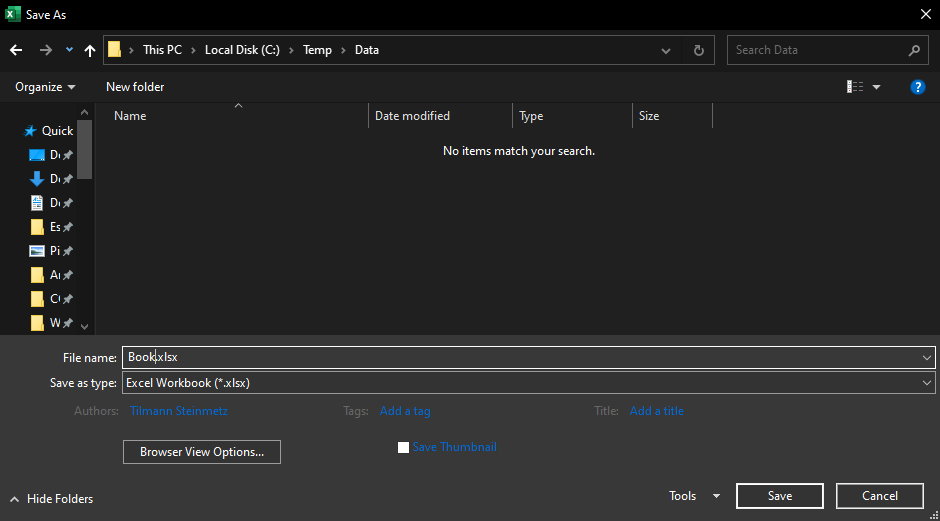
Saving in one of the network locations isn't working: the dialog opens and displays the network location, user navigates to correct folder and specifies a file name & clicks on "Save", then a second "Save As" dialog opens with the option to save to the local drive.
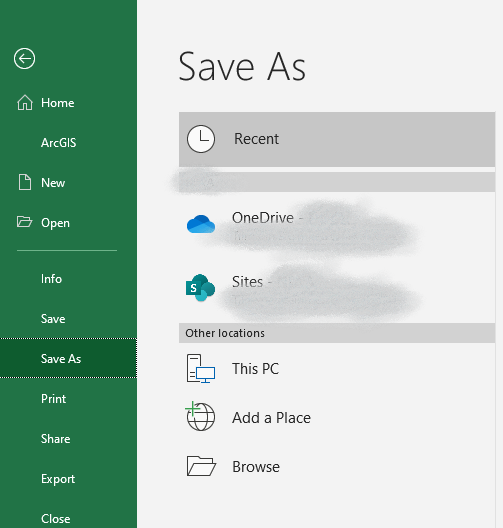
Select network location (e.g. a corporate Sharepoint Site) and navigate to folder:
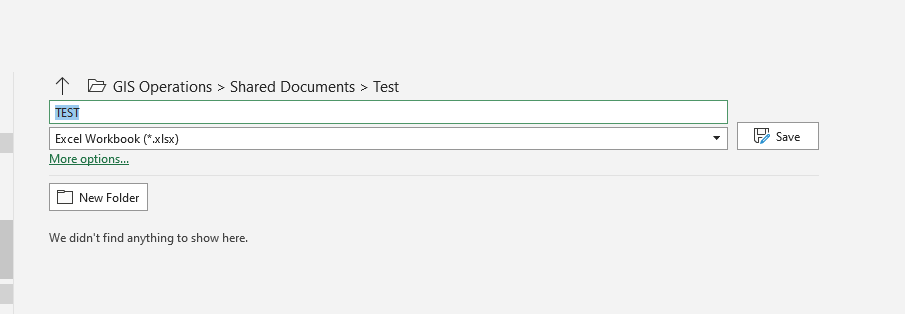
Clicking on "Save" then brings up this dialog (which makes no sense at all as I've already specified a different location and file name for saving):
For this workflow it makes no difference whether or not an ArcGIS Map has actually been created or not.
We've tested this both in ArcGIS Maps for Office (2020.1) and ArcGIS for Office (2021.1), in a current Office 365 Excel, on Windows 10 (1909) with consistent (mis-)behaviour.
The same workflow in PowerPoint, using the same install, works correctly.
Is this a bug in the Excel Addin?
Thanks!


