Dear ArcGIS community!
I found something that I'm not sure if it's a bug or a feature. Here's what I'm trying to accomplish. I have a map with several layers, each layer containing markers consisting of a background circle (SimpleMarkerSymbol) and a foreground icon (PictureMarkerSymbol), enveloped in a CompositeSymbol. So far, all of this renders perfectly.
Lately we have introducted the idea of marker clusters where there are multiple markers in a relatively small area and so a single cluster marker represents several individual markers. Zooming further into the map causes the cluster markers to divide into the individual markers. This is the idea. The number of individual markers represented by a cluster marker is displayed by a number (TextSymbol), added as the last (and so top-most) element of the CompositeSymbol.
And this is where there is a rendering problem. The TextSymbol seems to get detached from the CompositeSymbol and overlap other markers even when it shouldn't. So if I have marker A and B living on the same layer and marker A was added first, marker B overlaps the SimpleMarkerSymbol and PictureMarkerSymbol component of marker A but the TextSymbol component of marker A overlaps marker B. It's as if the TextSymbols added to the CompositeSymbol would live on their own separate layer.
This might be a desired behavior when a TextSymbol is for example a title or name that should be "more visible" than the marker dots themselves and so it should overlap the marker dots (the circle in my case) but in my case it's not nice user experience since the markers seem to fall apart.
Things I tried to research/workaround the issue and the results:
- I tried further enveloping the TextSymbol in another CompositeSymbol and then added this second dedicated CompositeSymbol to the original CompositeSymbol. The rendering didn't change.
- I tried adding the TextSymbol to the CompositeSymbol before the PictureMarkerSymbol. In this case, once again, the rendering ignored the order, the text was on top of the icon.
Below is the essence of the code composing and adding the markers.
// The envelope CompositeSymbol instance.
val compositeSymbol = CompositeSymbol()
// Adding the background circle.
val circleSymbol = SimpleMarkerSymbol(SimpleMarkerSymbol.Style.CIRCLE, markerColor, mSize)
compositeSymbol.symbols.add(circleSymbol)
// Creating the image icon.
val iconSymbolListenableFuture = PictureMarkerSymbol.createAsync(drawable)
iconSymbolListenableFuture.addDoneListener {
	// Adding the image icon.
	val pictureMarkerSymbol = iconSymbolListenableFuture.get()
	compositeSymbol.symbols.add(pictureMarkerSymbol)
	// Adding the cluster count.
	val countSymbol = TextSymbol(16.0f, "${eventCluster.count}", Color.WHITE, TextSymbol.HorizontalAlignment.CENTER, TextSymbol.VerticalAlignment.MIDDLE)
	countSymbol.outlineColor = Color.WHITE
	countSymbol.outlineWidth = 2.0f
	countSymbol.haloColor = Color.BLACK
	countSymbol.haloWidth = 1.0f
	compositeSymbol.symbols.add(countSymbol)
}
// Adding the marker graphics to the layer.
val point = Point(mLongitude, mLatitude, SpatialReferences.getWgs84())
layer?.graphics?.add(Graphic(point, symbol))
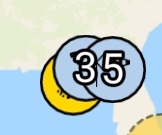
This is a cutout of a screenshot showing my problem. The number '3' belongs to the left blue marker below the right blue marker that has the number '5' written on top of it and should render below it instead of overlapping it.
Could you please confirm if this is a bug or this is how it is supposed to work (ie. TextSymbol components always overlapping other markers on the same layer). In either case, is there a workaround for this problem? Or am I using TextSymbol improperly?
Thank you very much in advance for any hint.
Mark

