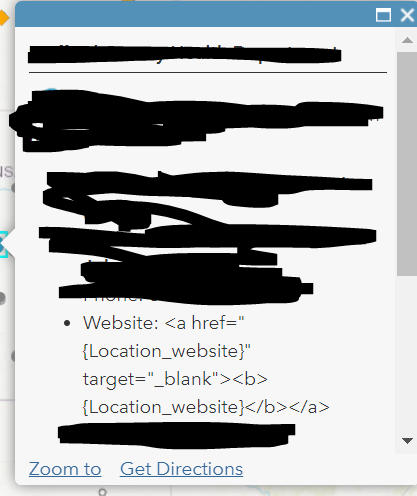
I have a dataset with a field that is either populated with a web address (https://....) or the text N/A. If there is a URL, I want to display it as a hyperlink in the pop-up so that the end user can just click to open it. I wrote up a conditional statement in Arcade and tried to plug it into HTML view in the pop-up custom configuration, but it only returns the HTML code in the pop-up, rather than recognizing the <a href> tag and adding the link.
Here is my Arcade code:
var webURL = $feature["Location_website"]
var linkYes = '<a href="{Location_website}" target="_blank"><b>{Location_website}</b></a>'
var linkNo = 'Website: <b>{Location_website}</b>'

when(webURL == 'N/A', linkNo, linkYes) And here is where I put the expression (I replace the highlighted text with {expression/expr0}
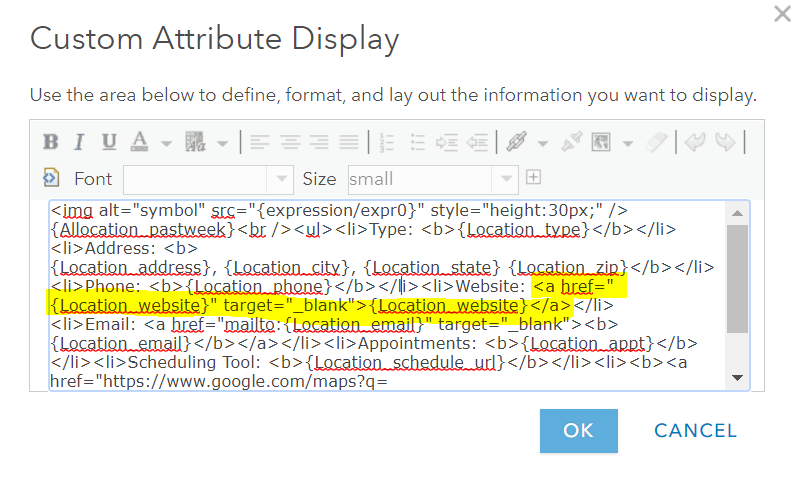
And here is the pop-up (forgive my messy redaction work):
Is there a better way to do this? I don't want to use the WYSIWYG editor to insert a hyperlink because I don't want N/A to be an active link that goes to nowhere.

