Our survey is a shared feature class between 4 people - myself (the owner), my supervisor and two technicians. We have an "images" field in our survey that we use record pictures. We add these pictures to the images field. We like the images field because it is "searchable" using filters in the Survey123 website, so we can filter for other conditions and have the pictures from all matching conditions show up in a gallery.
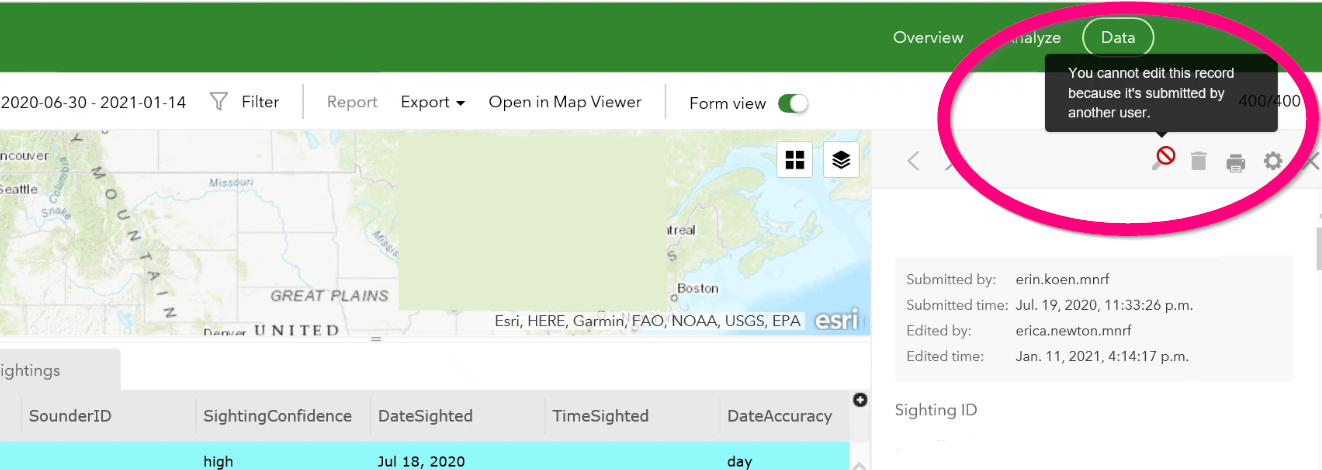
However, sometimes a technician works on a record they did not create, because pictures come in to us after the record was created. To be truly collaborative, the survey should allow anyone to add the picture to the image field, so that it can be viewed in the Survey123 filter and image gallery. However, when my supervisor or technicians add images to the feature class via ArcGIS online, they appear as "attachments" instead, meaning we cannot see the images through the Survey123 filter webpage and gallery, and the images are stored "some where else". Editing the surveys in Survey123 seems buggy at times (technicians are not able to edit all surveys, especially ones they did not create). This means that I myself have to add pictures, which is a pain when we've asked the technicians to keep this layer up to date - they can't. To top it off, I can't even figure out a way to determine which images are stored as images in the proper image field, and which are stored as attachments.
I would like the option to have my technicians be able to add images to ANY record's image field if I give them full write permission to this survey. This is a big deal for us in terms of consistent data entry and usability of the feature.
When I asked ESRI support about this, I received a lot of great support from a staff member, but ultimately the answer from ESRI Inc regarding my issue was this:
Images that are added directly into the images field from ArcGIS Online will fall under the attachment field instead of the image field in the analyze tab on the survey123 website.
This behaviour has been determined to be expected. Whenever the submitters add images through ArcGIS Online, they will be treated as an attachment. If the user wishes to add the images and wants them to be treated as images, then they have to ensure that the images are uploaded directly through a survey whether using a mobile phone or desktop. Unfortunately, this is the only way we will get images to appear under the Images field on the Survey123 website.
So, if I go to "collaborate" and "share survey" on the Survey123 website, I'd like there to be a fourth option - allow users to modify other people's records.
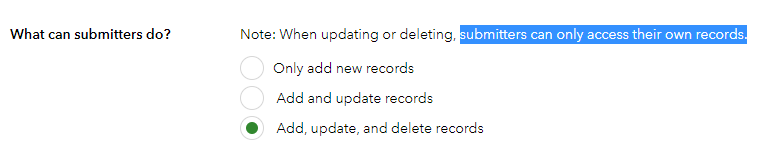
Because, currently, this is what my users see when they try to edit someone else's record...