Turn on suggestions
Auto-suggest helps you quickly narrow down your search results by suggesting possible matches as you type.
Cancel
- Home
- :
- All Communities
- :
- Industries
- :
- State & Local Government
- :
- State & Local Government Questions
- :
- Re: Avoiding gaps and slivers in the parcel fabric
Options
- Subscribe to RSS Feed
- Mark Topic as New
- Mark Topic as Read
- Float this Topic for Current User
- Bookmark
- Printer Friendly Page
Avoiding gaps and slivers in the parcel fabric
6909
7
03-30-2011 10:55 AM

03-30-2011
10:55 AM
- Mark as New
- Bookmark
- Subscribe to RSS Feed
- Permalink
Any ideas on how to manage this or what the best workflow for this would be? I realize you can add the fabric to a topology, but it shouldn't be necessary. I would like hear about what others are doing.
Thanks in advance!:D
Thanks in advance!:D
7 Replies

03-30-2011
02:09 PM
- Mark as New
- Bookmark
- Subscribe to RSS Feed
- Permalink
Hey Tiffany,
I'm curious, are you seeing gaps and slivers in your fabric? The fabric inherently has some "built in" topology rules, so you really shouldn't need to run the fabric in a topology outside of the normal fabric environment....
I'm curious, are you seeing gaps and slivers in your fabric? The fabric inherently has some "built in" topology rules, so you really shouldn't need to run the fabric in a topology outside of the normal fabric environment....
04-01-2011
06:55 AM
- Mark as New
- Bookmark
- Subscribe to RSS Feed
- Permalink
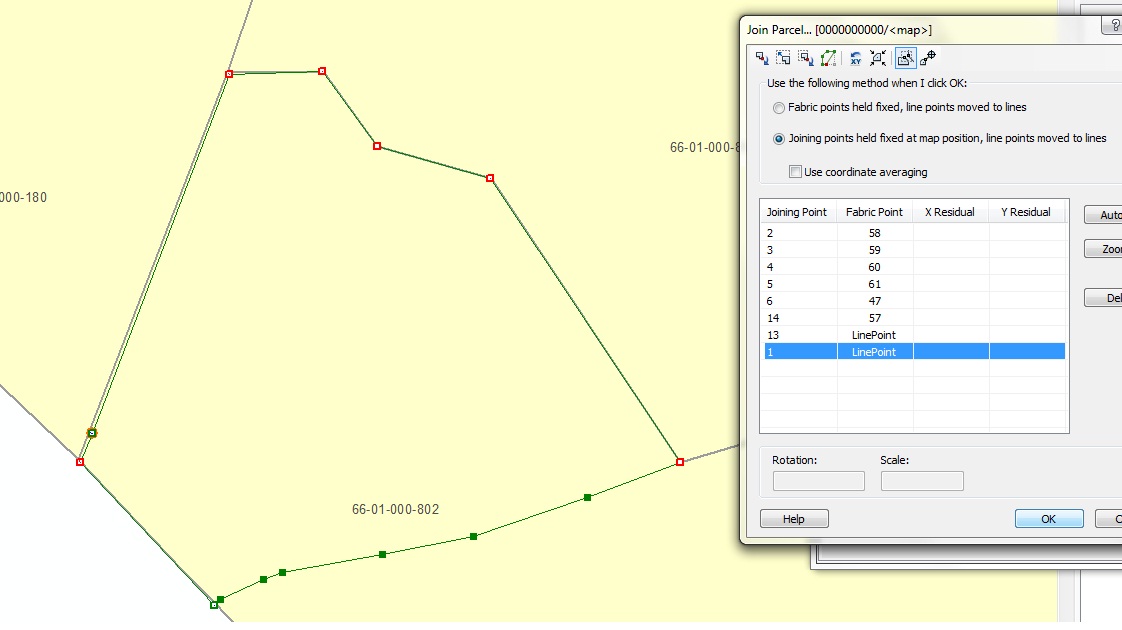
Here I'm creating a new parcel in a new plan. I've included the details for line construction as well as the join details in case I'm missing something. See the "First Glance" sort of looks okay but I notice the 2 new line points. I'm okay with the one to the southeast, but can't figure out why there's another one on the boundary here. So I zoom in. Notice the sliver in "Detailed Look."
The team at ESRI said they are currently looking at a fix for the next release where you can reshape some edges to match up with your new survey. At 9.3 we used topology editing tools for this.
I started this post because no one seems to share my concern, so I'm just wondering how they manage to edit without said slivers & gaps!
The team at ESRI said they are currently looking at a fix for the next release where you can reshape some edges to match up with your new survey. At 9.3 we used topology editing tools for this.
I started this post because no one seems to share my concern, so I'm just wondering how they manage to edit without said slivers & gaps!


04-04-2011
12:54 PM
- Mark as New
- Bookmark
- Subscribe to RSS Feed
- Permalink
It looks like there are two points very close together, one was picked up as a line-point and for some reason the other wasn't. Can you please turn on regular points and then send another screenshot of your "detailed view"? Thanks
As a side note, there is a "topology" threshold for line-points. By default, the line-cracking tolerance is set to 100cm. This can be changed using a registry key, please also let me know if this gap is larger than 100cm.
Thanks,
Chris
As a side note, there is a "topology" threshold for line-points. By default, the line-cracking tolerance is set to 100cm. This can be changed using a registry key, please also let me know if this gap is larger than 100cm.
Thanks,
Chris
04-26-2011
11:26 AM
- Mark as New
- Bookmark
- Subscribe to RSS Feed
- Permalink
.....hmmmm as it turns out there are 2 line points there that are really close together--more like 10 cm. This is something that I've seen hanging out since the original coverage conversion where little slivers created polys, that, once discovered, would be merged to the appropriate poly. If someone forgets to merge the line segments afterwards then the extra line point will get left behind.
Is there a GP tool I could run to merge those that would not compromise my line-poly topo relationship?
Is there a GP tool I could run to merge those that would not compromise my line-poly topo relationship?
05-11-2011
10:49 AM
- Mark as New
- Bookmark
- Subscribe to RSS Feed
- Permalink
FYI, by logging an incident with tech support regarding the formation of an overlapping poly being created when using curves in the fabric, it is now a bug with using the parcel remainder: NIM067973
While they're currently working on patch post SP2, perhaps this will be fixed then.
While they're currently working on patch post SP2, perhaps this will be fixed then.

06-09-2011
10:19 AM
- Mark as New
- Bookmark
- Subscribe to RSS Feed
- Permalink
Dear,
I'm searching for training material about Survey analyst extension including the training data.
please any one help me.
I'm searching for training material about Survey analyst extension including the training data.
please any one help me.



06-10-2011
09:49 AM
- Mark as New
- Bookmark
- Subscribe to RSS Feed
- Permalink
Take a look at the Survey Editor documentation
http://webhelp.esri.com/arcgisdesktop/9.3/index.cfm?TopicName=An_overview_of_Survey_Analyst
Christine
http://webhelp.esri.com/arcgisdesktop/9.3/index.cfm?TopicName=An_overview_of_Survey_Analyst
Christine
