Are You Lost? Routing and Indoor Positioning Improve Pedestrian Wayfinding at Austin Community College

At Austin Community College (ACC), our mission centers on supporting the well-being, growth, learning, and success of our students. Every team across the district contributes to that mission—including our Facilities Information Systems (FIS) team, which helps students, employees, and visitors navigate ACC’s spaces with clear, accessible maps and signage.
In Fall 2024, ACC debuted a new indoor wayfinding map across district kiosks and touchscreen displays. This initial single-map deployment quickly evolved into a second-generation system featuring campus-specific viewers, indoor pedestrian routing, and Bluetooth-based indoor positioning (IPS)—all with a modernized interface that greatly enhances wayfinding throughout the district.
A New Indoor Viewer for Each Campus
When we first launched our indoor maps, all campuses were contained within a single Indoors viewer. While functional, this setup often produced overwhelming search results. A query for “Student Support Services,” for example, returned 11 options—one per campus. Even simple room searches returned multiple results, making it difficult for users to know which one belonged to their location. Additionally, the original viewer lacked routing capabilities.
To address this, we created distinct viewers for each campus, showing only the relevant rooms, services, and resources at that location.
We achieved this by developing geography-restricted views of our district-wide Indoor GIS database for each campus. This enables us to maintain a single authoritative dataset while ensuring that campus viewers remain accurate and easy to navigate.
Other improvements include:
- Redesigned and reorganized categories
- Updated room descriptions to improve searchability
- More informative, streamlined pop-ups
- A unified point set for essential resources such as restrooms, stairs, elevators, police, food, and ATMs
- Color-coded maps and enhanced labels for departments and service areas
These changes create a clearer, more intuitive experience for our campus community.
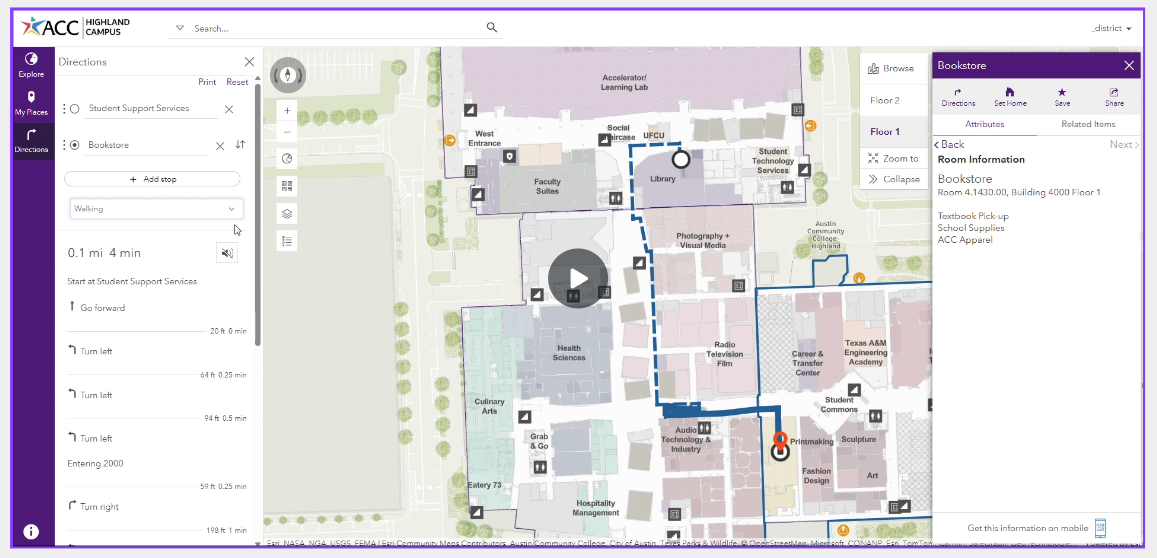
ACC’s redesigned and reorganized ArcGIS Indoors Viewer application for Highland Campus.
Indoor Routing: A Collaborative Solution
ACC’s GIS environment relies on ArcGIS Online and local geodatabases—we do not operate an Enterprise GIS system. This created a unique challenge for pedestrian routing, since ArcGIS Online doesn't support hosting network analysis datasets.
To bridge this gap, we partnered with Cloudpoint Geospatial, an Esri partner, to host our network datasets within their Enterprise GIS environment.
Our workflow:
- ACC builds individual routing networks, one for each of our 11 campuses.
- We send each network dataset to Cloudpoint.
- Cloudpoint tests and publishes the routing services on their Enterprise GIS Server.
- They provide the routing service REST URLs back to ACC, and ensure the GIS server is secured, maintained and monitored.
- We add the services into our web maps, test, refine, and repeat as needed.
During early development, we discovered that a combined district-wide routing network performed poorly. Individual networks—one per campus—proved significantly more effective.
Today, ACC offers fully functional indoor pedestrian routing across all campuses through browser-based Indoors Viewer apps. Users receive clear, turn-by-turn routes and can opt for accessible pathways that prioritize elevators and avoid stairs.
 Routing network usage, fall 2025. Wayfinding and map usage spike at the beginning of each semester.
Indoor Positioning: Bringing the “Blue Dot” Indoors
Wayfinding is even more powerful when maps can indicate where you are. To that end, ACC has begun rolling out a Bluetooth-based Indoor Positioning System (IPS) delivered through ArcGIS IPS.
Our pilot site, the Highland Campus, spans 1.2 million square feet of renovated mall space—an inspiring but complex environment where people frequently get turned around. Over the summer, we installed 562 Bluetooth beacons throughout the campus and generated an Indoors map package with routing and ArcGIS IPS for use in the ArcGIS Indoors Mobile app.
The result is a real-time, GPS-like “blue dot” experience indoors.
Performance Insights
Testing showed generally strong performance, with a few exceptions. Large open spaces, skylights, and window-heavy areas reduced accuracy, causing the blue dot to drift or lag. iOS devices exhibited better performance than Android. Despite these challenges, we released a Beta version of the Indoors Mobile app to the Highland community for Fall 2025, and feedback has been positive.
Geometry-Aided Positioning: A Major Upgrade
In November 2025, Esri released Geometry-Aided Positioning, a new geoprocessing tool in ArcGIS IPS that incorporates physical barriers—like walls—into location estimation. Early testing at Highland has shown a significant performance improvement with a reduction in drift and incorrect wall crossings. We are excited by the improved accuracy and plan to expand indoor positioning to additional campuses.
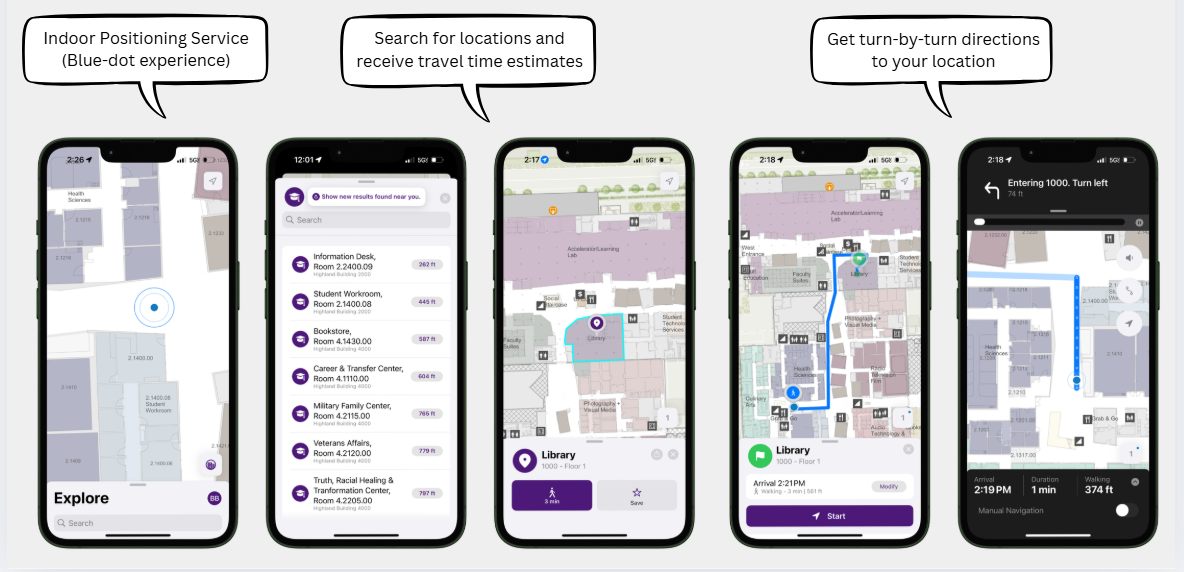
ArcGIS Indoors mobile application with indoor positioning using ArcGIS IPS at ACC Highland Campus. Much like a GPS-enabled map, the mobile app can track and display a user's location in real time.
Explore Our New Indoor Maps and Tell Us What You Think
Our commitment is to continually enhance the indoor wayfinding experience so students, staff, and visitors know where to go—without feeling lost.
ACC now offers:
Contact: FIS@austincc.edu